What is a POS machine – Types, Uses, and Benefits
Published: 16 May 2026
Have you ever wondered how shops complete payments so fast? Why do stores now prefer cards and smartphone payments instead of cash? Many businesses now use the latest gadgets & tools to handle sales and customer payments with ease. One popular tool is the POS system.
If you often ask, “What is a POS machine?”, you are not alone. Many people see these machines every day but do not know how they work or why businesses use them. From small shops to large supermarkets, this technology helps businesses manage payments quickly and smoothly.
In this guide, you will learn how this system works, why businesses use it, and what features make it useful in daily operations.
What is a POS Machine?
A POS machine is an electronic gadget that helps businesses accept customer payments. Shops, restaurants, and other businesses use it to complete sales quickly and easily. Customers can pay through debit cards, credit cards, mobile wallets, or contactless payment methods.
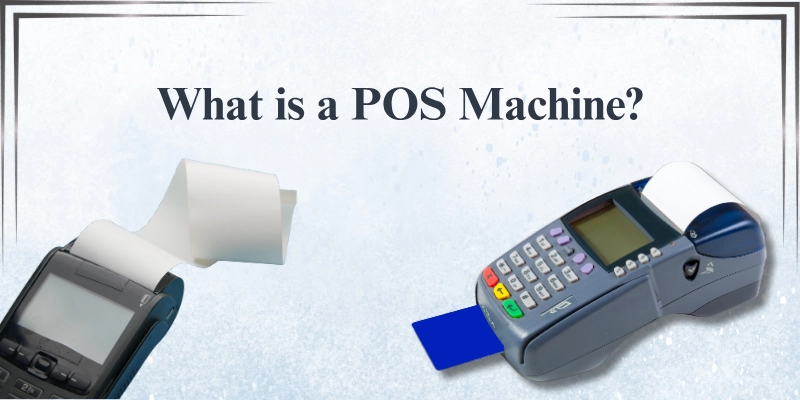
The term “Point of Sale” means the place where a customer pays for a product or service. It can be a checkout counter in a store, a payment desk in a restaurant, or even a mobile device used for payments.
- It helps businesses accept digital payments quickly.
- It reduces manual billing and payment errors.
- It supports card, mobile, and contactless payments.
- It creates payment records for better tracking.
- It improves the overall customer checkout experience.
How Does a POS Machine Work?
A POS machine follows a simple process to complete customer payments quickly and securely. Here is how it works step by step.
Card or Payment Input
The payment process starts when a customer chooses a payment method. The customer can use:
- Debit card
- Credit card
- Mobile wallet
- NFC or contactless payment
The machine reads the payment information after the customer taps, inserts, or swipes the card or device.
Transaction Authorization
After reading the payment details, the system sends the information to the bank or payment gateway. The bank checks the account balance and payment details before making a decision.
Payment Processing
The payment provider verifies the transaction details and checks for security issues. If everything is correct, the system approves the payment within seconds. If a problem appears, the machine declines the transaction.
Receipt Generation
After approval, the machine creates a receipt for the customer. Some businesses print paper receipts, while others send digital receipts through email or SMS.
Data Recording
The system stores transaction details automatically. Businesses use this data to track sales, manage records, and review daily payment activity more easily.
Types of POS Machines
Businesses use different types of POS machines based on their size, payment needs, and working style.
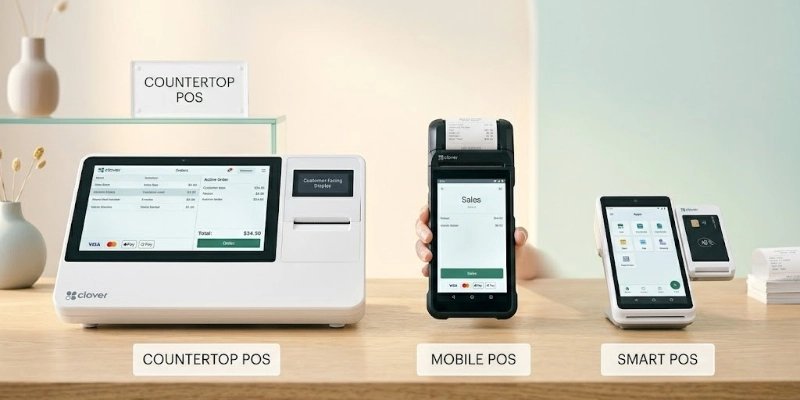
Some systems work best for retail stores, while others support mobile businesses and self-service payments.
Traditional Countertop POS Machines
Traditional countertop POS machines stay at a fixed checkout counter. Retail stores, supermarkets, and restaurants often use these terminals for daily customer payments.
- Fixed setup for checkout counters
- Fast card payment processing
- Receipt printing support
- Suitable for high customer traffic
- Common in retail and grocery stores
Mobile POS Machines (mPOS)
Mobile POS machines are portable card readers that connect to smartphones or tablets. Small businesses and delivery services often use them for flexible payments.
- Easy to carry and use anywhere
- Connects with mobile devices
- Supports card and digital payments
- Good for small businesses
- Ideal for delivery and outdoor sales
Wireless POS Machines
Wireless POS machines use Wi-Fi or Bluetooth connections instead of cables. These systems help businesses accept payments from different locations inside a store or restaurant.
- Wireless payment processing
- Easy movement inside business locations
- Supports contactless payments
- Reduces cable setup
- Helpful for restaurants and cafes
Smart POS Machines
Smart POS machines use Android-based software and advanced features. These systems can manage payments, inventory, and business applications in one device.
- Touchscreen display
- App support for business tools
- Inventory management features
- Sales and reporting functions
- Modern and user-friendly interface
Cloud-Based POS Systems
Cloud-based POS systems store data online through internet-connected software. Businesses can access sales records and reports from different devices and locations.
- Online data storage
- Remote business access
- Real-time sales tracking
- Automatic software updates
- Easy business management
Self-Service POS Kiosks
Self-service POS kiosks allow customers to complete payments without staff assistance. Many supermarkets, airports, and fast-food restaurants use these systems to reduce waiting time.
- Customer-operated checkout process
- Faster payment experience
- Reduces long queues
- Supports digital payments
- Common in self-checkout areas
Key Features of a POS Machine
Modern POS machines offer many useful features that help businesses manage payments, sales, and customer service more efficiently. These features improve daily operations and create a better shopping experience for customers.
Multiple Payment Methods
A modern POS system supports different payment options to make transactions fast and convenient for customers.
Supported Payment Method
- Debit cards
- Credit cards
- QR code payments
- NFC or tap-to-pay payments
- Digital wallets
Inventory Management
Many POS systems help businesses track products and stock levels automatically. This feature reduces manual work and helps businesses avoid stock shortages.
Benefits of Inventory Management
- Tracks available products
- Updates stock in real time
- Reduces inventory mistakes
- Helps manage product sales
- Improves stock planning
Sales Reporting
POS systems generate sales reports that help businesses understand their performance. Owners can review daily, weekly, or monthly sales data easily.
Reporting Features
- Daily sales summaries
- Weekly and monthly reports
- Product performance tracking
- Revenue monitoring
- Better business decision-making
Receipt Printing
After each transaction, the system creates a receipt for the customer. Businesses can provide printed or digital receipts based on customer preference.
Receipt Options
- Paper receipts
- Email receipts
- SMS receipts
- Quick transaction records
- Easy payment confirmation
Customer Management
Some POS systems include customer management tools. These features help businesses build stronger customer relationships and improve loyalty.
Customer Management Features
- Loyalty programs
- Customer purchase history
- Contact information storage
- Discount management
- Personalized customer service
Security Features
Security plays an important role in digital payments. POS systems use advanced protection methods to keep payment information safe.
Security Benefits
- Encrypted payment data
- Fraud protection tools
- Secure transactions
- Password and access control
- Safe customer information storage
Benefits of Using a POS Machine
A modern POS system helps businesses work faster, smarter, and more efficiently. It improves daily operations and also creates a smoother experience for customers.
- A POS machine helps businesses process payments quickly, which reduces checkout time and improves overall efficiency.
- It improves the customer experience by making payments smooth, fast, and hassle-free at the point of sale.
- It supports accurate inventory management by automatically updating stock levels after every sale.
- It reduces human errors in billing and calculations by automating the entire transaction process.
- It provides clear sales reports and analytics that help business owners understand performance and make better decisions.
Limitations of POS Machines
Although POS systems offer many benefits, they also come with some drawbacks that businesses should consider before using them.
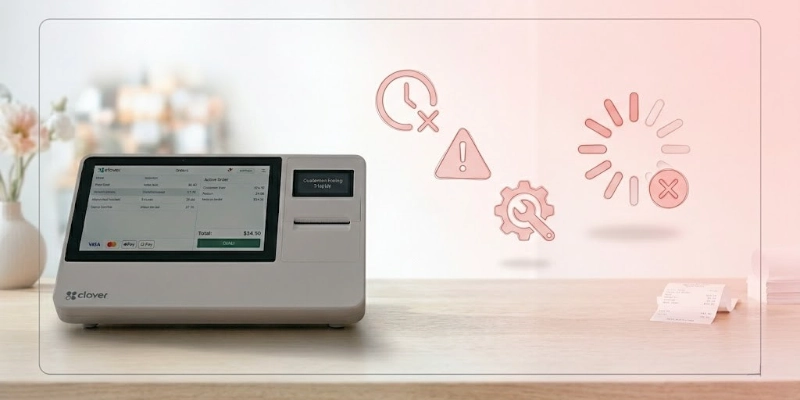
These limitations can affect cost, reliability, and day-to-day operations, especially for small businesses.
- Some POS systems depend on a stable internet connection, and any network issue can interrupt payment processing.
- The initial setup cost can be high, especially for advanced or smart POS systems with full features.
- Many POS solutions require ongoing software subscription fees, which increase long-term expenses.
- POS systems need regular technical maintenance and updates to work properly and avoid system errors.
- Small technical issues or hardware failures can temporarily disrupt business operations and delay transactions.
POS Machine vs Cash Register
Businesses often compare POS machines with traditional cash registers to decide which system fits their needs better. Both are used for billing, but they differ in speed, features, and overall functionality.
POS systems offer modern digital tools, while cash registers provide a simple and basic way to handle cash transactions.
| POS Machine | Cash Register |
| Accepts cards, QR, and mobile pay | Cash only or basic card support |
| Fast digital payments | Slower manual billing |
| Tracks stock automatically | No inventory tracking |
| Gives sales reports & analytics | No reports or limited records |
| Stores customer data | No customer records |
| Uses software & apps | Basic hardware system |
| Needs internet (often) | Works offline |
| Best for modern businesses | Best for very small shops |
Industries That Use POS Machines
POS machines are used in many different industries where fast, accurate, and secure payment processing is important. They help businesses manage sales, reduce errors, and improve customer service in daily operations.
- Retail stores use POS systems to handle quick billing and manage product sales efficiently at checkout counters.
- Restaurants and cafes use POS machines to take orders, process payments, and manage tables smoothly.
- Supermarkets rely on POS systems to scan products, speed up billing, and track large inventories.
- Salons and spas use POS machines to accept payments easily and keep records of customer services.
- Healthcare and pharmacies use POS systems to process payments and manage billing for medicines and services.
How to Choose the Best POS Machine?
Choosing the right POS machine is important for smooth business operations. Different businesses have different needs, so it is important to focus on features that match your daily work, payment methods, and budget.
- Business Type Requirements
Choose a POS system that fits your business type, such as retail, restaurant, or service-based business, so it supports your daily operations properly.
- Supported Payment Methods
Make sure the POS machine supports multiple payment options like cards, QR codes, and mobile wallets to serve all types of customers.
- Ease of Use
Select a system that is simple and user-friendly so staff can learn it quickly and use it without confusion.
- Software Features
Check if the POS system includes useful tools like inventory tracking, sales reports, and customer management features.
- Security & Compliance
Ensure the system has strong security features like encryption and follows payment safety standards to protect customer data.
- Budget and Transaction Fees
Compare the initial cost, monthly fees, and transaction charges to choose a POS system that fits your business budget.
Popular POS Machine Brands & Providers
Many businesses choose trusted POS brands because they offer reliable performance, easy setup, and strong payment security. These providers also offer useful software tools that help manage sales and customers efficiently.
- Square provides simple POS solutions that work well for small businesses and support fast digital payments.
- Shopify POS connects with online stores and helps manage both online and offline sales in one system.
- Stripe Terminal offers flexible payment solutions for in-person transactions with strong developer support.
- Clover delivers complete POS systems with hardware and software for retail and restaurant businesses.
- PayPal Zettle allows easy card payments and is popular among small and mobile businesses.
- Toast POS is designed mainly for restaurants and helps manage orders, payments, and tables efficiently.
Security Tips for Using POS Machines
POS systems handle sensitive payment and customer data, so strong security practices are important to prevent fraud and data loss. Businesses should follow basic safety steps to keep transactions secure and reliable.
- Always use a secure and trusted internet connection to protect payment data from unauthorized access.
- Keep POS software updated regularly to fix security issues and improve system protection.
- Limit employee access by giving permissions only to staff who need the system for daily work.
- Monitor transactions carefully to detect any unusual or suspicious activity at an early stage.
Future of POS Machines
POS systems are evolving quickly as technology improves and customer payment habits change. Businesses are moving toward faster, smarter, and more secure payment solutions that reduce effort and improve efficiency.
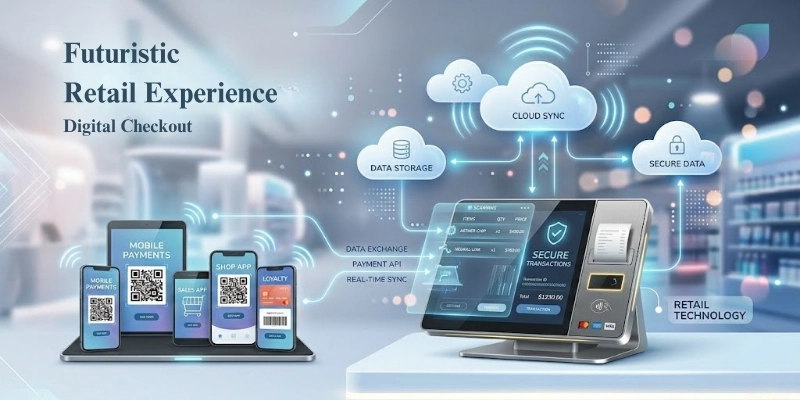
- Contactless payments will become more common, allowing customers to pay instantly using cards, phones, or wearable devices.
- AI-powered POS systems will help businesses analyze sales data, predict demand, and improve decision-making.
- Cloud and mobile integration will make it easier for businesses to access sales data anytime and manage operations from anywhere.
- Biometric payment technology will improve security by using fingerprints or facial recognition for faster and safer transactions.
Conclusion
POS machines have become an important part of modern business operations. They help businesses process payments faster, reduce errors, manage inventory, and track sales more effectively. From small shops to large enterprises, POS systems improve both efficiency and customer experience.
In today’s digital world, using a POS system is no longer optional for most businesses; it has become essential for smooth and secure transactions. Whether you run a small store or a large business, choosing the right POS machine can help you save time, improve accuracy, and grow your business more effectively.
FAQ
If you still have questions about POS machines, check the answers below to get a clear and simple understanding before you choose or use one.
A POS machine helps businesses accept payments from customers using cards, QR codes, and mobile wallets. It processes transactions quickly and records each sale automatically. This helps businesses manage payments more easily.
A card machine only processes card payments, while a POS machine offers more features. A POS system also handles billing, inventory, and sales tracking. This makes it more advanced than a basic card reader.
Some POS machines can work offline for basic transactions. However, most modern systems need the internet for full features and secure payment approval. The Internet also helps sync data in real time.
The price depends on the type and features of the system. Basic POS machines are more affordable, while advanced systems cost more. Some providers also charge monthly or transaction fees.
Yes, POS machines use encryption and security systems to protect payment data. They reduce the risk of fraud and keep transactions safe. Still, businesses should follow security best practices.
A POS machine can accept debit cards, credit cards, QR payments, and mobile wallets. Many systems also support contactless payments like NFC. This gives customers more payment options.
Yes, POS systems help manage sales, inventory, and reports in one place. They give real-time data that helps business owners make better decisions. This improves overall business efficiency.
Yes, small businesses can easily use POS systems. Many affordable options are available for beginners. They help small shops handle payments and records efficiently.
Some POS systems store customer purchase history and basic details. This helps businesses improve service and offer loyalty rewards. The data is usually protected with security features.
If a POS system stops working, transactions may be delayed. Some systems offer offline or backup modes for basic billing. Businesses can also fix issues by restarting or contacting support.



- Be Respectful
- Stay Relevant
- Stay Positive
- True Feedback
- Encourage Discussion
- Avoid Spamming
- No Fake News
- Don't Copy-Paste
- No Personal Attacks
- Be Respectful
- Stay Relevant
- Stay Positive
- True Feedback
- Encourage Discussion
- Avoid Spamming
- No Fake News
- Don't Copy-Paste
- No Personal Attacks
