What is a Security Camera – Types, Features & Uses
Published: 13 Jul 2026
What is a security camera? It is a device that records or streams video to monitor people, property, and activities for safety and security. As safety concerns continue to grow, more people install surveillance systems in homes, offices, shops, schools, and other locations.
These systems help monitor daily activity, discourage unwanted behavior, and provide valuable video evidence when an incident occurs. Many modern models also allow users to view live footage from anywhere through a smartphone or computer. Because many types and features are available, choosing the right option can feel confusing.
This guide explains how these cameras work, the different types you can choose from, their key features, common uses, benefits, limitations, and practical tips to help you make the right decision.
What is a Security Camera?
A security camera is an electronic device that captures video to monitor people, property, and activities. It records or streams footage in real time, helping users keep an eye on important areas. Many modern models also include features such as motion detection, night vision, and remote access.
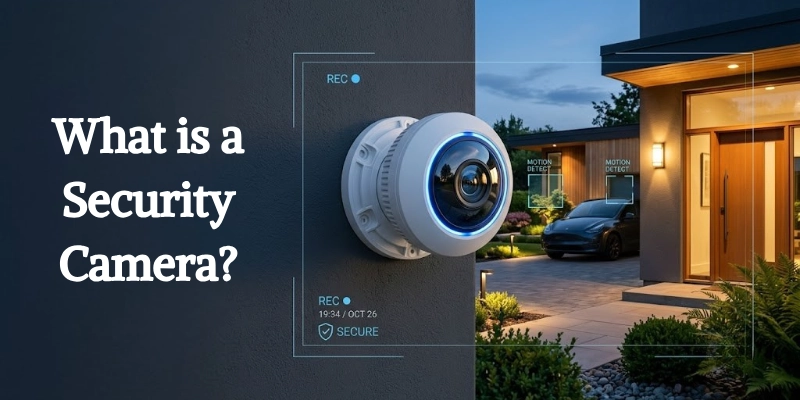
The main purpose of this device is to improve safety and security. It helps deter unwanted activity, supports incident investigations, and provides video evidence when needed. Some systems also send instant alerts after detecting movement, allowing users to respond more quickly.
People use these cameras in many places, including:
- Homes and apartments
- Offices and commercial buildings
- Retail stores and shopping malls
- Schools and universities
- Hospitals and healthcare centers
- Warehouses and factories
- Parking lots and public spaces
Although people often use the terms security camera and surveillance camera interchangeably, they have a slight difference. A security camera mainly protects a specific property or area by monitoring for threats.
A surveillance camera usually focuses on continuous observation of larger public or commercial spaces. In practice, however, both devices use similar technology, and many manufacturers use the two names for the same type of camera.
How Does a Security Camera Work?
A security camera follows a simple process. It captures video, records the footage, detects movement, streams live video, and sends alerts when needed. Each step helps users monitor their property more effectively.
Capturing Video
The camera starts by capturing light through its lens. The lens focuses the light onto an image sensor, which converts it into a digital video signal. The camera then processes this signal to create clear video that you can watch live or save for later.
Recording Footage
After capturing the video, the camera stores the footage for future viewing. Most systems offer two storage options:
- Local storage: Saves video on a memory card, DVR, NVR, or external hard drive.
- Cloud storage: Uploads videos to secure online servers, allowing users to access recordings from anywhere with an internet connection.
Some cameras support both options, giving users greater flexibility.
Motion Detection
Instead of recording all the time, many cameras use motion detection to save storage space. The camera monitors the scene and looks for changes in movement. When it detects motion, it starts recording automatically or marks the event for easy review. Some advanced models can also tell the difference between people, vehicles, pets, and other objects.
Live Streaming
Many modern cameras allow users to watch live video in real time. After connecting the camera to a network, users can open a mobile app or web browser to view the footage from almost anywhere. This feature makes it easy to check on your home, office, or business while you are away.
Alerts and Notifications
Motion detection also works with mobile notifications. When the camera detects activity, it sends an instant alert to the connected app. Users can open the notification, watch the live video, or review the recorded clip immediately. This quick response helps users take action when necessary.
Types of Security Cameras
Manufacturers offer different types of security cameras for different environments and monitoring needs. Some models work better indoors, while others perform well outdoors or provide advanced monitoring features.
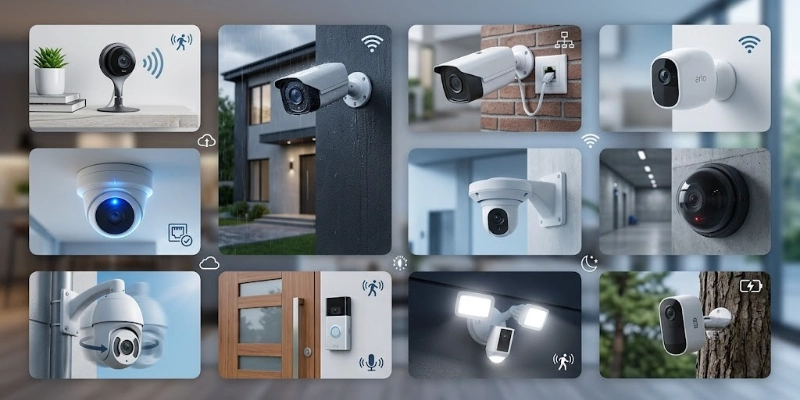
Below are the most common types.
- Indoor Security Cameras
Indoor cameras monitor rooms, hallways, offices, and other enclosed spaces. They are compact, easy to install, and include features such as motion detection and two-way audio.
- Outdoor Security Cameras
Outdoor cameras protect areas outside a building. They use weather-resistant materials and often include night vision for around-the-clock monitoring.
- Wired Security Cameras
Wired cameras connect through cables for power and video transmission. They provide a stable connection and suit locations that need continuous monitoring.
- Wireless Security Cameras
Wireless cameras connect through Wi-Fi, making installation easier and allowing flexible placement. Many homeowners choose them because they require fewer cables.
- IP (Internet Protocol) Cameras
IP cameras transmit video over a network or the internet. They deliver high-quality footage and allow users to view live video remotely.
- CCTV Cameras
CCTV cameras operate within a closed system instead of the public internet. Businesses, schools, and public buildings commonly use them for reliable surveillance.
- PTZ (Pan-Tilt-Zoom) Cameras
PTZ cameras can pan, tilt, and zoom remotely. They work well for monitoring large areas that require flexible viewing angles.
- Doorbell Cameras
Doorbell cameras monitor the front entrance and let users see visitors, communicate through two-way audio, and receive motion alerts.
- Floodlight Security Cameras
Floodlight cameras combine video monitoring with bright LED lights. They improve nighttime visibility and help discourage unwanted activity.
- Battery-Powered Security Cameras
Battery-powered cameras operate without permanent wiring. Their portable design makes them suitable for locations where power cables are difficult to install.
Key Features of a Security Camera
Modern security cameras offer many features that improve monitoring, convenience, and overall protection. Understanding these features helps you choose a camera that matches your needs.
High-Definition Video Quality
Video quality affects how clearly the camera captures people, objects, and events. Most modern cameras support 1080p, while premium models offer 2K or 4K resolution for sharper images and more detail.
Night Vision
Night vision allows the camera to record clear video in low-light or dark conditions. Many cameras use infrared (IR) night vision, while newer models also provide color night vision for better visibility after dark.
Motion Detection
Motion detection helps the camera recognize movement within its viewing area. When activity occurs, the camera can start recording automatically and send an alert to the connected device.
Two-Way Audio
Two-way audio lets users speak and listen through the camera using a built-in microphone and speaker. This feature is useful for talking to visitors, family members, or delivery drivers from anywhere.
Remote Viewing
Remote viewing allows users to watch live video or recorded footage through a smartphone, tablet, or computer. This feature makes it easy to monitor the property even when you are away.
Cloud and Local Storage
Most cameras offer two recording options:
- Cloud storage: Saves footage on secure online servers for remote access.
- Local storage: Stores recordings on a memory card, DVR, NVR, or hard drive without relying on the internet.
Some models support both options for added flexibility.
Wide Viewing Angle
A wide viewing angle helps the camera cover a larger area with fewer blind spots. This feature works well for entrances, living rooms, driveways, and parking areas.
AI Detection
Many advanced cameras use artificial intelligence (AI) to identify different objects. They can recognize people, vehicles, and pets, reducing unnecessary alerts caused by leaves, rain, or other movement.
Weather Resistance
Outdoor cameras include weather-resistant designs that protect them from rain, dust, heat, and cold. Many models carry an IP rating, which indicates their level of protection against water and dust. Choosing a camera with a suitable IP rating helps ensure reliable performance in outdoor environments.
Benefits and Limitations of Security Cameras
Security cameras offer many advantages for homes and businesses, but they also have a few limitations. Understanding both sides helps you choose the right system and set realistic expectations before making a purchase.
| Benefits | Limitations |
| Helps protect homes, offices, and valuable property. | Buying cameras and installing a system can cost money. |
| Discourages theft, vandalism, and trespassing. | Poor placement may affect the privacy of family members, employees, or neighbors. |
| Let users view live video and recordings from almost anywhere. | Many smart features require a stable internet connection. |
| Record incidents that can help during investigations or disputes. | A camera cannot monitor areas outside its viewing angle without additional coverage. |
| Allows users to check their property at any time, even when away. | Lenses, batteries, storage devices, and software need regular maintenance for reliable performance. |
Common Uses of Security Cameras
People install these gadgets in different places to improve safety, watch daily activities, and keep valuable assets under observation.
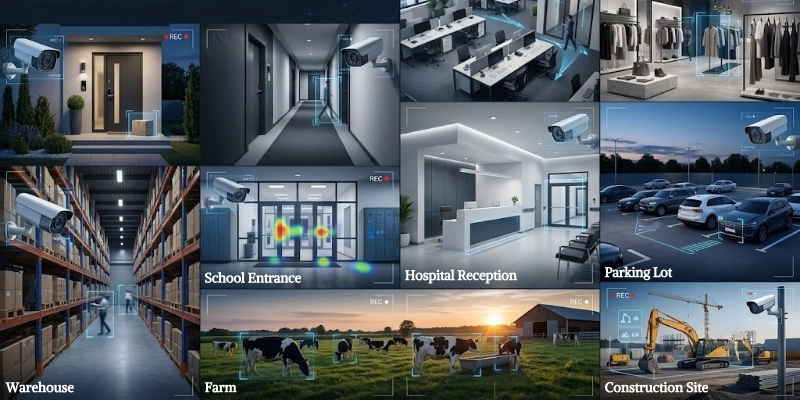
The best location depends on the purpose and the area that needs coverage.
- Homes: Watch entrances, driveways, backyards, and other important areas.
- Apartments: Keep an eye on shared entrances, hallways, and parking spaces.
- Offices: Track workplace activity and help manage access to important areas.
- Retail Stores: Reduce shoplifting and review customer or staff activity when needed.
- Warehouses: Watch stored goods, loading zones, and delivery areas.
- Schools: Improve campus safety in classrooms, corridors, and playgrounds.
- Hospitals: Observe public areas, entrances, and restricted sections.
- Parking Areas: Record vehicle movement and help investigate accidents or damage.
- Farms: Check livestock, equipment, and remote locations without frequent visits.
- Construction Sites: Watch building materials, machinery, and ongoing work after working hours.
Security Camera vs CCTV Camera
Both options help monitor people and property, but they differ in technology, connectivity, and features. The table below highlights the main differences to help you choose the right option.
| Feature | Security Camera | CCTV Camera |
| Technology | Uses digital technology. | Uses a traditional closed system. |
| Internet | Can connect to the internet for remote access. | Usually works without an internet connection. |
| Installation | Often offers flexible and simple setup. | Usually requires more cables and equipment. |
| Video Quality | Commonly supports HD, 2K, or 4K resolution. | Video quality depends on the system and model. |
| Remote Viewing | Supports live viewing through mobile apps or web browsers. | Remote access is limited unless additional hardware is installed. |
| Smart Features | May include AI detection, motion alerts, and cloud storage. | Focuses mainly on recording and monitoring. |
| Best For | Homes, small businesses, and smart monitoring. | Businesses, schools, banks, and large facilities. |
Which Option is Better?
The better choice depends on your needs. If you want remote access, smart features, and easy control, a modern security camera is a good option. If you need a reliable system for continuous recording in one location, a CCTV system remains a practical choice.
How to Choose the Best Security Camera?
Choosing the right camera depends on where you plan to use it and the features you need. Before buying, compare the following factors to find the best option for your home or business.
- Indoor or Outdoor:
Choose an indoor model for enclosed spaces. For outside areas, select a weather-resistant model that can handle rain, dust, and changing temperatures. - Video Resolution:
Look for a resolution that provides clear footage. 1080p is suitable for most users, while 2K and 4K offer sharper details for larger areas. - Storage:
Decide how you want to save recordings. Local storage keeps footage on a memory card or recorder, while cloud storage lets you access videos online from anywhere. - Wired or Wireless:
Wired systems provide a stable connection and continuous recording. Wireless models offer easier installation and greater flexibility for placement. - Night Vision:
If you need monitoring after dark, choose a model with reliable night vision. Color night vision provides more detail than standard infrared in suitable lighting conditions. - Motion Detection Features:
Select a camera with smart motion detection that records only when activity occurs. Advanced models can also identify people, vehicles, or pets to reduce unnecessary alerts. - Field of View:
A wider viewing angle covers more space and reduces blind spots. Consider the size of the area before choosing a camera. - Smart Home Compatibility:
If you use smart home devices, check whether the camera works with your existing system. This allows easier control through a single app or voice assistant. - Budget:
Set a budget before you buy. Compare video quality, storage options, smart features, and warranty to get the best value instead of choosing the cheapest model.
Wired vs Wireless Security Cameras
Both wired and wireless cameras provide reliable monitoring, but each suits different situations. Compare the key differences below to decide which option fits your needs.
| Feature | Wired Cameras | Wireless Cameras |
| Installation | Requires cables and takes more time to install. | Installs faster with fewer cables. |
| Reliability | Provides a stable connection with minimal signal issues. | Performance depends on Wi-Fi strength. |
| Video Quality | Delivers consistent video without network interruptions. | Offers high-quality video, but weak Wi-Fi may affect streaming. |
| Flexibility | Placement is limited by cable length. | Allows easier placement and relocation. |
| Maintenance | Needs little maintenance after installation. | May require battery charging or Wi-Fi troubleshooting, depending on the model. |
| Best Use | Homes, offices, and businesses that need continuous monitoring. | Apartments, rental homes, and places that need quick installation. |
Popular Security Camera Brands
Many companies offer reliable cameras for homes and businesses. Some focus on smart home features, while others provide advanced surveillance systems for commercial use.
Below are some of the most popular brands.
Arlo: Arlo is known for its wire-free cameras, high-resolution video, and smart features. Many models support cloud storage, motion alerts, and remote viewing through a mobile app.
Ring: Ring specializes in doorbell cameras and home monitoring solutions. Its products offer live video, two-way audio, and instant notifications when someone approaches your property.
Google Nest: Google Nest provides smart cameras that work well with the Google Home ecosystem. Many models include AI-powered person detection, clear video quality, and easy remote access.
Reolink: Reolink offers cameras for both homes and businesses. The brand provides high-resolution video, flexible storage options, and both wired and wireless models.
Lorex: Lorex focuses on reliable surveillance systems with continuous recording and high-quality video. It is a popular choice for users who prefer local storage.
Eufy: Eufy is well known for privacy-focused products. Many of its cameras support local storage, AI detection, and advanced features without requiring a monthly subscription.
TP-Link Tapo: TP-Link Tapo offers affordable smart cameras for indoor and outdoor use. The brand provides simple installation, mobile app control, and useful features for everyday monitoring.
Hikvision: Hikvision develops professional surveillance solutions for businesses, schools, warehouses, and other large properties. Many of its products include advanced video technology and AI capabilities.
Dahua: Dahua offers a wide range of surveillance products for residential and commercial use. Its cameras often include high-resolution video, smart detection, and reliable performance in different environments.
How to Install a Security Camera?
Installing a security camera is easy when you follow a few basic steps. Proper setup improves coverage and helps the system work efficiently.
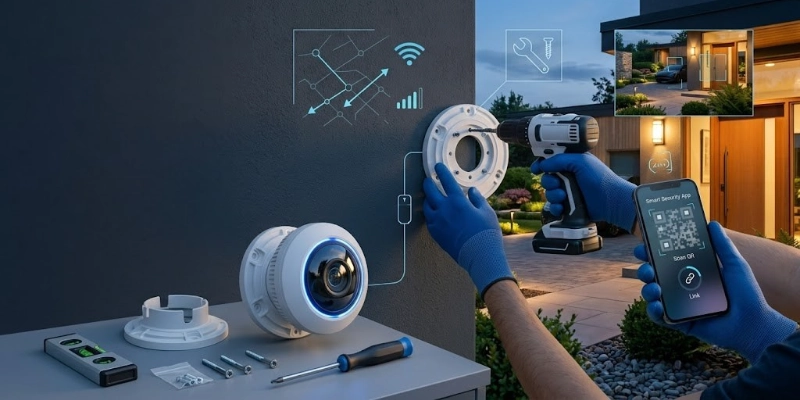
Let’s look at the steps.
- Location: Select a spot that covers the area you want to watch. Install the camera high enough to reduce tampering and avoid direct sunlight or bright lights.
- Camera: Secure the camera with the included mounting hardware. Adjust the angle before tightening the screws.
- Wi-Fi or Power: Connect wired models to power and recording equipment. For wireless models, connect the camera to your Wi-Fi network.
- Mobile App: Install the official app and add your camera. Then set up motion alerts, recording preferences, and storage options.
- Camera Coverage: Check the live view to ensure the camera covers the desired area. Make small adjustments if needed and confirm that recording and notifications work properly.
Tips for Maintaining a Security Camera
Regular maintenance helps your camera deliver clear video and reliable performance over time. These simple tips can keep the system working properly.
- Clean the Lens: Wipe the lens with a soft cloth to remove dust, dirt, and fingerprints.
- Update the Firmware: Install software updates to improve performance, security, and features.
- Wi-Fi Signal: Make sure wireless models have a strong and stable connection.
- Motion Detection: Check motion alerts regularly and adjust the detection area if needed.
- Outdoor Units: Remove leaves, snow, or debris that may block the camera or affect the view.
- Strong Passwords: Secure your account with a unique password and enable two-factor authentication if available.
Common Security Camera Problems and Solutions
Even a well-installed camera can develop occasional issues. Most problems are easy to fix with a few simple checks.
| Problem | Solution |
| Not connecting to Wi-Fi | Move the camera closer to the router, check the Wi-Fi password, and restart both devices. |
| Blurry footage | Clean the lens and adjust the camera angle or focus if supported. |
| Motion detection is not working | Enable motion detection, adjust the sensitivity, and remove objects that block the view. |
| Night vision issues | Clean the lens, remove nearby light reflections, and make sure nothing blocks the infrared LEDs. |
| Recording failures | Check available storage, verify recording settings, and make sure the memory card or recorder works properly. |
| Power problems | Check the power cable, adapter, battery, or outlet, and reconnect the device if necessary. |
Future Trends in Security Cameras
Technology continues to improve, making modern surveillance systems smarter, faster, and more efficient.
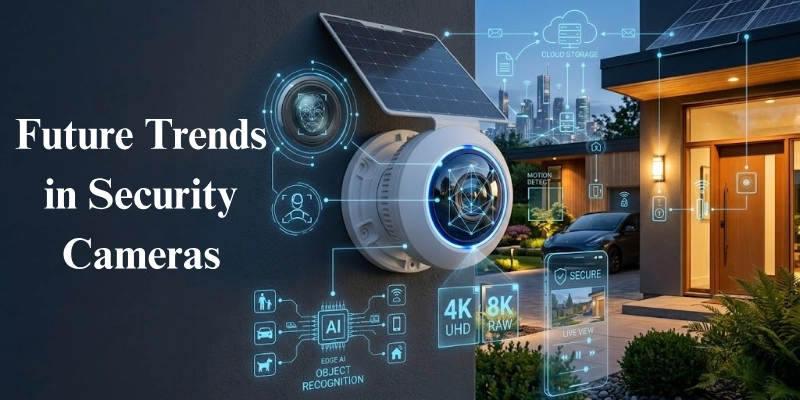
Here are some of the key trends shaping the future:
- AI-Powered Surveillance: Improves object recognition, reduces false alerts, and provides smarter monitoring.
- Facial Recognition: Identifies familiar faces and sends more personalized notifications.
- 4K and 8K Video: Delivers sharper images with greater detail for better identification.
- Edge AI Processing: Processes data directly on the camera for faster performance and better privacy.
- Solar-Powered Cameras: Use solar energy to extend battery life and reduce maintenance.
- Smarter Home Automation: Connects with smart lights, locks, alarms, and voice assistants for seamless control.
Conclusion
Security cameras have become an important part of modern home and business safety. They help monitor important areas, record valuable footage, and provide greater peace of mind. With many types, features, and installation options available, there is a solution for almost every need and budget.
When choosing a camera, consider where you plan to use it, the video quality you need, storage options, smart features, and your budget. A well-chosen system can improve daily monitoring and provide reliable protection for years to come.
Whether you want to protect your home, office, retail store, or another property, investing in the right surveillance solution is a practical step toward improving safety and staying connected to what matters most.
FAQs
Still have questions? Explore the FAQs below for clear answers to the most common questions about security cameras.
A security camera helps monitor people, property, and daily activities. It can also record footage that supports investigations after an incident. Many people use it to improve safety at home or work.
The camera captures video through its lens and image sensor. It then stores the footage locally or in the cloud, depending on the setup. Many models also support live viewing and motion alerts.
It depends on the recording mode and the system.
- Some models record 24/7.
- Others record only when they detect motion.
Yes, many models work without Wi-Fi. Wired systems and cameras with local storage can continue recording without an internet connection. However, remote viewing and mobile alerts usually require internet access.
Yes, wireless cameras provide reliable performance with a strong Wi-Fi connection. They are easy to install and work well in most homes. Weak signals, however, may affect live streaming.
CCTV cameras usually operate through a closed wired system. IP cameras use a network connection and support remote viewing through the internet. They also offer more smart features in many cases.
The storage period depends on several factors.
- Storage capacity
- Video quality
- Recording schedule
Some systems keep footage for a few days, while others store it for several weeks.
Yes, they provide an effective way to monitor homes and businesses. They can discourage unwanted activity and preserve important video evidence. The right model depends on your needs and budget.
Install cameras where they cover important areas with a clear view.
- Front and back doors
- Driveways
- Garages
- Main entrances
Avoid placing them where trees, walls, or bright lights block the view.
Yes, most modern models support mobile apps for remote access. You can watch live video, review recordings, and receive activity alerts from almost anywhere. This feature usually requires an internet connection.





- Be Respectful
- Stay Relevant
- Stay Positive
- True Feedback
- Encourage Discussion
- Avoid Spamming
- No Fake News
- Don't Copy-Paste
- No Personal Attacks
- Be Respectful
- Stay Relevant
- Stay Positive
- True Feedback
- Encourage Discussion
- Avoid Spamming
- No Fake News
- Don't Copy-Paste
- No Personal Attacks
