USB Hub vs Docking Station: Which One Is Better?
Published: 15 May 2026
Modern laptops look slim and stylish, but many now come with very few ports. Some laptops only include USB-C ports, which creates a new problem. How do you connect a monitor, mouse, keyboard, and USB drive at the same time?
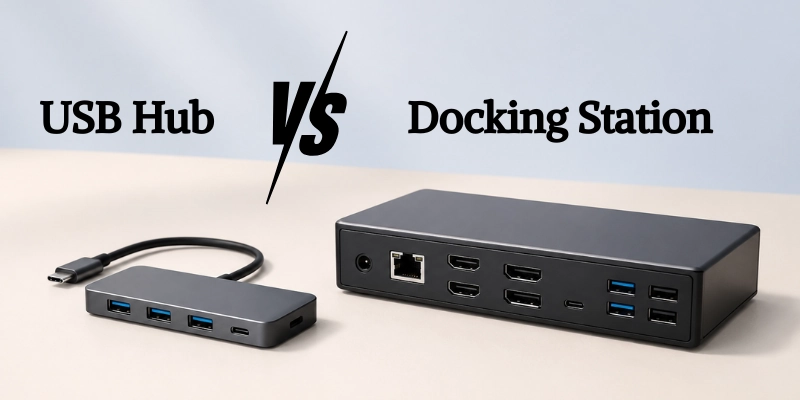
This is why many people search for expansion devices. But then another question appears: USB Hub vs Docking Station, which one is the better choice?
At first, both gadgets seem almost the same. They both add extra ports and connect multiple devices to your laptop. So why do some people choose a simple USB hub while others buy a docking station?
What Is a USB Hub?
A USB hub is a small device that expands one USB port into multiple ports. It helps you connect several devices to a laptop or computer at the same time, even if it has limited ports. It is commonly used when a laptop does not have enough built-in ports for everyday accessories.
How a USB Hub Works?
A USB hub takes one USB connection from your device and splits it into multiple ports. All connected devices share the same bandwidth from that single connection. This means performance can depend on how many devices you use at the same time.
Common Types of USB Hubs
USB hubs come in different types based on connection and power needs. Each type is designed for specific devices and usage.
- USB-A hubs
These connect to traditional USB-A ports found on older laptops and PCs. They are widely compatible and easy to use.
- USB-C hubs
These use modern USB-C ports found on new laptops. They support faster data transfer and slimmer devices.
- Powered vs unpowered hubs
Powered hubs use an external power source for stable performance with multiple devices. Unpowered hubs draw power from the laptop and are better for light use.
Main Features of USB Hubs
USB hubs are designed to expand connectivity and make your laptop more flexible for daily use. They combine multiple useful functions in a single small device.
- Extra USB ports
They add more USB ports so you can connect multiple devices at once. This is useful for keyboards, mice, and storage drives.
- SD card readers
Many USB hubs include SD and microSD card slots for quick file transfers. This is helpful for photographers and content creators.
- HDMI support (basic)
Some hubs offer basic HDMI output to connect an external monitor. It usually works well for simple display needs.
- Portable design
USB hubs are small and lightweight, making them easy to carry anywhere. You can easily keep one in your laptop bag.
Advantages of a USB Hub
USB hubs are popular because they offer a simple way to expand laptop connectivity without extra cost or complexity.
- Affordable:
USB hubs are budget-friendly compared to docking stations. This makes them a good choice for most users. - Compact and lightweight:
They are small in size and do not take up much space on your desk. You can easily plug them in without clutter. - Great for travel:
Their portable design makes them easy to carry in a bag. This is perfect for students and remote workers.
Limitations of USB Hubs
USB hubs are useful for basic tasks, but they are not built for heavy or professional use. Their performance depends on the single connection they share.
- Limited power delivery
Most USB hubs cannot provide strong power for charging laptops or running high-power devices. They work best with low-power accessories. - Lower bandwidth
All connected devices share the same data speed, which can slow things down. This becomes noticeable when multiple devices are active at once. - Weak multi-monitor support
USB hubs usually support only basic external display setups. They are not ideal for running multiple high-resolution monitors.
What Is a Docking Station?
A docking station is a powerful expansion device that turns your laptop into a full desktop setup. It is designed for users who need more performance, ports, and stability than a basic hub. It is often used in offices and professional environments where multiple devices run at the same time.
How a Docking Station Works?
A docking station connects to your laptop using a single cable, usually USB-C or Thunderbolt. It then provides multiple ports for monitors, storage devices, the internet, and other accessories. This allows you to run a complete workstation setup with minimal effort.
Types of Docking Stations
Docking stations come in different types based on connection speed and compatibility. Each type is designed for different performance needs.
- USB-C docks
These connect through a USB-C port and are common in modern laptops. They offer good speed and support for multiple devices.
- Thunderbolt docks
These use Thunderbolt technology for very fast data transfer and advanced display support. They are ideal for high-performance users and creative professionals.
- Universal docking stations
These are designed to work with a wide range of laptops and brands. They provide flexible connectivity options for mixed-device environments.
Main Features of Docking Stations
Docking stations are built to handle heavy workloads and create a complete desktop experience from a laptop. They offer advanced connectivity in one device.
- Multiple display outputs
They support two or more external monitors for better multitasking. This is ideal for professional and office setups.
- Ethernet connection
Most docking stations include a wired LAN port for stable and fast internet. This improves reliability compared to Wi-Fi.
- Audio ports
They provide dedicated audio input and output ports for headphones and speakers. This makes communication and media use easier.
- High-speed charging
Docking stations can charge laptops while connected through a single cable. This reduces the need for separate chargers.
- Advanced connectivity
They include a wide range of ports like USB, HDMI, and DisplayPort. This allows you to connect many devices at once.
Advantages of Docking Stations
Docking stations are ideal for users who want a powerful and organized workstation. They make laptop setups more efficient and professional.
- Setup
They turn your laptop into a full desktop system with multiple devices connected. This improves productivity and comfort. - Cable management
All connections run through a single cable to the laptop. This keeps your desk clean and reduces clutter. - Professional workflows
They are designed for heavy tasks like video editing, coding, and multitasking. This makes them perfect for office and creative work.
Limitations of Docking Stations
Docking stations offer strong performance, but they also come with a few drawbacks. These limits make them less suitable for casual or mobile users.
- Expensive
Docking stations cost significantly more than basic USB hubs. This can be a barrier for budget users. - Size
They are bigger and take up more desk space. This makes them less convenient for small setups. - Portable
Docking stations are not easy to carry around. They are mainly designed for fixed workstation use.
USB Hub vs Docking Station: Key Differences
Both devices expand your laptop’s connectivity, but they differ in power, performance, and use cases. A USB hub is mainly for basic expansion, while a docking station is for a full desktop-like setup.
Design and Portability
Both devices differ mainly in size and mobility.
- A USB hub is small, light, and easy to carry anywhere. It is made for quick and simple use.
- A docking station is larger and meant to stay on your desk as a fixed workstation setup.
Number of Ports
The main difference is how many devices you can connect.
- A USB hub gives you a few extra ports for basic devices like USB drives and keyboards.
- A docking station offers many ports such as USB, HDMI, DisplayPort, audio, and more.
Power Delivery and Charging
This shows how each device handles laptop charging.
- Most USB hubs offer limited or no charging support for laptops.
- Docking stations can charge your laptop while running multiple devices at the same time.
Monitor Support
This explains how many screens you can connect.
- USB hubs usually support only one basic external monitor.
- Docking stations can support dual or even triple high-resolution displays.
Data Transfer Speeds
Speed and performance vary between the two devices.
- USB hubs share bandwidth from a single USB connection, which can slow performance when many devices are used.
- Docking stations use stronger connections like USB-C or Thunderbolt for faster and more stable data transfer.
Ethernet and Networking
This covers internet connection options.
- USB hubs often do not include an Ethernet port.
- Docking stations usually include a LAN port for fast and stable wired internet.
Performance and Bandwidth
This shows how well each handles heavy use.
- USB hubs are best for light tasks like connecting basic accessories.
- Docking stations are built for heavy use, such as multitasking, editing, and professional work.
Compatibility
This explains how easily both devices work with laptops.
- USB hubs work with almost all laptops and devices easily.
- Docking stations may need specific ports like USB-C or Thunderbolt for full features.
Price Comparison
This highlights the cost difference between the two options.
- USB hubs are affordable and budget-friendly.
- Docking stations are more expensive because they offer advanced features and higher performance.
USB Hub vs Docking Station Comparison Table
Here is a quick side-by-side comparison between a USB hub vs docking station to make the differences easy to understand at a glance.
| Feature | USB Hub | Docking Station |
| Size | Compact | Larger |
| Port Expansion | Basic | Advanced |
| Monitor Support | Limited | Multi-monitor |
| Ethernet | Rare | Common |
| Power Delivery | Limited | High power |
| Performance | Moderate | High |
| Best For | Travel | Office setups |
| Price | Budget-friendly | Premium |
When Should You Choose a USB Hub?
A USB hub is a good choice when you only need basic extra ports without spending much money. It works best for simple, everyday laptop use.
Best for Students
USB hubs are perfect for students who need a simple and affordable way to connect basic devices. They help with tasks like assignments, online classes, and basic file transfers.
Best for Travelers
USB hubs are small and easy to carry in a bag, making them ideal for travel. You can quickly connect your devices anywhere without a heavy setup.
Best for Casual Users
USB hubs suit users who only need basic expansion for daily tasks. They are great for light browsing, watching videos, and simple office work.
Best for Lightweight Laptop Setups
USB hubs work well with thin laptops that have limited ports. They keep your setup simple without adding bulk or complexity.
Suggested Examples
USB hubs are useful in everyday situations where you don’t need heavy performance. For example, you can connect a mouse and keyboard, use USB drives for file transfer, or do occasional HDMI output for a monitor or TV.
When Should You Choose a Docking Station?
A docking station is the right choice when you need a powerful and stable setup that can handle multiple devices at once. It is designed for professional and heavy-use environments.
Best for Remote Workers
Docking stations are ideal for remote workers who need a full desktop-like setup at home. They make it easy to connect all devices through one cable and stay productive all day.
Best for Gamers
Gamers benefit from docking stations because they support high-speed connections and multiple peripherals. They help reduce lag and improve overall gaming performance with stable connectivity.
Best for Video Editors
Video editors need strong performance and multiple connections for a smooth workflow.
Docking stations allow fast file transfers, external drives, and dual displays for editing timelines.
Best for Multi-Monitor Setups
Docking stations are perfect for users who work with more than one screen. They support dual or triple monitors, making multitasking much easier.
Suggested Examples
Docking stations are best when you need a complete and powerful workstation setup. For example, you can run dual or triple monitors, use Ethernet, charging, and display through one cable, or create a permanent desk setup for professional work.
Common Problems With USB Hubs and Docking Stations
Even though a USB hub vs docking station is very useful, they can sometimes cause issues. These problems usually happen due to power limits, compatibility, or poor-quality devices.
- Device Disconnecting Issues
Sometimes connected devices suddenly disconnect from the hub or dock. This often happens when too many devices are connected, or the power supply is not enough.
- Monitor Not Detected
External monitors may not show any display when connected. This usually occurs due to cable issues, outdated drivers, or limited display support.
- Slow Charging Problems
Charging speed can be slower than expected on some setups. This happens when the hub or dock cannot deliver enough power to the laptop.
- Overheating
Some hubs and docking stations can become hot during long use. This is common when multiple devices are connected at the same time.
- Compatibility Issues With Mac and Windows
Not all hubs and docks work perfectly with every operating system. Some features may not function properly on Mac or Windows without proper drivers.
How to Choose the Right Option for Your Setup?
Choosing between a USB hub vs docking station becomes easy when you understand your real needs. Focus on how many devices you use and how powerful your setup must be.
Questions to Ask Before Buying
These simple questions will help you decide the right option for your daily use.
How many monitors do you use?
If you only use one screen, a USB hub may be enough. If you need two or more monitors, a docking station is the better choice.
Do you need Ethernet?
If you need a stable wired internet connection, especially for work or gaming, a docking station is more suitable.
Will you travel often?
If you move around a lot or work in different locations, a USB hub is more portable and convenient.
Do you need fast charging?
If you want to charge your laptop while using multiple devices, a docking station is a better option.
Buying Factors to Consider
When choosing between a USB hub vs docking station, you should focus on your real usage needs. These key factors help you pick the right device for performance, compatibility, and long-term use.
Port Selection
The number and type of ports decide how many devices you can connect. Make sure it has the right mix of USB, HDMI, SD card, and other ports you actually need.
Wattage
Wattage determines how much power the device can deliver to your laptop and accessories. Higher wattage is important if you want fast charging or multiple devices running at once.
Display Support
Check how many monitors the device can support and at what resolution. Basic hubs may support one display, while docking stations can handle multiple high-resolution monitors.
USB Version
USB version affects speed and performance (USB 3.0, 3.2, USB-C, Thunderbolt). Higher versions give faster data transfer and better stability for heavy tasks.
Build Quality
Strong build quality ensures durability and better heat management. A well-built hub or dock also reduces connection issues and improves long-term reliability.
Conclusion
Both a USB hub vs docking station help expand laptop connectivity, but they serve different needs. A USB hub is simple, affordable, and portable, making it perfect for basic everyday use like travel, study, and light tasks.
A docking station is designed for power and productivity. It supports multiple monitors, fast charging, and heavy workloads, making it ideal for professional and office setups. Your choice depends on whether you need portability or full performance.
FAQs
Still have questions about USB hub vs docking station? Check the FAQs below to quickly clear your doubts and choose the right option for your setup.
A docking station is better for heavy use and full workstation setups. It supports more devices, monitors, and faster charging. A USB hub is better for simple and portable needs.
Most USB hubs support only one monitor. Some advanced models may support two, but performance can be limited. A docking station is more reliable for dual monitors.
Yes, many docking stations support laptop charging through power delivery. You can use one cable for both charging and connectivity. This reduces cable clutter on your desk.
USB-C is the connector type, while Thunderbolt is a faster technology that uses USB-C. Thunderbolt offers higher speed and better display support. Not all USB-C ports support Thunderbolt.
Yes, you can use a docking station for gaming setup and accessories. It works well for monitors, keyboard, and wired internet. Performance depends on your laptop’s GPU and specs.
Yes, they are worth it for professionals and multitaskers. They improve productivity with multiple screens and better connectivity. Basic users may not need them.
Yes, performance can drop when many devices share one connection. Data speed may slow during heavy usage. For light tasks, it usually works fine.
Not always. Some require USB-C or Thunderbolt support to function fully. Always check compatibility before buying.
A powered hub uses external power for stable performance. An unpowered hub uses laptop power and is best for light use. Powered hubs handle more devices better.
Yes, you can still use it for ports and monitors. Charging is optional if your dock supports it. You may need a separate charger for your laptop.





- Be Respectful
- Stay Relevant
- Stay Positive
- True Feedback
- Encourage Discussion
- Avoid Spamming
- No Fake News
- Don't Copy-Paste
- No Personal Attacks
- Be Respectful
- Stay Relevant
- Stay Positive
- True Feedback
- Encourage Discussion
- Avoid Spamming
- No Fake News
- Don't Copy-Paste
- No Personal Attacks
