HDD vs SSD in 2026: Which Storage Type Should You Actually Buy?
Published: 1 Nov 2026
It used to be simple to buy storage. If people could afford an SSD, they used to buy it. But in 2026, the answer depends more on what you are storing and how much of it you have.
When comparing HDD vs SSD, both storage devices have their own strengths, limitations, and ideal uses. An SSD offers faster performance and quicker loading times, while an HDD provides more storage space at a lower cost. Understanding these differences can help you avoid spending money on the wrong type of drive.
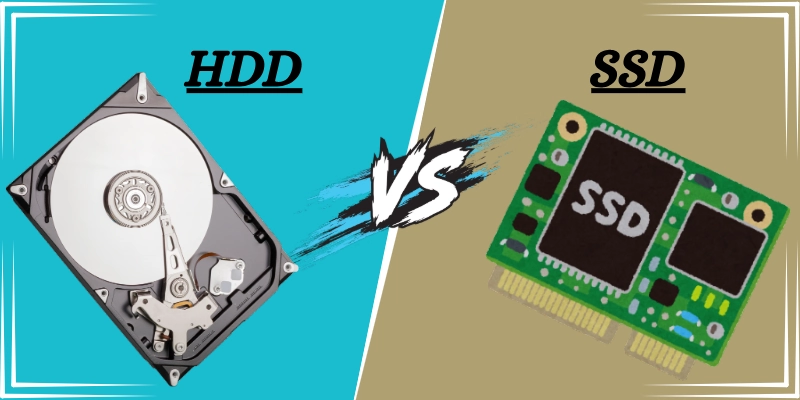
Now, this guide explains that difference in plain terms and helps you pick the right drive.
How do SSD and HDD work?
When comparing HDD vs SSD, both storage devices store your files, programs, and operating system, but they use different technologies to save and access data. Here is how each storage device works and what makes them different.
- Hard Disk Drive (HDD): It stores data on spinning metal platters. So, a moving read/write head reads them.
- Solid State Drive (SSD): It stores data on flash memory chips, but has no moving parts. In turn, it is faster and quieter.
SSD vs HDD at a glance
Understanding the differences between HDD vs SSD can help you choose the right storage device for your needs. Let’s compare their speed, storage capacity, price, and durability to see how each one performs.
| Factors | SSD | HDD |
| Speed | Much faster | Slower |
| Per-Price Terabyte | Higher | Lower |
| Maximum capacity | Large, but costly | Very large at lower cost |
| Durability | No moving parts | Sensitive to drops and vibration |
| Noise | Silent | Audible spinning |
| Power Use | Higher | Higher |
| Best for | System drive, apps, games, and laptops | Archives, backups, and media libraries |
SATA SSD Vs NVMe SSD: What is the difference?
Not all SSDs are the same. Instead, there are two common types:
- SATA SSDs connect like older hard drives. But they are limited by the SATA interface to roughly 550 MB/s in everyday use. They are cheaper and work on old laptops and desktops.
- NVMe SSDs can be plugged into an M.2 slot and talk to the computer much faster. Their speed can range between 3,500 MB/s on older generations and 7,000 MB/s or more on newer ones.
In comparison, a typical HDD manages nearly 100-200 MB/s. Both types are a big jump over a hard drive for everyday use. So, before you buy an NVMe drive, check that your laptop or motherboard has an M.2 slot and which generation it supports.
What changed for online storage in 2026?
SSD prices have quickly increased over 2025 and 2026. Flash memory supply was pulled toward high-demand products such as AI servers and consumer SSDs. But hard drive prices stayed steadier.
As a result, the price gap per terabyte has increased. Different trackers give different multiples, and prices move week to week. So, check the live prices before you buy rather than trusting a number in an article.
Eventually, buying an SSD for bulk storage is a worse deal than it was several years ago, while an HDD gives a better value for capacity. Instead, SSDs’ strength lies in their speed and responsiveness, which haven’t changed.
Which one should you buy?
There is no single winner in the HDD vs SSD comparison because each drive serves different purposes. Your budget, available storage, and daily computer activities will help determine which option is best for you. The table below makes the choice easier.
| Your Situation | Best Choice |
| Main drive in a laptop or desktop | SSD |
| Gaming PC | SSD for the system and games you play now, HDD for the rest |
| Photo and video library (lots of GB or TB) | HDD, or a big HDD plus a small SSD |
| Backups and archives | HDD (and keep a second copy) |
| Older PC that feels slow | Replace the HDD with an SSD, usually the biggest upgrade you can make |
| Tight budget, needs lots of space | HDD |
| Video editing | Fast SSD for current projects, HDD for finished ones |
How much storage do you actually need?
When deciding on HDD vs SSD, storage capacity is another important factor to consider. Think about how much space your files, games, photos, and programs require today and how much you might need in the future. This will help you choose a drive that fits your needs without running out of space too soon.
A simple starting point is:
- 256GB SSD is adequate for basic use, but it fills up quickly.
- A 500GB to 1TB SSD is comfortable for most people who use their computers for work, study, and games.
- 1TB to 2TB SSD is better for gamers and people who install large programs because modern games can take up a lot of space
- 2TB to 4TB or more HDD is a sensible choice for photos, videos, and backups.
Therefore, don’t try to fill an SSD completely. Many manufacturers suggest leaving some free space, because a very full drive can slow things down.
5 Buying Tips for SSD and HDD storage
Before choosing between an SSD and HDD, keep a few important buying factors in mind. These HDD vs SSD buying tips will help you compare your options, choose the right storage drive, and get the best value for your money.
- Try to buy an SSD that’s adequate for the operating system and daily files.
- Choose NVMe (Non-Volatile Memory Express) over SATA (Serial ATA) when you can for its speed. Otherwise, SATA is more affordable.
- Use an HDD for bulk storage at affordable rates
- Always keep a backup because both types can fail
- Before you finalize your purchase of either an SSD or an HDD, check a few retailers and look for current or verified coupon codes. Websites such as DealsShutter list Electronics coupons that are verified before publishing.
Conclusion
When comparing HDD vs SSD, choose an SSD if you want faster performance and an HDD if you need more storage at a lower price. The best HDD vs SSD setup in 2026 is a modest SSD as your main drive and an HDD for everything else.
This combination gives you a fast computer without paying higher SSD prices for files you rarely open.
FAQs
Still have questions about HDD vs SSD? Check out these frequently asked questions to find quick answers and make the right storage choice.
Yes, SSDs can wear out over time because their memory cells have a limited number of write cycles. However, modern SSDs are designed to last for several years with normal use. When comparing HDD vs SSD, an SSD is still a reliable choice for everyday computing.
Yes, installing an SSD can make an old computer feel much faster. It helps the computer start quickly and open programs without long waiting times. In the HDD vs SSD comparison, upgrading from an HDD to an SSD is one of the most noticeable improvements for an older PC.
Yes, you can use an SSD and HDD together if your computer supports both drives. You can install Windows and your favorite programs on the SSD for faster performance. Use the HDD to store large files, photos, videos, and backups.
If you need more storage right now, there is no need to wait for lower prices. Compare different brands, capacities, and prices before making your purchase. Whether you choose an HDD or SSD, focus on getting good value for your budget.
An SSD is generally better for gaming because it loads games and levels faster. An HDD can still store games, but loading times may be longer. For the best HDD vs SSD setup, install your favorite games on an SSD and keep less-played games on an HDD.
Yes, an HDD is often a good choice for storing large collections of photos and videos. It usually offers more storage space at a lower price than an SSD. In the HDD vs SSD comparison, an HDD is a budget-friendly option for keeping files you do not access regularly.
Yes, replacing an HDD with an SSD can noticeably improve your computer’s speed. Your computer will start faster, and programs will usually open more quickly. However, an SSD cannot fix every performance problem, such as low RAM or an outdated processor.


- Be Respectful
- Stay Relevant
- Stay Positive
- True Feedback
- Encourage Discussion
- Avoid Spamming
- No Fake News
- Don't Copy-Paste
- No Personal Attacks
- Be Respectful
- Stay Relevant
- Stay Positive
- True Feedback
- Encourage Discussion
- Avoid Spamming
- No Fake News
- Don't Copy-Paste
- No Personal Attacks
