What is a CPU Cooler – How it Works and Why it Matters
Published: 4 Aug 2026
Behind every smooth-running computer is an important part that controls heat, but what is a CPU cooler, and why does it matter? Every processor produces heat during normal use, and without proper cooling, your system may lose performance, become unstable, or experience hardware problems over time.
In this guide, you’ll learn how a CPU cooler works, its main components, the different types available, its benefits, and how to choose the right option for your computer.
By the end, you’ll have a clear understanding of why this small piece of hardware is so important.
What is a CPU Cooler?
A CPU cooler is a hardware component that keeps the processor from getting too hot while it is working. Since every task generates heat, this component removes excess heat to help the system operate safely and efficiently.
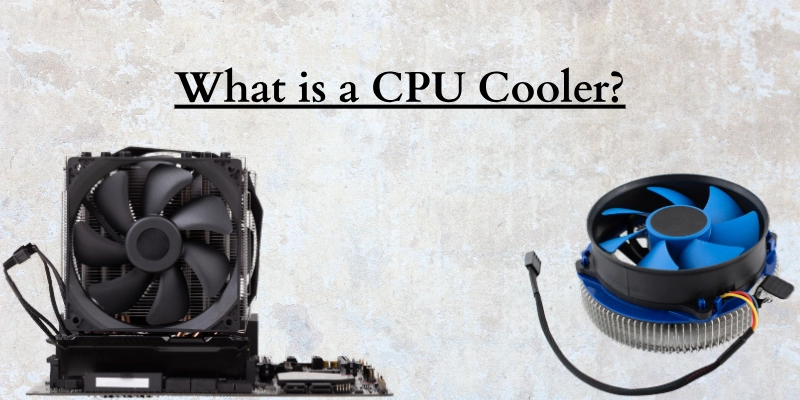
It plays an important role by:
- Keeping the processor at a safe temperature.
- Preventing overheating during heavy workloads.
- Maintaining smooth and stable performance.
- Helping important hardware last longer.
Why Does a CPU Generate Heat?
Whenever you use your computer, the processor is constantly handling instructions. Whether you’re browsing the web, watching videos, editing photos, or playing games, it performs millions of calculations every second.
These calculations require electrical power, and part of that power is naturally released as heat. The temperature usually increases when you:
- Run demanding software.
- Play modern games.
- Edit videos or photos.
- Open multiple applications at the same time.
- Perform long or intensive tasks.
Why Cooling Is Important for Your Computer
Too much heat can affect how well your computer performs. When temperatures become too high, the processor may automatically reduce its speed to protect itself. This can lead to slower performance, reduced responsiveness, and an unstable experience.
Proper cooling helps your computer:
- Deliver consistent performance.
- Stay stable during demanding tasks.
- Reduce the risk of overheating.
- Improve the lifespan of key components.
- Run more efficiently over time.
How Does a CPU Cooler Work?
Every time you use your computer, the processor creates heat while handling different tasks. A cooling system removes this heat before it builds up to unsafe levels. It does this by transferring thermal energy away from the chip and releasing it into the surrounding air.
This process happens continuously to keep the computer running smoothly. The cooling process works in five simple steps:
- The processor produces heat while processing data.
- Thermal paste transfers that heat to the heat sink.
- Heat pipes spread the thermal energy across the metal fins.
- The fan pushes air through the fins to carry the warmth away.
- Case fans remove the warm air and bring fresh air into the computer.
Heat Transfer from the CPU
When the computer is running, the CPU constantly performs calculations. As electrical energy passes through the chip, some of it naturally turns into heat. This warmth moves from the surface of the chip to the cooler, where the cooling process begins.
Thermal Paste
Thermal paste is a thin material placed between the CPU and the heat sink. It fills tiny gaps that would otherwise trap air, creating better contact between both surfaces. This allows thermal energy to move more efficiently.
Heat Sink
The heat sink is usually made of aluminum or copper and contains many thin fins. It absorbs thermal energy from the base and spreads it over a larger surface area. The larger surface allows heat to escape much faster.
Heat Pipes
Many modern coolers use heat pipes to move thermal energy away from the base. Inside each pipe is a small amount of liquid that absorbs warmth, changes into vapor, and travels to the cooler end. It then cools, becomes liquid again, and repeats the cycle.
Cooling Fan
The fan forces cool air through the heat sink fins. As the air passes over the metal, it carries away the stored thermal energy. In most systems, the fan automatically increases or decreases its speed based on the current temperature.
Airflow Inside the PC Case
Good airflow helps the entire system stay cool. Front or bottom fans bring fresh air into the case, while rear or top fans push warm air outside. This steady air movement prevents heat from becoming trapped and supports reliable performance for all internal components.
Main Components of a CPU Cooler
Every cooling system includes several parts that work together to remove heat from the processor. Although the design may vary between air and liquid coolers, the purpose of each component remains the same.
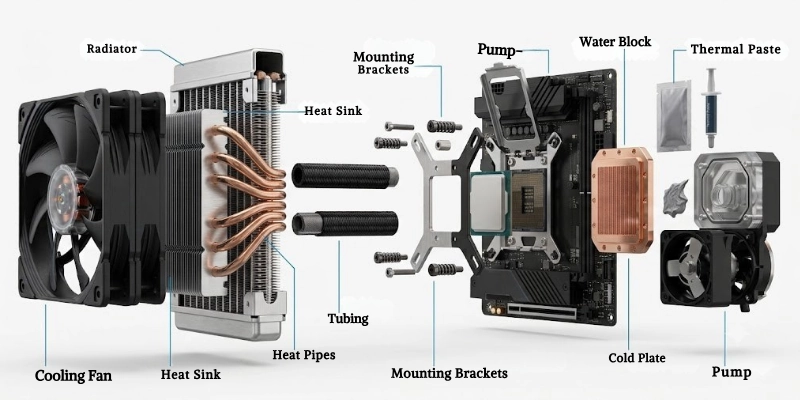
Let’s look at the main components of CPU coolers.
- Heat Sink: The heat sink absorbs heat from the processor and spreads it across its metal fins, allowing heat to dissipate more quickly. It is commonly made of aluminum or copper because both materials conduct heat efficiently.
- Cooling Fan: The cooling fan pushes air through the heat sink to carry heat away from the system. Many modern fans automatically adjust their speed based on the processor’s temperature.
- Heat Pipes: Heat pipes transfer thermal energy from the base of the cooler to the heat sink fins. This helps distribute heat evenly and improves overall cooling performance.
- Cold Plate: The cold plate sits directly on top of the processor and acts as the first point of contact for heat transfer. It passes the collected heat to the rest of the cooling system.
- Thermal Paste: Thermal paste fills tiny gaps between the processor and the cold plate, creating better contact between the two surfaces. This improves heat transfer and increases cooling efficiency.
- Mounting Brackets: Mounting brackets secure the cooler firmly to the motherboard and keep it properly aligned with the processor. A secure installation helps maintain consistent cooling performance.
- Pump (Liquid Coolers): The pump circulates coolant through the liquid cooling loop, carrying heat away from the processor and toward the radiator.
- Radiator (Liquid Coolers): The radiator releases heat from the coolant into the surrounding air. Cooling fans attached to the radiator help remove this heat before the liquid flows back through the system.
- Water Block: The water block is placed directly on the processor to absorb heat. It transfers that heat to the circulating coolant for efficient cooling.
- Tubing: The tubing connects the pump, water block, and radiator, allowing coolant to move continuously through the system. This closed loop helps maintain effective heat transfer.
Types of CPU Coolers
Several cooling solutions are available, and each one is designed for different performance needs, budgets, and computer builds. Understanding their differences can help you choose the right option for your system.
Here are some types of CPU coolers.
- Air Cooler: Uses a heat sink and fan to remove heat. It is the most common type and offers a good balance of performance, price, and reliability.
- Tower Cooler: Best for gaming and high-performance computers.
- Low-Profile Cooler: Designed for compact PCs with limited space.
- Stock Cooler: Comes with many processors and is suitable for everyday use.
- Liquid Cooler: Uses coolant to transfer heat away from the processor. It provides better cooling than most air coolers, especially under heavy workloads.
- All-in-One (AIO): A pre-built liquid cooling system that is easy to install.
- Custom Water Cooling Loop: A customizable solution that offers excellent cooling but requires more maintenance.
- Passive Cooler: Operates without a fan and relies on a large heat sink for cooling. It is silent but works best with low-power processors.
Air Cooler vs Liquid Cooler
Air and liquid coolers both keep the processor at a safe temperature, but they differ in performance, cost, installation, and maintenance. The table below highlights their key differences to help you choose the right option.
| Feature | Air Cooler | Liquid Cooler |
| Cooling Performance | Good for most users | Excellent for heavy workloads |
| Price | More affordable | More expensive |
| Noise | Can be louder at high fan speeds | Usually quieter under load |
| Installation | Simple and beginner-friendly | More complex to install |
| Maintenance | Very little maintenance | Requires occasional maintenance |
| Durability | Long-lasting with fewer parts | Good, but has more components that can wear out |
| Space Required | Needs enough room around the CPU | Requires space for a radiator |
| Appearance | Simple and functional | Modern and premium-looking |
| Overclocking | Suitable for light overclocking | Better for heavy overclocking |
| Best For | Everyday use, office work, and budget gaming | Gaming, video editing, rendering, and high-performance PCs |
Quick Verdict
Both options have their own advantages, and the right choice depends on how you use your computer. Consider your budget, performance needs, and available case space before making a decision.
- Choose an air cooler if you want an affordable, reliable, and easy-to-maintain cooling solution.
- Choose a liquid cooler if you need better cooling for demanding tasks or want a cleaner, high-end PC build.
Main Functions of a CPU Cooler
A cooling system does more than lower temperatures. It helps the processor perform efficiently, protects important components, and supports reliable operation during both everyday use and demanding tasks.
Let’s see the main functions of CPU coolers.
- Heat: Transfers excess heat away from the processor, helping it operate within a safe temperature range.
- Overheating: Reduces the risk of excessive temperatures that can cause unexpected shutdowns or system issues.
- Performance: Helps the processor deliver consistent speed without slowing down during normal or intensive workloads.
- Hardware: Reduces thermal stress on internal components, helping protect them from heat-related damage over time.
- Thermal Throttling: Keeps temperatures under control, allowing the processor to maintain higher performance instead of automatically lowering its speed.
- System Stability: Supports smooth operation during multitasking, gaming, and resource-intensive applications by minimizing temperature-related interruptions.
- High Workloads: Handles demanding activities such as video editing, 3D rendering, software development, and modern gaming more efficiently.
- CPU Lifespan: Maintains healthier operating conditions, which can contribute to longer-lasting processor performance and reliability.
Key Features of a CPU Cooler
Before buying a cooler, it’s important to compare its features. The right combination of performance, compatibility, and design will help you choose a model that suits your computer and workload.
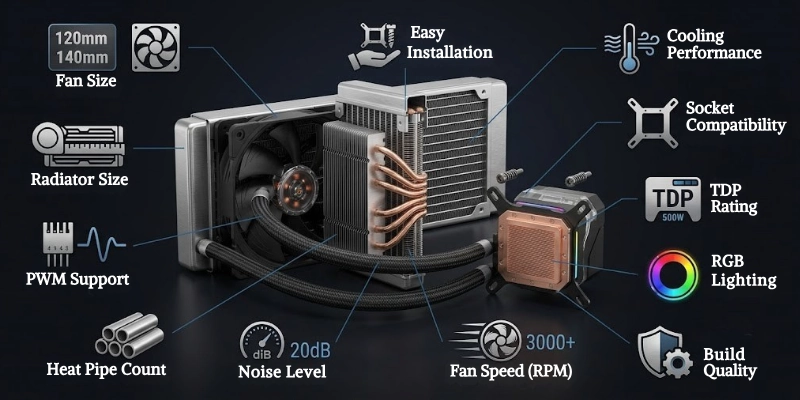
Here are some features of CPU coolers.
- Cooling Performance: Determines how effectively the cooler removes heat. Better cooling helps maintain safe temperatures during everyday use and demanding tasks.
- Fan Size: Larger fans can move more air at lower speeds, often providing better cooling with less noise. Common sizes include 92 mm, 120 mm, and 140 mm.
- Fan Speed (RPM): RPM (Revolutions Per Minute) shows how fast the fan spins. Higher RPM can improve cooling but may also increase noise.
- Noise Level: A quieter cooler creates a more comfortable working or gaming environment. Noise is usually measured in decibels (dB).
- Heat Pipe Count: More heat pipes generally improve heat transfer from the processor to the heat sink, resulting in better cooling performance.
- Radiator Size: For liquid coolers, a larger radiator provides more surface area to release heat. Common radiator sizes include 120 mm, 240 mm, and 360 mm.
- RGB Lighting: Some models include customizable RGB lighting to enhance the appearance of your computer. This feature improves aesthetics but does not affect cooling performance.
- Build Quality: High-quality materials, such as copper and aluminum, improve durability and heat transfer. A well-built cooler is also likely to last longer.
- Socket Compatibility: Always check whether the cooler supports your processor’s socket. A compatible mounting system ensures proper installation and reliable performance.
- TDP Rating: The TDP (Thermal Design Power) rating shows how much heat the cooler is designed to handle. Choose a model with a rating that matches or exceeds your processor’s requirements.
- PWM Support: Pulse Width Modulation (PWM) allows the fan to adjust its speed automatically based on temperature. This helps balance cooling performance and noise.
- Easy Installation: A user-friendly mounting system makes installation faster and reduces the chance of mistakes, especially for first-time PC builders.
Benefits of Using a CPU Cooler
A good cooling solution does more than control temperature. It helps your computer perform efficiently, stay reliable, and handle demanding tasks with greater confidence.
Below are some benefits of a CPU cooler.
- Better Performance: Allows the processor to operate at its full potential without unnecessary slowdowns.
- Lower Temperatures: Keeps operating temperatures within a safe range, even during long or intensive workloads.
- Longer CPU Life: Reduces heat-related wear, which can help the processor remain reliable for many years.
- Reduced Noise: Efficient coolers often require less fan speed, creating a quieter and more comfortable computing experience.
- Improved Gaming: Maintains consistent performance during long gaming sessions, helping reduce lag caused by high temperatures.
- Better Productivity: Supports demanding applications such as video editing, programming, graphic design, and 3D rendering without frequent performance drops.
- More Stable System: Helps prevent unexpected freezes, crashes, and automatic shutdowns caused by excessive temperatures.
- Supports Overclocking: Provides additional cooling capacity for users who want to increase processor performance beyond its default settings.
- Energy Efficiency: Efficient cooling helps the system operate more effectively, reducing unnecessary power use from constantly running fans.
Limitations of CPU Coolers
Although a cooler is essential for maintaining safe temperatures, it also has a few drawbacks. Understanding these limitations can help you choose the right option for your computer and avoid unexpected issues.
Below are some limitations of CPU coolers.
- Additional Cost: High-performance models can increase the overall cost of building or upgrading a computer.
- Installation Complexity: Some coolers require careful installation, especially larger air coolers and liquid cooling systems.
- Space Requirements: Large coolers may not fit inside compact computer cases or may block nearby components such as RAM modules.
- Dust Accumulation: Dust can collect on fans and heat sinks over time, reducing cooling efficiency if not cleaned regularly.
- Fan Noise: Cooling fans can become noisy, especially when running at high speeds during demanding workloads.
- Maintenance Needed: Regular cleaning and occasional thermal paste replacement are necessary to maintain optimal performance.
- Liquid Cooler Leak Risk: Although rare, a damaged or faulty liquid cooling system can develop leaks that may affect other hardware components.
- Compatibility Issues: Not every cooler supports every processor socket or computer case, so compatibility should always be checked before purchasing.
Common Uses of CPU Coolers
A cooler is used in almost every computer to keep the processor operating within a safe temperature range. The type of cooler you need depends on how the computer is used and the amount of processing power required.
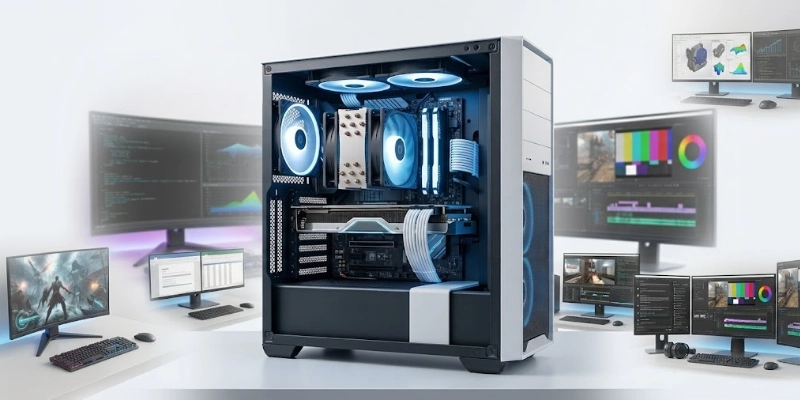
Let’s look at some common uses of CPU coolers.
- Gaming PCs: Keeps temperatures under control during long gaming sessions, helping maintain smooth and consistent performance.
- Office Computers: Provides reliable cooling for everyday tasks such as web browsing, document editing, emails, and video meetings.
- Workstations: Supports professional applications that require high processing power, ensuring stable performance during intensive workloads.
- Video Editing: Helps the processor handle long rendering and editing sessions without slowing down due to high temperatures.
- 3D Rendering: Maintains efficient cooling while creating complex 3D models, animations, and visual effects.
- Streaming PCs: Keeps the system stable while gaming, recording, or streaming live content for extended periods.
- Engineering Software: Supports resource-intensive programs used for CAD, simulations, data analysis, and technical design.
- Servers: Operates continuously to keep server processors at safe temperatures, ensuring reliable performance and minimizing downtime.
- Home PCs: Delivers dependable cooling for everyday activities such as browsing the internet, watching videos, online learning, and light multitasking.
CPU Cooler vs GPU Cooler
Both coolers help manage heat, but they are designed for different components. Understanding their differences can help you identify their roles and choose the right upgrade when needed.
| Feature | CPU Cooler | GPU Cooler |
| Cools | The processor (CPU) | The graphics processor (GPU) |
| Installed On | Mounted directly on the CPU | Built into or mounted on the graphics card |
| Upgrade Options | Easy to replace or upgrade with aftermarket models | Limited upgrade options; most users keep the original cooler |
| Maintenance | Requires regular dust cleaning and occasional thermal paste replacement | Requires dust cleaning, while thermal paste replacement is less common |
| Purpose | Keeps the processor at a safe temperature for stable system performance | Keeps the graphics processor cool during gaming, video editing, 3D rendering, and other graphics-intensive tasks |
How to Choose the Right CPU Cooler?
Choosing the right CPU cooler depends on your computer, budget, and the type of work you do. Before buying, compare the following factors to make sure you select a model that meets your needs.
- CPU Socket Compatibility: Make sure the cooler supports your processor’s socket (such as Intel or AMD). A compatible socket ensures a proper fit and secure installation.
- Processor TDP: Check your processor’s Thermal Design Power (TDP) and choose a cooler with an equal or higher TDP rating. This helps the cooler handle the heat produced under normal and heavy workloads.
- Case Size: Measure the available space inside your computer case before buying. Large air coolers and liquid radiators may not fit in smaller cases.
- Budget: Decide how much you want to spend. Budget-friendly models are suitable for everyday use, while premium options provide better cooling and additional features.
- Noise Preference: If you prefer a quiet computer, look for a model with low noise levels and PWM fan support. Larger fans also tend to run more quietly than smaller ones.
- Air vs Liquid: Air coolers are affordable, reliable, and easy to maintain. Liquid coolers usually offer better cooling for demanding workloads but cost more and require additional space.
- RGB Preference: If appearance is important, choose a model with customizable RGB lighting. If you prefer a simple build, a non-RGB cooler is a practical option.
- Overclocking Needs: If you plan to overclock your processor, choose a high-performance cooler that can handle the extra heat. Standard models are usually sufficient for normal use.
- Brand Reputation: Buy from a trusted manufacturer known for quality products, reliable performance, and good customer support. Reading customer reviews can also help you make an informed decision.
- Warranty: A longer warranty often reflects the manufacturer’s confidence in the product. It also provides peace of mind if you experience any issues after purchase.
Popular CPU Cooler Brands
Many manufacturers offer reliable cooling solutions for different budgets and performance needs. The brands below are well known for their build quality, cooling efficiency, and long-term reliability.
Below are some popular CPU coolers.
- Noctua: Known for premium build quality, excellent cooling performance, and exceptionally quiet fans. It is a popular choice among PC enthusiasts and professionals.
- Cooler Master: Offers a wide range of affordable and high-performance cooling products for beginners and experienced PC builders.
- Corsair: Popular for stylish liquid cooling solutions with RGB lighting and reliable performance for gaming and content creation.
- be quiet!: Focuses on low-noise cooling products that deliver strong performance while keeping systems quiet.
- DeepCool: Provides feature-rich products at competitive prices, making it a favorite among budget-conscious users.
- ARCTIC: Recognized for dependable performance, quiet operation, and excellent value for money across its product lineup.
- Thermalright: Delivers high-performance air coolers with efficient heat dissipation, often at an affordable price.
- NZXT: Offers modern cooling solutions with clean designs, RGB options, and software controls for performance monitoring.
How to Install a CPU Cooler?
Installing a CPU cooler correctly helps maintain proper heat transfer and stable system performance.
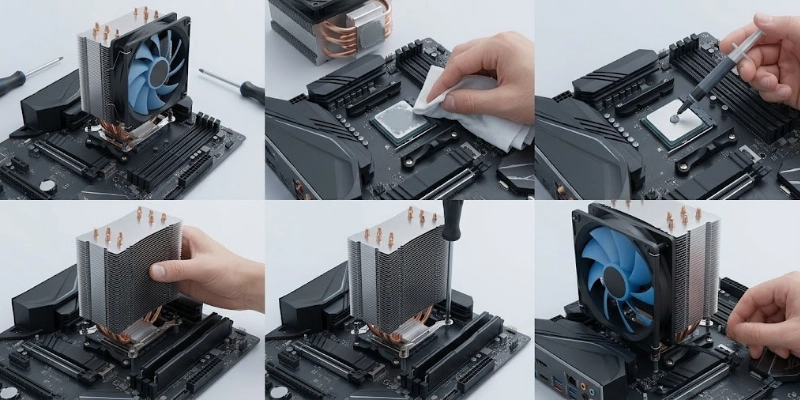
Follow these steps carefully to ensure a secure installation.
- Turn Off the PC: Shut down your computer completely, unplug the power cable, and press the power button for a few seconds to discharge any remaining electricity.
- Remove the Old Cooler: Disconnect the fan cable from the motherboard, loosen the mounting screws or clips, and carefully lift the old cooler away from the processor.
- Clean the Old Thermal Paste: Use a lint-free cloth or coffee filter with isopropyl alcohol to remove the old thermal paste from the processor and the cooler’s contact surface.
- Apply Fresh Thermal Paste: Place a small pea-sized amount of thermal paste in the center of the processor. Avoid spreading too much, as the pressure from the cooler will distribute it evenly.
- Mount the Cooler: Position the cooler over the processor, align it with the mounting holes, and place it carefully without sliding it across the surface.
- Tighten the Screws Evenly: Tighten each screw a little at a time in a cross pattern. This applies even pressure and helps create proper contact with the processor.
- Connect the Fan Cable: Plug the fan cable into the CPU_FAN header on the motherboard to ensure the fan receives power and speed control.
- Test CPU Temperatures: Turn on the computer and check the processor temperature in the BIOS or a hardware monitoring tool to confirm the cooler is working correctly.
CPU Cooler Maintenance Tips
Regular maintenance helps your cooling system perform efficiently and extends its lifespan. Following these simple tips can improve cooling performance and reduce the risk of overheating.
- Clean Dust Regularly: Remove dust from the fan, heat sink, and radiator using compressed air or a soft brush. Dust buildup can block airflow and reduce cooling efficiency.
- Replace Thermal Paste: Replace the thermal paste every few years or whenever you reinstall the cooler. Fresh thermal paste improves heat transfer between the processor and the cooler.
- Check Fan Operation: Make sure the fan spins smoothly without unusual noise or vibration. Replace it if it stops working or shows signs of wear.
- Tighten Mounting Screws: Check that all mounting screws are secure but not over-tightened. Proper mounting ensures good contact with the processor.
- Monitor Temperatures: Use a hardware monitoring tool to keep an eye on processor temperatures. A sudden increase may indicate that the cooling system needs attention.
- Replace Faulty Fans: If a fan becomes noisy, spins slowly, or fails completely, replace it as soon as possible to maintain proper airflow.
- Inspect the Liquid Cooler Pump: If you use a liquid cooling system, listen for unusual pump noises and check that it is operating correctly. A faulty pump can reduce cooling performance and cause temperatures to rise.
Signs You Need a Better CPU Cooler
If your computer is running hotter than usual or struggling during demanding tasks, it may be time to upgrade your cooling solution. Watch for these common signs before high temperatures begin affecting your system.
- High CPU Temperatures: If the processor frequently reaches high temperatures, your current cooler may no longer provide enough cooling.
- Loud Fan Noise: A fan that constantly runs at high speed or makes excessive noise may be working harder than it should to control heat.
- Frequent Thermal Throttling: If the processor regularly reduces its speed to lower temperatures, your cooling system may not be keeping up with the workload.
- Random Shutdowns: Unexpected shutdowns during gaming, rendering, or other demanding tasks can be a sign of overheating.
- Poor Gaming Performance: Sudden frame rate drops or performance issues during long gaming sessions may indicate that the processor is getting too hot.
- Slow Rendering: Video editing, 3D rendering, or other intensive tasks taking longer than expected can sometimes result from excessive temperatures.
- CPU Overheating Warnings: Temperature alerts from the BIOS or hardware monitoring software are clear signs that your system needs better cooling.
- Old Stock Cooler: If you’re using an older stock cooler with a newer or more powerful processor, upgrading to a better model can improve cooling and overall performance.
Common CPU Cooler Problems and Solutions
Like any computer component, a cooler can develop issues over time. The table below highlights common problems and simple solutions for CPU coolers to help keep your system running efficiently.
| Problem | Solution |
| High Temperature | Clean the CPU cooler, replace the thermal paste if needed, and ensure the fan or pump is working properly. |
| Loud Fan | Remove dust from the fan, check for loose screws, and replace the fan if the noise continues. |
| Dust Build-up | Use compressed air or a soft brush to clean dust from the fan, heat sink, and radiator regularly. |
| Pump Failure | Check that the pump is receiving power. If it has stopped working, replace the pump or the liquid cooling unit. |
| Fan Not Spinning | Confirm the fan cable is connected to the CPU_FAN header and replace the fan if it is faulty. |
| Poor Thermal Paste | Remove the old thermal paste, clean both surfaces, and apply a fresh, pea-sized amount before reinstalling the cooler. |
| Loose Mounting | Tighten the mounting screws evenly to ensure firm contact between the cooler and the processor. |
Future Trends in CPU Cooling
As modern gadgets and computers become more powerful, cooling technology continues to improve to keep up with increasing performance demands.
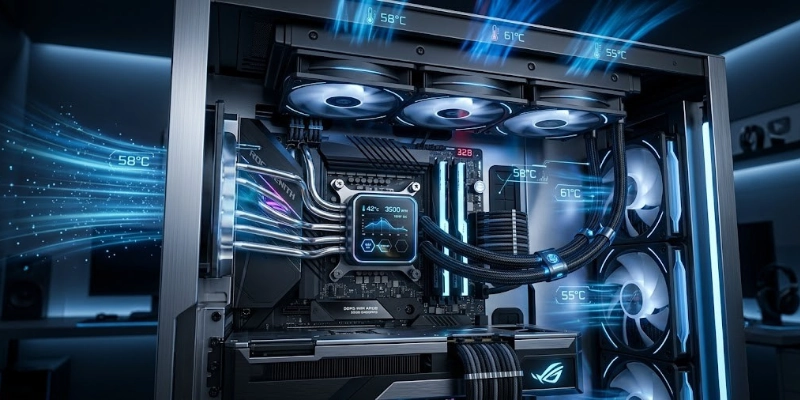
Future innovations will focus on smarter temperature control, quieter operation, and more efficient heat management.
- AI-Based Fan Control: Artificial intelligence can automatically adjust fan speeds based on system usage, providing efficient cooling while reducing unnecessary noise.
- Larger Vapor Chambers: Advanced vapor chamber designs are expected to spread heat more evenly, improving cooling performance for high-end processors.
- Improved Heat Pipe Designs: New heat pipe technologies will transfer thermal energy more efficiently, helping systems stay cooler under heavy workloads.
- More Efficient AIO Coolers: Future All-in-One liquid coolers are likely to feature better pumps, improved radiators, and higher cooling efficiency with lower power consumption.
- Silent Cooling Technologies: Manufacturers are developing quieter fans and vibration-reducing designs to create near-silent computing experiences.
- Better Thermal Materials: New thermal compounds and advanced materials are expected to improve heat transfer between the processor and the cooling system.
- Compact Cooling Solutions: As small form factor PCs become more popular, manufacturers are designing compact solutions that deliver strong performance without taking up much space.
- Smart Temperature Monitoring: Future cooling systems may include intelligent sensors and software that provide real-time temperature monitoring, automatic optimization, and performance alerts.
Conclusion
Keeping the processor cool is essential for stable performance, lower temperatures, and long-term reliability. Whether you choose an air cooler or a liquid cooler depends on your performance needs, budget, and computer setup.
Rather than buying the most expensive option, choose a CPU cooler that matches your processor, case size, and everyday workload. The right choice will provide efficient cooling and reliable performance for years to come.
FAQs
The following FAQs cover common questions to help you better understand CPU coolers and their importance.
Yes, every processor needs proper cooling to work safely. Without it, temperatures can rise quickly and affect performance. A good cooling solution also helps protect your hardware over time.
No, it is not recommended. Modern processors heat up within seconds, and most computers will automatically shut down to prevent damage. Always install a cooling solution before turning on your PC.
Most air coolers can last for many years with regular cleaning. Liquid models may have a shorter lifespan because they contain more moving parts. Proper maintenance can help either type last longer.
A better cooler does not make the processor faster by itself. It helps maintain stable performance by keeping temperatures under control during heavy workloads. This is especially useful for gaming, video editing, and other demanding tasks.
Thermal paste usually lasts between two and five years under normal use. It should also be replaced whenever you remove the cooler. Fresh paste helps improve heat transfer between the processor and the cooler.
Both options are effective, but the best choice depends on your needs. Air cooling is affordable, reliable, and easy to maintain, while liquid cooling offers stronger performance for demanding tasks. Consider your budget, computer case, and workload before deciding.
High temperatures, loud fan noise, or frequent system slowdowns are common warning signs. You may also notice unexpected shutdowns during demanding tasks. Checking temperatures with monitoring software can help identify the problem.
Stock coolers are suitable for everyday activities such as browsing, office work, and watching videos. They can also handle light multitasking without any issues. If you play modern games, edit videos, or overclock your processor, an upgraded cooler is usually a better choice.






- Be Respectful
- Stay Relevant
- Stay Positive
- True Feedback
- Encourage Discussion
- Avoid Spamming
- No Fake News
- Don't Copy-Paste
- No Personal Attacks
- Be Respectful
- Stay Relevant
- Stay Positive
- True Feedback
- Encourage Discussion
- Avoid Spamming
- No Fake News
- Don't Copy-Paste
- No Personal Attacks
