Types of RGB Keyboards: 10 Types Explained Simply
Published: 17 Sep 2026
RGB keyboards are popular because they add color and style to a computer setup. But not all of them work or feel the same. They come in different designs, sizes, switch types, and lighting options.
Understanding the Types of RGB Keyboards can help you choose one that fits your needs. A gamer may want a fast and responsive keyboard, while someone who mainly types may care more about comfort and quiet keys.
In this guide, we will look at the main types, their features, and what each one is best for. This will make it easier to understand your options and choose the right keyboard for your setup.
What Are RGB Keyboards?
An RGB keyboard is a keyboard with built-in lighting that can display a wide range of colors. The lights are placed beneath or around the keys and can be controlled through keyboard buttons or software.
Unlike a standard backlit keyboard that usually uses one fixed color, RGB lighting can change between different colors and effects. Some keyboards allow users to choose a single color, while others can display several colors at the same time.
How RGB Lighting Works
RGB lighting uses tiny LEDs based on three main colors: red, green, and blue. By changing the brightness of these colors, the LEDs can produce many different shades.
For example, combining red and blue can create purple, while red and green can create yellow. The keyboard’s lighting system controls these colors to create effects such as fading, waves, or color changes.
The level of control depends on the keyboard. Basic models may offer a few preset effects, while advanced ones can let users adjust the lighting for individual keys.
Main Types of RGB Keyboards
RGB keyboards can use different technologies to register each key press. The main difference is how the keys detect your input and how they feel when pressed.
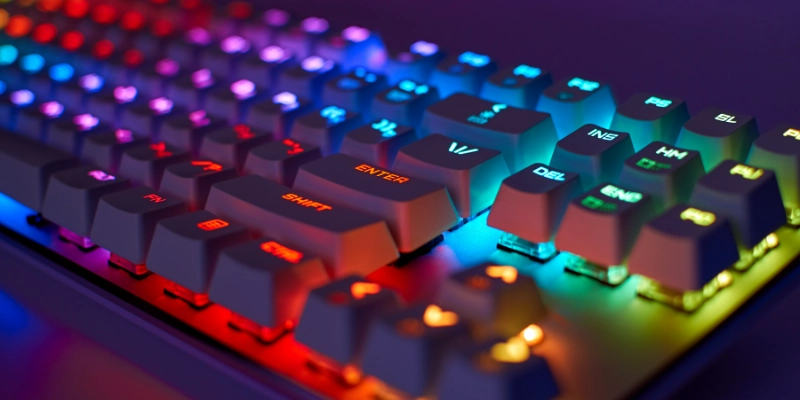
Here are some main types of RGB keyboards.
Mechanical RGB Keyboards
Mechanical models use a separate switch under each key. This gives each key a more defined response when pressed.
They are available with different switch styles. Linear switches feel smooth, tactile switches have a small bump, and clicky switches produce an audible sound. This variety lets users choose a typing feel that suits them.
Mechanical keyboards are also known for their long-lasting switches, making them a common choice for people who type or play games often.
Membrane RGB Keyboards
Membrane models use a thin rubber layer beneath the keys instead of separate mechanical switches. When a key is pressed, the rubber layer completes the connection and registers the input.
The keys usually feel softer and produce less noise than mechanical ones. These keyboards are also often less expensive, making them a practical option for basic computer use.
Their main drawback is that the key response can feel less precise, and the rubber parts may wear out over time.
Optical RGB Keyboards
Optical models use light to detect when a key is pressed. When the key moves, it interrupts or changes a light signal, which tells the keyboard to register the input.
This method can provide quick key detection and a consistent response. It also works differently from traditional mechanical switches, even though some optical models still use a switch mechanism that feels similar to mechanical keyboards.
They are especially suited to users who want quick and responsive key presses.
Hall Effect RGB Keyboards
Hall Effect models use magnets and sensors to detect key movement. Instead of relying on a physical contact point, the sensor measures changes in the magnetic field as the key moves.
One major advantage is adjustable actuation on supported keyboards. Users can choose how far a key needs to move before the press is registered.
This technology gives users more control over key response, although these models are generally aimed at enthusiasts and gamers and can cost more than basic options.
Types of RGB Keyboards Based on Connection
Keyboards can also be grouped by how they connect to a computer or other device. The main options are wired, wireless, and models that support more than one connection method.
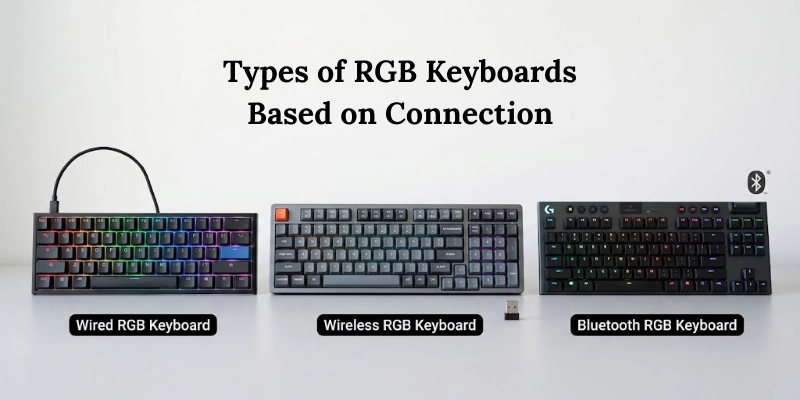
Let’s look at types of RGB keyboards based on connection.
Wired RGB Keyboards
Wired models connect directly to a computer through a USB cable. They receive power through the cable, so there is no built-in battery to recharge.
A wired connection also keeps the keyboard connected without relying on wireless signals. This makes it a simple choice for a permanent desktop setup.
Wireless RGB Keyboards
Wireless models connect without a physical cable. The two common options are Bluetooth and 2.4 GHz wireless connections.
Bluetooth is useful when connecting to laptops, tablets, and other compatible gadgets. A 2.4 GHz connection usually uses a small USB receiver and is often chosen for a direct connection to a computer.
Since these keyboards use a battery, they need to be recharged or have their batteries replaced, depending on the model.
Dual-Mode or Tri-Mode RGB Keyboards
Some models support more than one connection method. A dual-mode keyboard may offer wired and Bluetooth connections, while a tri-mode model can support wired, Bluetooth, and 2.4 GHz connections.
This flexibility is useful for people who switch between different devices. For example, you can use a wired connection at a desk and switch to a wireless option when needed.
Types of RGB Keyboards Based on Size and Layout
Keyboard size is mainly determined by how many keys are included and how they are arranged. Larger layouts provide more dedicated keys, while smaller ones remove certain keys to save space.
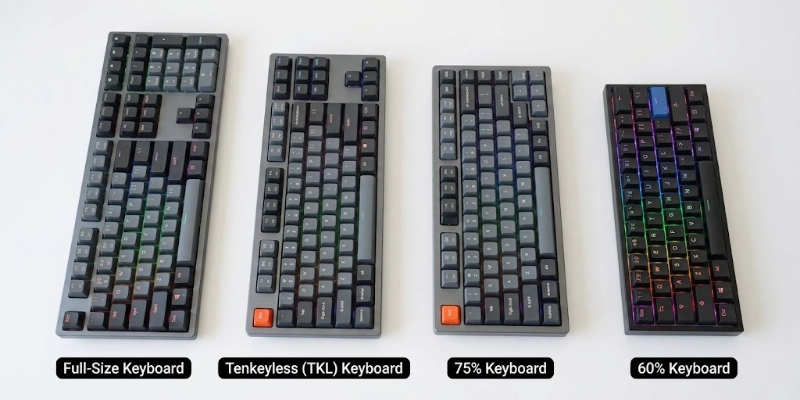
Let’s look at types of RGB keyboards based on size and layout.
Full-Size RGB Keyboards
A full-size layout has the standard set of keys, including the number pad on the right side. It also includes the function row, arrow keys, and navigation keys.
This layout is useful for people who regularly work with numbers or prefer having every key in its usual position.
Tenkeyless (TKL) RGB Keyboards
A TKL layout removes the number pad while keeping most of the other keys found on a full-size model.
This makes it shorter from side to side and leaves more room on the desk. It is a good middle ground for users who rarely need a dedicated number pad.
75% RGB Keyboards
A 75% layout takes a more compact approach while keeping the function row and arrow keys. Some navigation keys are placed closer together to reduce the overall size.
It suits people who want a smaller keyboard but still need many of the keys found on larger layouts.
65% RGB Keyboards
A 65% layout removes the function row and number pad but keeps the arrow keys. A small group of navigation keys may also remain.
Its compact shape takes up less desk space while keeping the arrow keys easily accessible.
60% RGB Keyboards
A 60% layout removes the number pad, function row, arrow keys, and dedicated navigation keys. These functions are usually accessed through key combinations.
The small size makes this layout easy to carry and leaves plenty of room around the keyboard.
40% RGB Keyboards
A 40% layout removes even more dedicated keys than a 60% model. Many common functions are accessed through layers, shortcuts, or combinations.
Because of this, it usually takes more time to learn. It is mainly suited to keyboard enthusiasts who enjoy highly compact layouts.
Types of RGB Lighting in Keyboards
RGB lighting can be built into a keyboard in different ways. The main difference is how much control the user has over the lights across the keys.
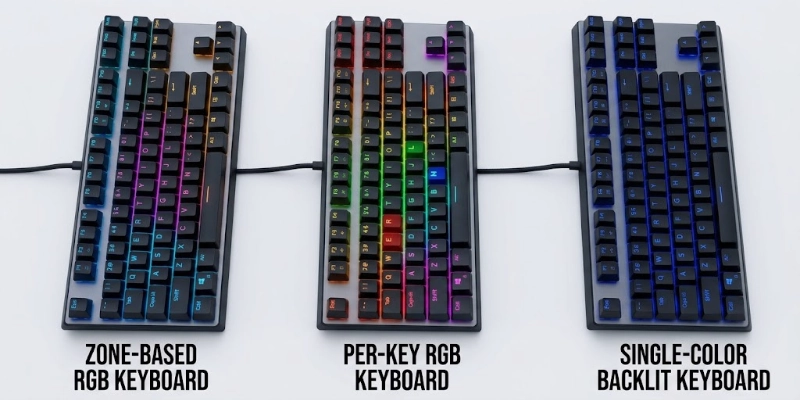
Zone-Based RGB Keyboards
Zone-based lighting divides the keyboard into separate sections. Each section can have its own color or lighting effect, but the keys within that section usually share the same setting.
This approach is simpler than controlling every key separately. It can be a good choice for users who want basic lighting without needing detailed controls.
Per-Key RGB Keyboards
With per-key lighting, each key has its own controllable light. This allows users to assign different colors or effects to specific keys.
For example, selected keys can be highlighted while the rest of the keyboard uses a different color. This gives much more control over the overall lighting pattern.
Single-Color Backlit Keyboards vs. RGB
A single-color backlit keyboard uses one lighting color, such as white, blue, or red. The brightness may be adjustable, but the color itself normally stays the same.
RGB models can produce a wide range of colors and usually offer more lighting options. So, a keyboard can be backlit without being an RGB keyboard.
Types of RGB Keyboards Based on Use
The right keyboard can depend on how you plan to use it. A gaming keyboard may focus on quick input, while a work keyboard may place more importance on quiet and comfortable typing.
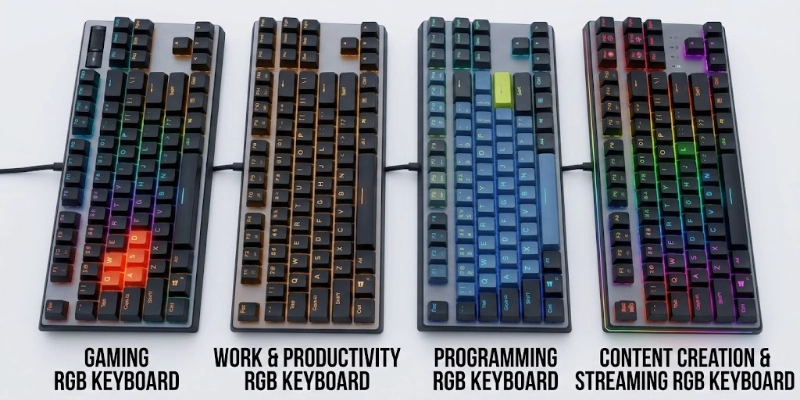
Here are some types of RGB keyboards based on use.
Gaming RGB Keyboards
Gaming models often include features designed for quick and accurate input. Anti-ghosting and N-key rollover help the keyboard register multiple key presses correctly.
Some also include programmable keys that let users assign shortcuts or commands. These features can be useful in games where quick actions matter.
RGB Keyboards for Work and Productivity
For everyday work, comfort and ease of use are often more important than extra gaming features. A suitable model may have a comfortable key layout, quiet keys, and dedicated shortcuts.
Some users also prefer simple lighting that is easy to adjust and does not distract during work.
RGB Keyboards for Programming
Programming involves frequent typing, so the key feel and layout can make a noticeable difference during long sessions.
Features such as programmable keys can provide quick access to commonly used commands. Compact layouts may also be useful for programmers who prefer keeping their mouse closer to the keyboard.
RGB Keyboards for Content Creators and Streamers
Content creators and streamers can benefit from keyboards with dedicated controls for media and other common actions. Macro keys can also be assigned to repeated tasks.
For streamers, quick access to functions such as play, pause, volume, or other shortcuts can make managing content easier while recording or streaming.
Types of RGB Keyboards Based on Design
Keyboard design can affect how the keys are arranged, how they feel, and how much control users have over the hardware. Some designs focus on comfort, while others are made for a slimmer shape or easier customization.
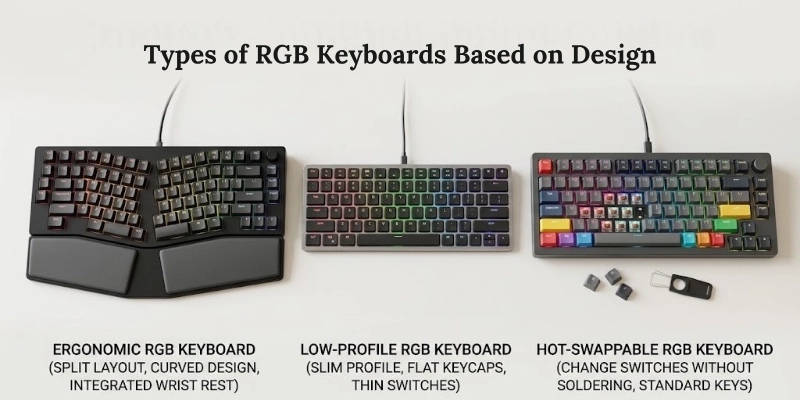
Let’s look at types of RGB keyboards based on design.
Ergonomic RGB Keyboards
Ergonomic models are designed to make typing feel more natural. Some use a split layout that separates the left and right sides of the keyboard, while others use curved or angled arrangements.
These designs can change the position of your hands and wrists while typing. They may suit people who prefer a more natural hand position over a traditional flat layout.
Low-Profile RGB Keyboards
Low-profile models use shorter keycaps and switches, giving the keyboard a thinner overall shape. The keys usually require less movement than those on standard-height keyboards.
Their typing feel is closer to what many people experience on laptops. The slim design also makes them a practical choice for users who prefer a thinner keyboard.
Hot-Swappable RGB Keyboards
Hot-swappable models allow compatible switches to be removed and replaced without soldering. This makes it easier to change the switches when you want a different key feel.
Before replacing switches, it is important to check whether the new switches are compatible with the keyboard. The socket type, switch design, and lighting setup can affect compatibility.
RGB Keyboard Switch Types
The switch under each key affects how the keyboard feels when you press a key. Different switches can make typing smoother, more noticeable, or quieter.
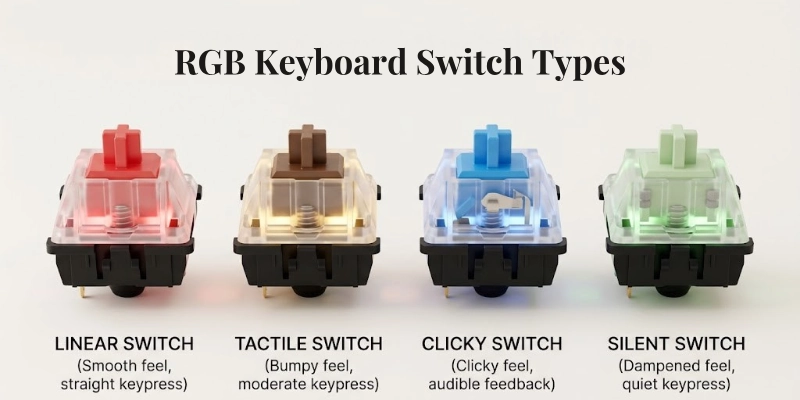
Linear Switches
Linear switches move straight down without a bump or click in the middle. The key press feels smooth from start to finish.
They are often chosen by users who prefer a quick and consistent key movement, especially during gaming.
Tactile Switches
Tactile switches have a small bump that you can feel when the key reaches the actuation point. This gives you physical feedback while typing.
They can be a good option for people who want to feel each key press without the loud sound of a clicky switch.
Clicky Switches
Clicky switches provide both a tactile bump and a noticeable clicking sound. The extra feedback makes each press feel more distinct.
They suit users who enjoy a louder and more pronounced typing experience. However, the sound may not be suitable for quiet offices or shared rooms.
Silent Switches
Silent switches are designed to reduce the noise produced during key presses. They usually use materials or internal designs that soften the sound as the key moves.
They can be useful when you want a quieter typing experience, especially when working around other people.
What Is the Difference Between Types of RGB Keyboards?
The main differences come down to how the keys work, how the keyboard connects, its size, and how the lighting is controlled. The table below gives a quick overview.
| Type | Main Benefit | Best For |
| Mechanical RGB | Defined and responsive key feel | Gamers and frequent typists |
| Membrane RGB | Simple and affordable | Everyday computer use |
| Optical RGB | Quick key detection | Fast-paced gaming |
| Hall Effect RGB | Adjustable actuation | Competitive gamers |
| Wireless RGB | No cable connection | Flexible desk setups |
| TKL RGB | Smaller than full-size | Gaming and general work |
| 60% RGB | Very compact layout | Minimalist setups |
| Per-Key RGB | Individual key lighting control | Users who want detailed lighting |
No single option is best for everyone. The right choice depends on the features, layout, and typing experience you prefer.
How to Choose the Right RGB Keyboard
Choosing a keyboard becomes easier when you focus on the features that actually matter to you. You do not need every available feature, so start with how you plan to use it.
Consider Your Main Use
Think about what you will do most often. Gamers may need quick and accurate input, while people who work or program may care more about typing comfort.
For general use, a simple model with a familiar layout can be enough. Your main activity should guide the rest of your choices.
Choose the Right Switch Type
The switch affects how each key feels when pressed. Linear switches have a smooth movement, tactile switches provide a noticeable bump, and clicky switches add an audible click.
If you work in a shared space or prefer less noise, silent switches may be a better fit.
Pick the Right Keyboard Size
Consider which keys you actually use. A full-size layout is useful if you need a number pad, while TKL removes it to save space.
Smaller layouts such as 75%, 65%, and 60% remove more dedicated keys. They can work well if you are comfortable using shortcuts for missing functions.
Decide Between Wired and Wireless
A wired model is straightforward and does not need battery charging. Wireless models offer more freedom from cables but require you to keep an eye on battery life.
Think about where you will use the keyboard and whether you regularly move it between devices.
Check RGB Customization
Not every lighting system offers the same level of control. Zone-based lighting gives control over larger sections, while per-key lighting allows individual keys to be adjusted.
Also check whether the keyboard uses built-in controls or software for changing colors and effects. Software support can be important if you want more detailed settings.
Consider Extra Features
Extra features are useful when they match your needs. Macro keys can provide shortcuts, while media controls make it easier to manage music or video.
Hot-swappable switches are useful if you want to change switches later. Anti-ghosting and N-key rollover can help when several keys need to register at the same time.
A wrist rest can also improve comfort, but it is a personal preference rather than an essential feature.
Are RGB Keyboards Good for Gaming?
RGB keyboards can work well for gaming, but their lighting is mainly an extra feature rather than a performance upgrade.
In a dark room, backlighting can make the keys easier to locate. Some models also allow different lighting profiles, so you can use one arrangement for each game or activity.
Compatible software may let the keyboard lighting work with other devices, creating matching effects across a gaming setup.
The important thing to remember is that RGB lighting does not make a keyboard respond faster. Gaming performance depends more on the keyboard’s switches, input response, and other hardware features.
Are RGB Keyboards Worth It?
RGB can be worth paying extra for if you enjoy changing the look of your keyboard or want lighting that fits your setup. It can also help you see the keys more clearly in a dark room.
If you do not care about lighting, there is little reason to choose an RGB model over a similar keyboard without it. You can put that money toward features that affect how the keyboard feels and works.
For most buyers, the best choice is to decide on the keyboard’s core features first and treat RGB as an optional extra.
Sure. I’ll add a short explanation after the H2, and under each H3 I’ll keep the points as bullets but make each one a complete sentence.
Pros and Cons of RGB Keyboards
RGB keyboards offer some useful features beyond their appearance, but they also have a few drawbacks. The benefits mainly depend on how much you value lighting and customization.
Pros
RGB keyboards offer several practical benefits besides their appearance. They can improve visibility, provide more customization, and give users more choices when setting up their keyboard.
- RGB lighting lets you change the keyboard’s appearance to match your setup.
- Backlighting can make the keys easier to see in low-light conditions.
- They are available in different sizes, layouts, and designs.
- Some models offer lighting profiles that can be useful for gaming.
- Custom lighting gives users more control over the look of their keyboard.
Cons
These drawbacks may matter more if you want a simple and low-maintenance keyboard. It is worth considering them before choosing a model.
- RGB models can cost more than similar keyboards without lighting.
- Good or changing effects may become distracting for some users.
- Advanced lighting controls may require additional software.
- Wireless models need regular charging to keep the lighting and keyboard working.
Conclusion
The types of RGB keyboards vary by switch technology, connection, size, layout, and lighting control. The best choice depends on how you plan to use the keyboard and which features matter most to you.
For gaming, mechanical, optical, or Hall Effect models are strong choices. If you want to save money, a membrane keyboard can be enough. For a smaller desk, TKL, 75%, or 60% layouts can save space, while per-key RGB is ideal for detailed lighting control. If you prefer a cable-free setup, a wireless model offers more flexibility.
Choose the features that fit your needs instead of paying for options you may not use.
FAQs
Get quick answers to the most common questions about types of RGB keyboards below.
The main options include mechanical, membrane, optical, and Hall Effect keyboards. They differ mainly in how they detect key presses and how they feel to use.
Mechanical models use individual switches, while membrane models use a rubber layer beneath the keys. Mechanical keyboards usually offer more choice in key feel.
There is no single best option for every gamer. Mechanical, optical, and Hall Effect models can be good choices when fast and consistent input is important.
Yes, wireless models can be a convenient choice for a clean desk or when using multiple devices. Just make sure the battery life suits your daily use.
A per-key model lets you control the lighting of individual keys. This gives you more freedom to create specific lighting patterns or highlight certain keys.
A zone-based model divides the keyboard into lighting sections. Each section can usually have its own color or effect instead of controlling every key separately.
Backlighting simply means the keys have lighting, while RGB lighting can display multiple colors. A keyboard can therefore be backlit without having RGB features.
Yes, but the lighting itself does not determine typing quality. The key feel, layout, and comfort are more important when you spend a lot of time typing.
The best size depends on the keys you use most. A larger layout can be convenient for regular office work, while a smaller one may be better when desk space is limited.
RGB lighting can use some additional power, especially at high brightness. The difference is usually more noticeable with wireless models because they rely on a battery.





- Be Respectful
- Stay Relevant
- Stay Positive
- True Feedback
- Encourage Discussion
- Avoid Spamming
- No Fake News
- Don't Copy-Paste
- No Personal Attacks
- Be Respectful
- Stay Relevant
- Stay Positive
- True Feedback
- Encourage Discussion
- Avoid Spamming
- No Fake News
- Don't Copy-Paste
- No Personal Attacks
