What Is a Mesh WiFi – How It Works and Benefits
Published: 20 Sep 2026
A weak WiFi signal can make simple online tasks frustrating. You may notice slow connections in some rooms, dropped signals, or areas where WiFi barely works. This often happens when a single router cannot cover the whole home properly.
What is mesh wifi is a common question for people looking for better coverage. A mesh WiFi system uses multiple connected devices to spread the WiFi signal across different areas of the home.
In this guide, we’ll explain how mesh WiFi works, its main benefits, how it compares with a WiFi extender, and where to place its nodes for better coverage.
What Is Mesh WiFi?
Mesh WiFi is a home network system that uses two or more connected devices to provide better wireless coverage. Instead of depending on one router to reach every room, it uses a main unit and additional nodes placed around the home.
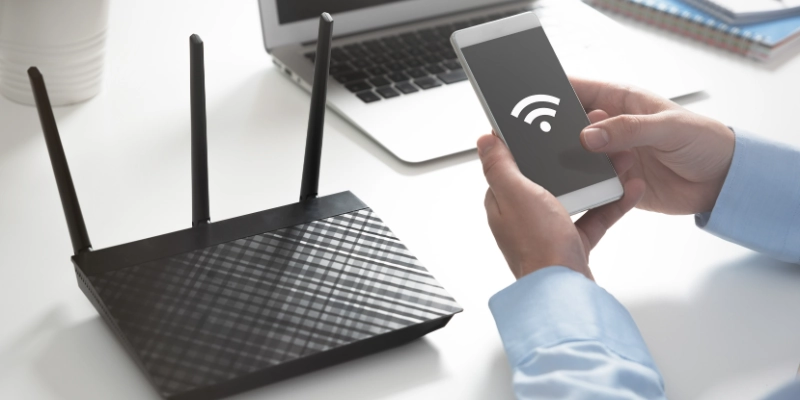
In a traditional setup, one router handles the entire wireless network. Its signal can become weaker as you move farther away or pass through thick walls. A mesh system spreads the connection across different areas, helping reduce weak spots.
The word “mesh” refers to the way these devices work together as one network. They communicate with each other and help your devices stay connected as you move around the home. You can usually use the same network name and password throughout the house, so you do not need to switch between separate networks.
How Does Mesh WiFi Work?
A mesh system works by using several connected units to spread a wireless connection around your home. Each part has a different job, but they work together to provide more consistent coverage.
Main Mesh Router
The main mesh router connects directly to your modem. It receives the internet connection and shares it with the other units in the system. This is usually the first device you set up and acts as the main point of the network.
Mesh Nodes or Satellites
Mesh nodes are additional units that you place in different areas of your home. They connect to the main router and help bring the network to rooms that may have a weak signal.
The nodes should not be placed too far from the main unit. A good location allows them to receive a strong connection while also reaching the areas that need better coverage.
How Devices Move Between Nodes
One useful feature of a mesh system is that your smartphone, laptop, or other device can move between nodes as you walk around the home. The system can connect your device to the unit that provides a better connection.
This means you can move from one room to another without manually choosing a different network each time. The exact roaming behavior can vary between mesh systems and devices.
What Is WiFi Backhaul?
Backhaul is the connection used to carry data between the main router and the other mesh units. It can be wireless or use an Ethernet cable.
With wireless backhaul, the nodes communicate with the main unit over WiFi. With wired backhaul, Ethernet cables connect the units instead. A wired connection can provide a more stable link between nodes, while wireless backhaul is easier to set up in homes without Ethernet wiring.
The type of backhaul can affect the overall performance of the system, especially when several devices are using the network at the same time.
What Are the Main Parts of a Mesh WiFi System?
A mesh system includes several parts that work together to provide a reliable connection around the home. Each one has a specific role in setting up and managing the network.
- Main router: This is the primary unit that connects to the modem and manages the network.
- Mesh nodes: These are extra units placed in different areas to help provide coverage where the main router may not reach well.
- Modem: The modem connects your home to your internet service provider. Some gadgets combine a modem and router in one unit.
- Ethernet cables: These cables can connect the main router to the modem and may also be used to connect nodes for a wired backhaul.
- Mobile app or management software: Most modern systems use an app that helps you set up the network, add nodes, check connected devices, and manage settings.
Together, these parts form one system rather than a group of separate WiFi networks.
What Are the Benefits of Mesh WiFi?
A mesh system can make a home network easier to use, especially when one router cannot provide a strong connection everywhere. Here are some of its main benefits.
- Wider WiFi Coverage:
Multiple units can spread the wireless signal across more areas of your home. This can help rooms that are far from the main router get a more reliable connection. - Fewer WiFi Dead Zones:
Walls, floors, and distance can create areas with weak or no signal. Placing additional units in suitable locations can help reduce these dead zones. - Seamless Roaming:
Your phone, laptop, or tablet can move between different parts of the home while staying connected to the same network. The system can help your device connect to a suitable unit as you move around. - Better Coverage for Large Homes:
Larger homes and homes with multiple floors can be harder to cover with one router. Additional units can help extend the network to distant rooms and other areas. - Easy to Expand:
Many systems allow you to add more compatible units when you need extra coverage. This lets you build the network gradually instead of replacing the whole system. - Devices:
Modern homes can have phones, computers, TVs, cameras, speakers, and other connected devices using the network. A well-designed mesh system can help provide coverage across the areas where these devices are used. - App-Based Management:
Most modern systems come with a mobile app for setup and management. Depending on the brand, you may be able to check connected devices, manage network settings, run tests, and add new units from your phone.
What Are the Disadvantages of Mesh WiFi?
Although a mesh system can improve coverage, it also has some drawbacks. Understanding these points can help you decide whether it fits your home and internet needs.
- Cost:
A mesh system usually costs more than a basic single router because it comes with multiple units. The price can also increase if you need extra nodes for a larger home. - Devices:
Instead of setting up one router, you need to install and configure several units. Most systems make this easier through a mobile app, but the initial setup can still take some time. - Placement:
Adding more units does not always mean better coverage. Each node needs to be placed in a suitable location where it can communicate properly with the rest of the system. Poor placement can reduce its effectiveness. - Wireless Backhaul:
When nodes use WiFi to communicate with each other, part of the wireless capacity is used for this connection. Distance, walls, interference, and network traffic can affect performance. A wired Ethernet backhaul can help avoid some of these limitations. - Unnecessary for Small Homes:
A mesh system may not be needed if a single router already provides strong coverage throughout a small home or apartment. In that case, buying multiple units could add cost without solving a real problem.
Mesh WiFi vs Traditional WiFi Router
Both setups can provide a reliable internet connection, but they are designed for different coverage needs. A traditional router may be enough for a small space, while a mesh system uses multiple units to cover a larger or more challenging layout.
| Feature | Traditional WiFi Router | Mesh WiFi |
| Coverage | Usually covers an area around one main location | Uses multiple units to cover more areas |
| Number of units | Usually one router | Two or more connected units |
| Network | One main device manages the connection | Multiple units work together as one system |
| Roaming | Devices may have limited roaming support | Devices can move between units more smoothly |
| Expansion | Coverage may require additional equipment | Compatible units can usually be added |
| Best for | Small homes, apartments, or simple layouts | Larger homes, multiple floors, or difficult layouts |
The main difference is how coverage is provided. A traditional router relies mainly on one device, while a mesh setup spreads the network across several coordinated units.
Who Should Use Mesh WiFi?
Mesh WiFi can be useful when a single router does not provide reliable coverage across your home. However, not everyone needs a multi-unit system. Your home size, layout, walls, and number of devices can all affect whether it is useful.
- Large homes often have rooms that are far from the main router. Additional units can help bring a stronger connection to these areas.
- A single router may struggle to provide consistent coverage across several floors. Placing units on different levels can help spread the network more evenly.
- If some rooms regularly have a weak or missing signal, a mesh setup can help cover those problem areas without requiring you to stay close to the main router.
- Concrete, brick, and other thick materials can weaken wireless signals. Additional units can help provide coverage on the other side of these obstacles.
- Homes with several phones, laptops, smart TVs, cameras, speakers, and other connected devices may benefit from having network coverage across more areas.
- If you regularly move between rooms while using your phone, tablet, or laptop, a mesh system can make it easier to stay connected as you move around the home.
- A single router may be all you need if you live in a small home or apartment and get a strong signal in the rooms where you use the internet. If you rarely experience weak coverage or dead zones, there may be little reason to add multiple network units.
How to Set Up Mesh WiFi
Setting up a mesh system is usually simple, especially when the manufacturer provides a mobile app. The exact steps can vary by brand, but the basic process is similar.
- Connection: Start by connecting the main mesh unit to your modem using an Ethernet cable. Turn on both devices and wait for the main unit to establish an internet connection.
- Mesh System App: Install the app recommended by the manufacturer on your phone. Create an account if required and follow the setup instructions shown on the screen.
- Other Nodes: Turn on the additional nodes and use the app to add them to your network. The app will usually guide you through the pairing process.
- Locations: Put the extra units in areas where they can communicate well with the main unit while still reaching rooms with weak coverage. Avoid placing them too far away or behind large obstacles.
- Connect Devices: Once the system is ready, connect your phones, computers, TVs, and other devices to the new network. You can normally use one network name and password throughout your home.
- Coverage: Walk around different rooms and check the connection. If a particular area still has a weak signal, try moving the nearest node to a better location and test again.
Where Should You Place Mesh WiFi Nodes?
The location of each node can affect the coverage and performance of your network. Instead of placing units wherever they fit, choose open and practical spots where they can communicate properly with each other.
- When possible, place the main unit in a central part of your home. This can help the connection reach more rooms instead of sending most of the signal in one direction.
- An additional unit still needs a good connection to the rest of the system. If it is too far from the main unit or another node, the connection between them may become weak.
- Large walls, metal objects, appliances, and other obstacles can interfere with wireless signals. Try to place the units in open areas with fewer physical barriers around them.
- Do not place nodes inside closed cabinets, drawers, or other enclosed spaces. Keeping them in an open location allows the wireless signal to travel more freely.
- A node should not be placed directly inside the area where the signal is already very weak. Instead, position it somewhere between the main unit and the problem area so it can receive a usable connection and extend coverage further.
- If your home has Ethernet wiring, you can connect compatible nodes with cables. This creates a wired link between units and can provide a more stable connection than relying on wireless communication between them.
Does Mesh WiFi Increase Internet Speed?
Mesh WiFi does not automatically increase the internet speed provided by your internet service provider. Its main purpose is to improve coverage and help devices maintain a more reliable connection around your home.
Internet Plan Speed
Your internet plan determines the maximum speed your ISP provides. For example, if your plan offers 100 Mbps, adding a mesh system does not change that plan to 200 Mbps.
WiFi Signal Strength
Signal strength describes how well your device can communicate with the nearby network equipment. A stronger signal can help your device maintain a better connection, especially in areas that were previously difficult to reach.
WiFi Coverage
Coverage refers to how much of your home can receive a usable wireless signal. A mesh setup can extend coverage by placing additional units in different areas.
Local Network Performance
Local network performance refers to how quickly devices communicate with each other over your home network. Factors such as the mesh hardware, wireless interference, node placement, and backhaul connection can affect this performance.
So, while a mesh setup may make your internet feel faster in a weak-signal area, it does not increase the speed of your internet plan itself. Its main benefit is providing more consistent coverage where a single router may struggle.
Does Mesh WiFi Replace a Router?
A mesh system can replace your existing router in some setups, but it depends on the type of system you buy. Some products are designed to work as the main router, while others are made to work with an existing network.
Some Mesh Systems Include a Router
Many mesh kits include a main unit that performs the job of a router. It connects to your modem and manages the network, while the other units help provide coverage in different areas.
Some Systems Work With an Existing Router
Certain mesh products can be used with an existing router. In this setup, the mesh units work alongside your current equipment rather than completely replacing it. The available features can depend on the product and how it is configured.
Modem/Router Combinations May Need Extra Configuration
If your ISP provides a device that combines a modem and router, you may need to change some settings before adding a mesh system. Depending on the equipment, this can include using bridge mode or another supported configuration.
Why Compatibility Matters
Before buying a system, check whether it supports your modem, router, internet connection, and preferred setup. Using compatible equipment can make installation easier and help avoid network conflicts or unnecessary configuration.
Is Mesh WiFi Worth It?
Whether a mesh system makes sense depends on your home and how well your current network performs. It can be useful for some homes, while a regular router may already provide everything you need.
Mesh WiFi Can Be a Good Choice If Your Home Has Coverage Problems
- You have multiple dead zones: Several areas of your home have weak or unreliable coverage.
- Your home is large or has multiple floors: A single router may not reach every room effectively.
- Your current router cannot cover distant rooms: The connection becomes weak as you move farther away from the router.
- You have many connected devices: Phones, computers, smart TVs, cameras, and smart home devices are spread across different areas of your home.
A Traditional Router May Be Enough If Your Current WiFi Works Well
- You live in a small apartment: One well-placed router may cover the entire space.
- Your current WiFi already reaches every room: There may be little reason to add more network equipment if the connection is reliable.
- You rarely experience connection problems: If your existing setup works well for your daily activities, a mesh system may not provide a noticeable benefit.
The key is to look at your actual coverage needs rather than choosing a system simply because it has more units.
Conclusion
Mesh WiFi uses multiple connected units to create one network and spread coverage across different areas of a home. It can be especially helpful in larger homes, multi-floor spaces, or places where walls and distance cause weak connections.
If your current router already provides reliable coverage, you may not need a multi-unit setup. The best choice depends on the size and layout of your home and where you need a stronger connection.
FAQs
Still have questions about mesh WiFi? Check these quick answers to clear up the most common things you may want to know.
In simple terms, it is a home networking system that uses several connected units to provide a more consistent connection across different areas.
It depends on your home and network needs. A single router can work well in a small space, while a multi-unit system can be useful when coverage is difficult.
It does not increase the speed included in your internet plan. However, it can help a device get a better connection in an area where the signal from one router is weak.
Yes, you normally need a modem or another device that provides the internet connection. Some ISP equipment combines modem and router functions in one device.
The number depends on the size and layout of your home. Start with the number recommended by the manufacturer and add another unit only if you still have areas with poor coverage.
Some systems support this setup, but the available features and configuration options vary. Check the manufacturer’s compatibility information before connecting the equipment.
Yes, wireless signals can pass through walls, but thick or dense materials can weaken them. The effect depends on the wall material, distance, and other sources of interference.
Yes. Many systems can connect their units wirelessly, so you do not need Ethernet cables between every unit. Ethernet can be used when a wired connection is preferred.
There is no single distance that works for every home. A node should be close enough to maintain a good connection with another unit while still reaching the area you want to cover.
It can work well for gaming when the connection between your gaming device and the network is stable. Your internet connection, latency, interference, and the system’s performance also affect the gaming experience.
Yes, compatible smart home devices can connect to the network. Before buying a system, check whether it supports the WiFi bands and features required by your devices.
Many systems allow you to add compatible units later. However, adding too many can be unnecessary, so it is better to expand only when your home has a genuine coverage need.



- Be Respectful
- Stay Relevant
- Stay Positive
- True Feedback
- Encourage Discussion
- Avoid Spamming
- No Fake News
- Don't Copy-Paste
- No Personal Attacks
- Be Respectful
- Stay Relevant
- Stay Positive
- True Feedback
- Encourage Discussion
- Avoid Spamming
- No Fake News
- Don't Copy-Paste
- No Personal Attacks
