What Is a Gaming Keyboard – Features, Types & Benefits
Published: 15 Aug 2026
Why do gamers use a special keyboard instead of a normal one? A regular keyboard can handle basic tasks, but a gaming keyboard is designed to give players better control, quick responses, and useful gaming features.
So, what is a gaming keyboard? It is a keyboard made with features that can improve the gaming experience, such as responsive keys, customizable controls, strong build quality, and lighting options. Some models also include special keys and software for creating shortcuts or game profiles.
In this article, you will learn how these keyboards work, their main types and features, their benefits and limitations, and how to choose the right one for your needs.
What is a Gaming Keyboard?
A gaming keyboard is a computer keyboard designed to provide better control and faster response during games. It often includes features such as responsive switches, customizable keys, anti-ghosting, RGB lighting, and programmable controls.
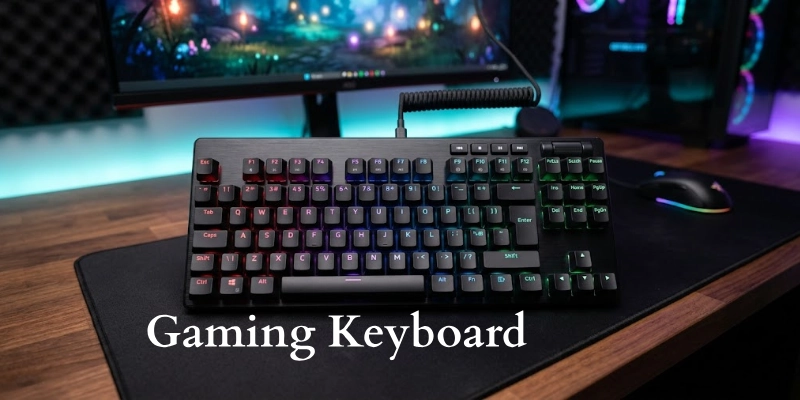
These features can make it easier to perform quick actions while playing.
What Makes It Different From a Regular Keyboard?
The main difference is the number of gaming-focused features it offers. A regular keyboard is mainly designed for typing and everyday computer tasks, while this type of keyboard may provide:
- Faster key response
- Anti-ghosting for pressing several keys at once
- Programmable or macro keys
- Customizable lighting
- Different switch options
- Stronger build quality
- Software for changing key settings
However, not every model includes all of these features.
Is it Only for Gaming?
No. You can also use a gaming keyboard for typing, studying, programming, office work, and other everyday tasks. Some people prefer these keyboards because they offer a comfortable key feel and extra customization options.
Who Can Benefit From Using One?
It can be useful for:
- Gamers: Better control and quick input during games.
- PC users: Extra customization and useful shortcuts.
- Writers: Different switch types can provide a comfortable typing experience.
- Programmers: Programmable keys can make common actions easier.
- Content creators: Custom shortcuts can speed up editing and other tasks.
- People who like customization: RGB lighting and software allow users to personalize their setup.
Gaming Keyboard vs Regular Keyboard
Both types can be used for typing and everyday computer tasks, but they are designed with different priorities. A gaming model usually offers more control, customization, and features for fast-paced use.
- Response: Gaming models often offer quick key response, which can help with fast actions. Regular keyboards focus more on basic typing and everyday use.
- Switches: They may use mechanical, membrane, or Hall Effect switches. Regular keyboards commonly use simple membrane switches.
- Extra Keys: Some models include macro keys or programmable buttons for shortcuts. Regular keyboards usually have a standard key layout.
- Customization: Users can often change key functions, create profiles, and adjust settings through software. Regular keyboards usually offer fewer options.
- Lighting: Many models include RGB or single-color backlighting. Regular keyboards may have no lighting or simple backlighting.
- Build Quality: Gaming models often use stronger materials and reinforced designs for frequent use. Regular keyboards can have simpler and lighter builds.
How Does a Gaming Keyboard Work?
A keyboard works by detecting your key presses and sending them to the computer as electrical signals. The computer then turns those signals into actions, such as moving a character, opening a menu, or using an ability in a game.
The basic process is:
- You press a key: Your finger pushes the key downward.
- The switch detects the press: The switch under the key registers the movement.
- The keyboard sends the input: The keyboard’s internal controller sends the signal to the computer.
- The computer processes the command: The operating system or game reads the signal and identifies the pressed key.
- The game responds: The character or game action changes based on your input.
What Happens When You Press a Key?
When you press a key, the key moves the switch underneath it. The switch detects the movement and creates an electrical signal. The keyboard controller identifies the key and sends that information to the computer through a USB or wireless connection.
The computer receives the signal almost instantly and passes it to the game. The game then performs the action linked to that key.
Why Response Time Matters in Gaming
Response time is the time between pressing a key and the computer receiving the input. A shorter response time can make controls feel quicker and more responsive.
This can be especially useful in fast games where players need to react quickly. However, response time is only one part of the overall gaming experience, and your computer, display, connection, and game settings can also affect how quickly an action appears on screen.
What Are Actuation and Key Travel?
Actuation is the point at which a key press is detected. Some switches register an input with a small amount of movement, while others need to travel farther.
Key travel refers to how far a key moves from its resting position to the bottom of the press. Shorter travel can feel quicker, while longer travel may provide a more noticeable and comfortable key press.
The best setting depends on personal preference and the type of games you play.
Types of Gaming Keyboards
Gaming keyboards come in different types, and each one uses a different way to register key presses.
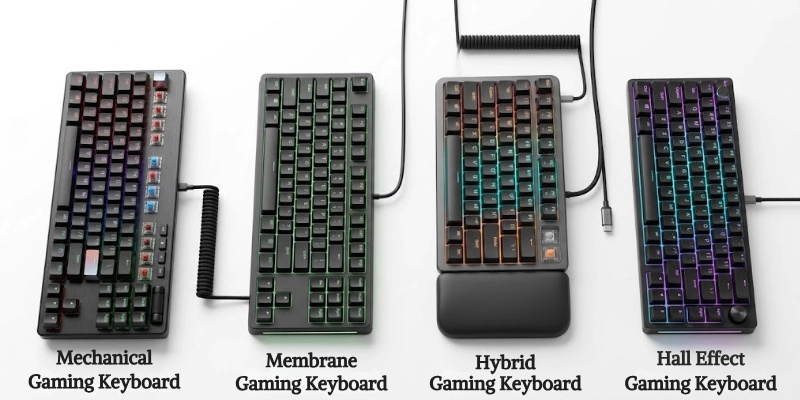
The main differences are the switch technology, key feel, response, price, and available features.
Mechanical Gaming Keyboards
Mechanical models use individual switches under each key. When you press a key, its switch registers the input and sends a signal to the computer.
Here are some main advantages:
- Fast and consistent key response
- Different switch options
- Durable design
- Clear and satisfying key feel
- Easy to customize on many models
Who should use them?
They are a good choice for players who want a responsive typing and gaming experience. They can also suit people who spend a lot of time typing or working at a computer.
Membrane Gaming Keyboards
Membrane models use a rubber or silicone layer beneath the keys. Pressing a key pushes this layer down and completes an electrical connection, which tells the computer that the key was pressed.
Here are some advantages:
- Usually more affordable
- Quieter than many mechanical models
- Soft and smooth key feel
- Lightweight in many designs
Let’s look at limitations:
- Less distinct key feedback
- Usually fewer customization options
- The rubber layer can wear over time
- Key presses may feel less consistent on some models
They can be a good option for casual players who want basic gaming features without spending too much.
Hybrid Gaming Keyboards
Hybrid models combine features from different switch technologies. Depending on the design, they may use a membrane base with mechanical-style components or offer a mix of technologies.
They aim to provide some of the feel and response of mechanical models while keeping the lower cost or softer feel associated with membrane designs. The exact experience can vary between models, so it is important to check how the particular keyboard is built.
Hall Effect Gaming Keyboards
Hall Effect models use magnetic switches to detect how far a key moves. Instead of relying on a traditional physical contact point, sensors measure changes in the magnetic field to detect the press.
Adjustable Actuation:
Many Hall Effect models let you choose how far a key needs to move before it registers. A shorter setting can make keys feel more responsive, while a deeper setting can help prevent accidental presses.
Rapid Trigger:
Rapid Trigger allows a key to register again as soon as it starts moving back up instead of waiting for it to return to a fixed reset point. This can be useful for quick repeated movements, especially in competitive games.
Why Competitive Gamers May Prefer Them:
Players who compete in fast-paced games may appreciate the precise control and adjustable settings. However, these features are not necessary for everyone, especially casual players who may prefer a simpler and more affordable option.
Common Gaming Keyboard Sizes and Layouts
Keyboards come in different sizes to suit different desks, games, and personal preferences. A larger layout provides more keys, while a smaller one saves desk space and gives your mouse more room.
Full-Size Keyboard
A full-size keyboard includes the standard letter keys, function keys, arrow keys, and a dedicated number pad. It is useful for people who want plenty of keys for both gaming and everyday work.
Tenkeyless (TKL) Keyboard
A TKL model removes the number pad while keeping most of the other keys found on a full-size layout. Its smaller design gives you more space for mouse movement, making it popular with gamers.
75% Keyboard
A 75% layout keeps the main function and arrow keys but places them closer together to reduce the overall size. It offers a good balance between compactness and everyday usability.
65% Keyboard
A 65% layout removes the function row and number pad but keeps the arrow keys and some navigation buttons. It is a practical choice for users who want a smaller setup without losing the arrow keys.
60% Keyboard
A 60% layout removes the number pad, function row, arrow keys, and dedicated navigation keys. It has a very compact design and is suitable for minimal desk setups or players who want maximum mouse space.
Keyboard Sizes at a Glance
Choose the keyboard size that fits your gaming style, desk space, and everyday needs.
| Layout | Size | Best For |
| Full-size | Large | Gaming + work |
| TKL | Medium | Gaming + extra mouse space |
| 75% | Compact | Gaming + typing |
| 65% | Small | Compact setups |
| 60% | Very small | Minimal setups |
Key Features of a Gaming Keyboard
Different models offer different features, so not every keyboard includes all of them. Here are the main features you may find:
- Mechanical Switches: Use individual switches under each key for a distinct and consistent feel.
- Anti-Ghosting: Helps the keyboard recognize multiple keys pressed at the same time.
- N-Key Rollover: Allows multiple keys to register together without missing inputs.
- Fast Actuation: Lets keys register after a small amount of movement for quicker input.
- Programmable Keys: Allow you to assign custom commands or shortcuts to selected keys.
- Macro Keys: Let you perform a sequence of commands with one key press.
- RGB Backlighting: Provides customizable colors and lighting effects.
- Dedicated Media Controls: Give you quick access to volume, playback, and other media functions.
- Wrist Rest: Provides support for your wrists during long gaming or typing sessions.
- Detachable Cable: Makes the keyboard easier to carry, store, and manage.
- Onboard Memory: Saves settings and profiles directly on the keyboard.
- Gaming Software: Lets you customize keys, lighting, macros, profiles, and other settings.
- Adjustable Actuation: Allows you to choose how far a key needs to move before registering.
- Rapid Trigger: Detects a key as soon as it starts moving upward, which can help with quick repeated inputs.
- Polling Rate: Shows how often the keyboard reports its input to the computer, usually measured in Hz.
Types of Mechanical Switches
Mechanical switches affect how each key feels, sounds, and responds when pressed. Choosing the right type depends on your gaming style, typing habits, and personal preference.
Linear Switches
Linear switches move smoothly from top to bottom without a noticeable bump. They are often preferred by players who want quick and consistent key presses.
- Smooth Keypress: Move straight down without a noticeable bump or click.
- Fast Repeated Inputs: Their smooth movement can feel comfortable for quick and repeated key presses.
- Best For: Gamers who prefer a smooth and consistent feel.
Tactile Switches
Tactile switches provide a small bump when a key reaches its actuation point. This feedback helps you feel when a press has been registered without needing to look at the screen.
- Noticeable Bump: Provides a small bump when the key registers.
- Gaming and Typing: Offer a good balance between quick control and typing feedback.
- Best For: Users who want one switch type for both gaming and everyday work.
Clicky Switches
Clicky switches provide both physical feedback and a noticeable sound when pressed. They can make typing feel more satisfying, but the extra noise may not suit every environment.
- Audible Click: Produces a clear clicking sound when pressed.
- Strong Feedback: Give both physical and audible feedback during use.
- Can Be Noisy: The sound may be distracting in shared or quiet spaces.
- Best For: Users who enjoy a noticeable and clicky typing experience.
Hall Effect Switches
Hall Effect switches use magnets and sensors to detect key movement. They offer advanced control options that are especially useful for players who want to fine-tune their inputs.
- Magnetic Sensing: Use magnets and sensors to detect key movement instead of traditional mechanical contacts.
- Adjustable Actuation: Many models allow users to set how far a key must move before registering.
- Rapid Trigger Support: Some models can detect small changes in key movement for faster repeated inputs.
- Best For: Players who want precise control and advanced customization.
Benefits of a Gaming Keyboard
A good model can make gaming more comfortable and give you better control over your actions.
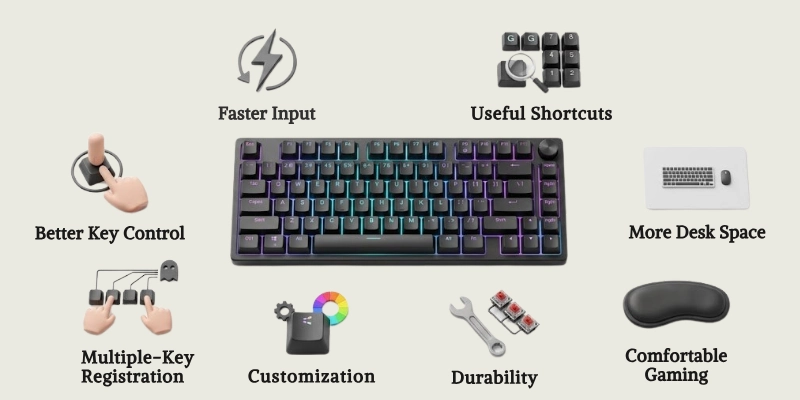
The benefits depend on the model and the features it includes.
- Faster and More Consistent Input: Responsive switches can register key presses quickly and provide a consistent feel during use.
- Better Key Control: Different switch types and actuation settings can help you choose how each press feels and responds.
- Multiple-Key Registration: Features such as anti-ghosting and N-key rollover help register several keys pressed at the same time.
- Customization: You can often change key functions, lighting, macros, and profiles to match your preferences.
- Better Durability: Many models use sturdy materials and switches designed to handle frequent use over a long period.
- Comfortable Long Gaming Sessions: Features such as suitable key switches, ergonomic designs, and wrist rests can make extended use more comfortable.
- Improved Desk Setup: Compact layouts can free up space for your mouse and other accessories, while lighting can add a personalized look.
- Useful Shortcuts and Macros: Programmable controls can make repeated actions and common commands easier to access.
Limitations of Gaming Keyboards
Although these keyboards offer useful features, they are not perfect for everyone. The right choice depends on your budget, desk space, preferences, and how you plan to use it.
- Higher Price: Models with advanced switches, wireless connections, or extra features can cost much more than basic keyboards.
- Some Models Are Noisy: Mechanical and clicky switches can produce noticeable sounds, which may be distracting in shared or quiet spaces.
- Larger Models Take More Desk Space: Full-size layouts need more room, which can leave less space for mouse movement and other accessories.
- Extra Features Can Be Confusing: Software, macros, profiles, and advanced settings may take time to understand and configure.
- RGB Does Not Improve Performance: Colorful lighting can make a setup look better, but it does not make your games run faster or improve your skills.
- Mechanical Switches May Not Suit Everyone: Some people may prefer the softer feel of membrane keys or find mechanical switches too loud.
- Wireless Models Need Charging: Battery-powered models need to be recharged regularly, especially when used for long periods.
Gaming Keyboard vs Regular Keyboard
Both types can handle everyday tasks such as typing, browsing, and using applications. The main difference is that gaming-focused models usually offer more performance features and customization options.
| Feature | Gaming Keyboard | Regular Keyboard |
| Response | Usually faster | Standard |
| Switches | Mechanical, membrane, or Hall Effect | Mostly membrane |
| RGB | Common | Less common |
| Macros | Often available | Rare |
| Anti-Ghosting | Common | Limited |
| Customization | High | Basic |
| Price | Usually higher | Usually lower |
Quick Verdict:
A gaming model is a better choice if you want extra control, customization, and gaming-focused features. A regular keyboard is usually enough for basic typing, browsing, and everyday computer use.
Wired vs Wireless Gaming Keyboard
Both options can provide a good gaming experience, but they offer different advantages. Your choice mainly depends on your preference for connection, portability, desk space, and charging.
| Feature | Wired | Wireless |
| Connection | USB cable | Wireless connection |
| Latency | Very low | Low on good models |
| Battery | Not needed | Needed |
| Portability | Lower | Higher |
| Desk Setup | More cables | Cleaner |
| Best For | Competitive gaming | Flexible setups |
Quick Verdict:
A wired model is a good choice if you want a simple connection without worrying about battery life. A wireless model is better if you prefer a cleaner desk and more freedom to move your setup.
What Are Gaming Keyboards Used For?
These keyboards are useful for gaming, but they can also support many everyday computer tasks. Their extra controls and customizable settings can be helpful in different situations.
FPS Games
FPS games require quick movement, aiming, and other actions. Responsive keys can help players perform these actions with better control.
- Quick Movement: Fast and responsive keys can help with movement and other actions.
- Multiple Inputs: Anti-ghosting and rollover features can help register several keys at once.
RPG Games
RPG games often have many commands for abilities, inventory, and movement. Extra controls can make frequently used actions easier to access.
- Many Commands: RPGs often use different keys for abilities, inventory, movement, and other actions.
- Easy Shortcuts: Programmable keys can make frequently used commands easier to access.
MOBA Games
MOBA games require players to manage abilities, items, and movement quickly. Custom controls can make these actions easier to perform during busy moments.
- Quick Abilities: Players often need to activate abilities and items without delay.
- Custom Controls: Key assignments can be adjusted to match personal preferences.
Strategy Games
Strategy games can involve many commands and shortcuts during a match. Extra controls can help players access common actions without searching for each key.
- Command Shortcuts: Many strategy games require frequent use of keyboard shortcuts.
- Extra Controls: Additional programmable keys can make common commands easier to reach.
Racing Games
Racing games use controls for steering, acceleration, braking, and other actions. A responsive keyboard can handle these inputs quickly, although some players prefer dedicated controllers.
- Quick Controls: Responsive keys can help with steering, acceleration, and braking commands.
- Other Options: Many racing players may prefer a controller or steering wheel for more precise control.
Everyday Typing
You can also use these keyboards for writing, browsing, emails, and other daily tasks. The right switch type can make typing feel more comfortable and enjoyable.
- Writing Tasks: You can use them for emails, documents, browsing, and other daily activities.
- Comfortable Typing: Choosing the right switch type can make long typing sessions more comfortable.
Programming and Work
Programmers and office users can benefit from customizable controls and useful shortcuts. These features can make repeated tasks easier and help improve the overall workflow.
- Useful Shortcuts: Programmable keys can provide quick access to commonly used commands.
- Better Workflow: Custom shortcuts can reduce repeated key combinations and make regular tasks easier.
How to Choose the Right Gaming Keyboard?
The best choice depends on your gaming style, desk space, comfort, and budget. Focus on the features you actually need instead of paying more for unnecessary extras.
- Switch Type
Choose a switch based on its feel, sound, and response. Linear, tactile, clicky, membrane, and Hall Effect options offer different experiences.
- Keyboard Size
Pick a layout that fits your desk and leaves enough room for your mouse. Full-size models offer more keys, while compact layouts save space.
- Connection
Wired models offer a simple connection without charging. Wireless options provide more freedom but need a battery.
- Key Rollover
Anti-ghosting and N-key rollover help register multiple key presses correctly. These features can be useful in games that require several inputs at once.
- Actuation
Check how far a key must move before it registers. Adjustable actuation can be useful for players who want more control over key response.
- Polling Rate
Polling rate shows how often the keyboard reports input to the computer. A higher rate can reduce reporting delay, but it should not be your only consideration.
- Programmable Keys
These keys let you assign shortcuts or custom commands. They can save time when you frequently use the same actions.
- RGB Lighting
RGB lighting allows you to customize colors and effects. It improves the appearance of your setup but does not directly improve gaming performance.
- Build Quality
Look for sturdy materials and a stable frame if you want long-term durability. Strong construction can also make the keyboard feel more reliable during regular use.
- Noise Level
Different switches produce different levels of sound. Choose quieter options if you share a room or prefer a more peaceful workspace.
- Budget
Set a price range before comparing models. Spend more on features that provide real value for your needs.
- Software
Check whether the manufacturer’s software supports your operating system. Good software can make it easier to manage lighting, macros, profiles, and key settings.
Quick Tip:
Focus on useful features rather than choosing a model simply because it has more RGB effects or higher specifications. The right choice should match your games, comfort, desk space, and budget.
How to Set Up a Gaming Keyboard?
Setting up a new keyboard is usually simple and takes only a few minutes. Follow these steps to get it ready for gaming and everyday use:
- Connect the Keyboard: Plug the USB cable into your computer or pair the device if it uses a wireless connection.
- Install Software: Download the manufacturer’s software if the model requires it for advanced settings.
- Update Firmware: Check for available firmware updates to improve compatibility and fix known issues.
- Configure Keys: Assign shortcuts, macros, or custom commands to programmable buttons if available.
- Set Lighting: Adjust the RGB colors and effects to match your preferred setup.
- Create Profiles: Make separate profiles for different games or applications when supported.
- Test the Keys: Press different keys and combinations to make sure everything works correctly before starting a game.
How to Maintain a Gaming Keyboard?
Regular care can keep your keyboard clean, responsive, and in good condition for longer.
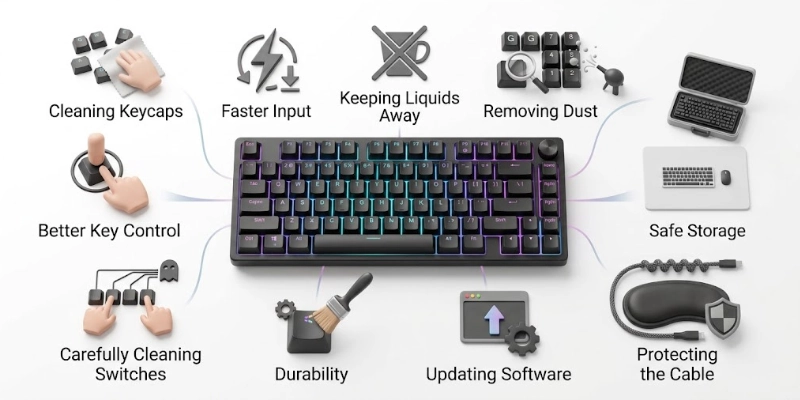
Simple maintenance also helps prevent dust, dirt, and accidental damage.
- Clean Keycaps: Wipe the keycaps regularly with a soft, slightly damp cloth to remove fingerprints and dirt.
- Remove Dust: Use compressed air or a soft brush to clear dust and small particles from between the keys.
- Avoid Liquids: Keep drinks and other liquids away from the keyboard to reduce the risk of internal damage.
- Clean Switches Carefully: If you remove the keycaps, gently clean around the switches without using excessive force or liquid.
- Protect Cables: Avoid bending, twisting, or pulling the cable sharply, especially near the connector.
- Update Software: Install available software or firmware updates to keep supported features working properly.
- Store Safely: Keep the keyboard in a clean, dry place when you are not using it for a long period.
Common Gaming Keyboard Problems and Solutions
Even a good keyboard can sometimes develop problems because of connection issues, software settings, dust, or worn components. The table below lists some common problems and simple solutions.
| Problem | Possible Solution |
| Keys Not Working | Reconnect the keyboard and check its software or settings. |
| Keyboard Not Detected | Try another USB port or reconnect the wireless receiver. |
| Double Key Presses | Clean the affected key or consider replacing the switch if the issue continues. |
| RGB Not Working | Check the lighting settings and make sure the required software is running. |
| Wireless Disconnects | Recharge the battery and reconnect the wireless device or receiver. |
| Input Feels Delayed | Check the connection, software settings, and wireless signal. |
| Macro Not Working | Open the software and check that the correct profile and command are assigned. |
Are Gaming Keyboards Worth It?
Whether one is worth buying depends on how you use your computer. The extra features can be useful for some people, but they are not necessary for everyone.
- For Competitive Gamers: It can be a worthwhile upgrade because responsive switches, anti-ghosting, adjustable actuation, and other features can provide better control during fast games.
- For Casual Gamers: A basic or mid-range model is usually enough. You do not need advanced features if you mainly play games for fun.
- For People Who Also Type or Work: It can be a good choice if you spend many hours typing or using shortcuts. Choosing the right switch type can also make everyday use more comfortable.
- For Users on a Tight Budget: A regular keyboard or affordable gaming model may provide better value. Focus on essential features instead of paying extra for RGB, wireless options, or advanced controls.
- When a Regular Keyboard May Be Enough: If you mainly browse the web, write documents, study, or play simple games, a regular keyboard can handle these tasks without any problem.
Bottom Line: A gaming keyboard is worth it when its features match your needs. If you do not need extra controls or advanced settings, spending more may not provide much benefit.
Future Trends in Gaming Keyboards
Keyboard technology continues to improve as manufacturers focus on faster input, better customization, and more flexible designs.
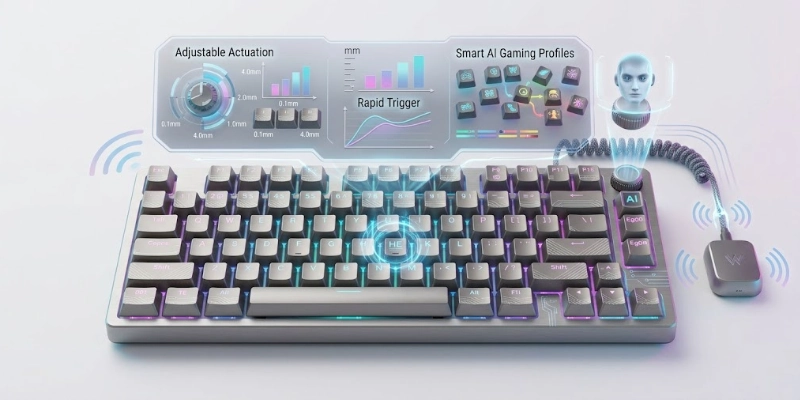
New features are also making it easier for users to adjust their setup to match different games and preferences.
- Hall Effect Technology: More models may use magnetic switches for precise input and features such as adjustable actuation and Rapid Trigger.
- Adjustable Actuation: Users may have more control over how far keys move before registering, allowing settings to match different games and tasks.
- Rapid Trigger: This feature may become more common as players look for faster repeated inputs and quick key resets.
- Higher Polling Rates: Future models may offer higher reporting rates to reduce the time between input updates.
- Smarter Gaming Profiles: Software may automatically switch key assignments, lighting, and other settings based on the game or application.
- More Wireless Options: Wireless technology may continue improving with more reliable connections, lower delay, and longer battery life.
- Low-Profile Designs: Slimmer keyboards with shorter key travel may become more popular among users who prefer a lighter and faster feel.
- AI-Assisted Customization: Future software may use AI to suggest or automatically adjust key settings, profiles, and controls based on user preferences.
Final Verdict
A gaming keyboard is designed to give users better control, responsive input, and useful features for gaming and everyday tasks. Its biggest advantages include customizable controls, multiple-key registration, different switch options, and features that can make gaming more comfortable.
It can be a good choice for competitive players, regular gamers, and people who want extra customization for work or typing. However, you do not need the most expensive model to get a good experience.
Before buying, focus on your games, preferred switch type, desk space, useful features, and budget. Choosing based on your actual needs will help you get better value without paying for features you may never use.
FAQs
Have more questions? Explore our other keyboard guides to find the right option for your setup and needs.
It is mainly used for playing computer games with better control and quick input. It can also be used for typing, work, and other daily tasks. Some models offer extra keys and settings for added convenience.
It can be better if you need features made for gaming. A normal keyboard is usually enough for basic tasks and casual games. The better choice depends on your needs and budget.
Yes, many models are comfortable for typing and everyday work. Mechanical switches can provide different typing feels, while membrane models often feel softer. Your preferred switch type is the main factor.
A good keyboard cannot improve your skills by itself. It may give you faster controls and more consistent input in some games. Your practice, reaction time, and game knowledge still matter more.
Mechanical models can offer a responsive feel and different switch choices. They are popular among players who want clear feedback and consistent key presses. However, a membrane model can also work well for casual gaming.
Anti-ghosting helps the keyboard recognize several keys pressed at the same time. This can prevent missed or incorrect inputs during games. It is useful when a game requires multiple buttons to be held together.
N-key rollover allows multiple keys to register at the same time. This helps prevent some key presses from being missed when several buttons are used together. The exact performance can vary between models.
Yes, a good wireless model can work well for gaming. Modern wireless connections can provide low delay and stable performance. You will need to keep the battery charged for continued use.





- Be Respectful
- Stay Relevant
- Stay Positive
- True Feedback
- Encourage Discussion
- Avoid Spamming
- No Fake News
- Don't Copy-Paste
- No Personal Attacks
- Be Respectful
- Stay Relevant
- Stay Positive
- True Feedback
- Encourage Discussion
- Avoid Spamming
- No Fake News
- Don't Copy-Paste
- No Personal Attacks
