What is a Processor – Functions, Types & Benefits
Published: 31 Jul 2026
Have you ever wondered how your computer can open apps, play games, or search the internet within seconds? Every click starts a chain of actions inside a tiny but powerful chip that keeps everything working smoothly.
If you are wondering “what is a processor?”, the simple answer is that it is the part that follows instructions and performs the tasks your device needs. That is why it is often called the brain of the computer. From laptops and desktops to smartphones, every latest gadget depends on it.
In this guide, you will discover how it works, its main parts, different types, and why it plays such an important role in everyday technology.
What is a Processor?
Think about what happens when you click an app, play a video, or search something online. These actions may seem instant, but a tiny chip inside your device is working hard to make them happen.
A Processing unit, or Central Processing Unit (CPU), is the component that receives instructions, performs calculations, and manages the tasks needed to keep your device running. It makes sure every command is completed in the correct order and as quickly as possible.
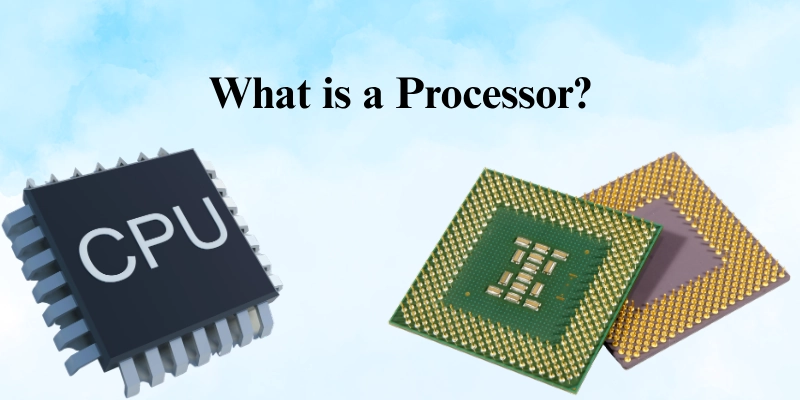
From turning on your computer to opening files, playing games, editing photos, or browsing the web, almost every task depends on it. The faster and more efficient it is, the smoother your device can handle everyday work.
That is why every desktop, laptop, smartphone, tablet, and many other smart devices need it. Without it, a device cannot understand instructions, run programs, or respond to your commands.
How Does a Processor Work?
It completes every task by following a simple cycle. It receives instructions, understands them, performs the required action, and then saves the results. This process happens millions or even billions of times every second, allowing your device to work smoothly.
Fetching Instructions
The first step is fetching. It collects the next instruction from the computer’s memory (RAM). These instructions tell it exactly what task needs to be completed, such as opening a file or running an app.
Decoding Instructions
After receiving the instruction, the CPU decodes it. This means it reads the command and figures out what action is required before doing any work.
Executing Instructions
Once the instruction is understood, the central processing unit executes it. It may perform calculations, compare data, move information, or complete another operation requested by the program.
Storing Results
After finishing the task, the computing unit stores the result. It sends the processed data back to memory so other programs or parts of the system can use it when needed.
Communicating with Other Components
It does not work alone. It constantly exchanges information with other hardware to keep everything running properly.
- RAM stores the data and instructions the computer chip is currently using.
- Storage (SSD or HDD) keeps files and programs for long-term use.
- GPU handles graphics and video processing, reducing the CPU’s workload.
- Motherboard connects all the components and allows them to communicate with each other.
By working together, these components help your computer deliver fast performance, smooth multitasking, and a better overall experience.
Main Components of a Processor
It is made up of several important parts that work together to complete tasks quickly and accurately.
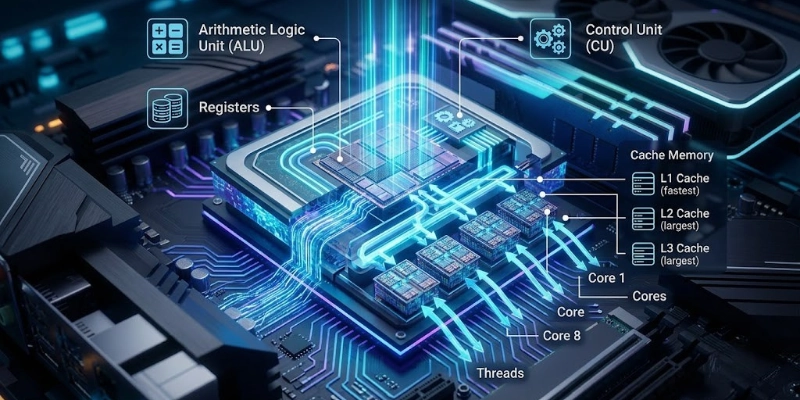
Each component has a specific job, helping your computer run programs, process data, and respond to your commands.
Arithmetic Logic Unit (ALU)
The Arithmetic Logic Unit (ALU) is the part of it that performs calculations and makes decisions.
Its main tasks include:
- Solving mathematical calculations like addition, subtraction, multiplication, and division.
- Comparing numbers and values.
- Performing logical operations, such as checking whether a condition is true or false.
Almost every program uses the ALU while it is running.
Control Unit (CU)
The Control Unit (CU) acts like a coordinator inside the computer chip. It controls how instructions move through the processor and makes sure every component works in the correct order.
The Control Unit:
- Reads instructions from memory.
- Directs data to the right component.
- Ensures each task is completed step by step.
Without the Control Unit, the central processing unit would not know what to do next.
Registers
Registers are tiny storage areas located inside the computing unit. They temporarily hold the data and instructions that the processor needs immediately.
Because registers are built into the computer chip, they are much faster than RAM. This allows the processor to access important information almost instantly.
Cache Memory
Cache memory is a very fast type of memory that stores frequently used data. Instead of repeatedly getting the same information from RAM, the CPU first checks the cache, which saves time and improves performance.
There are three common levels of cache:
- L1 Cache: The smallest and fastest cache. It is built directly into each computing unit core.
- L2 Cache: Larger than L1 but slightly slower. It stores more data for quick access.
- L3 Cache: The largest cache level. It is usually shared between multiple cores and helps improve performance during demanding tasks.
The more useful data stored in the cache, the faster the processing unit can complete many operations.
Cores
A core is an individual processing unit inside a computing unit. Each core can work on instructions independently. Common processing unit types include:
- Single-core: Handles one task at a time. Suitable for very basic computing.
- Dual-core: Can process two tasks more efficiently.
- Quad-core: Offers smoother multitasking for everyday users.
- Hexa-core, Octa-core, and higher: Designed for gaming, video editing, programming, and other demanding workloads.
More cores generally allow a computer to handle multiple tasks at the same time with better performance.
Threads
A thread is a sequence of instructions that a CPU can handle. Some processors use technologies that allow one core to manage multiple threads at the same time.
This helps improve:
- Multitasking
- Faster application performance
- Better responsiveness while several programs are open
- More efficient use of CPU resources
Although threads do not replace physical cores, they help the CPU complete work more efficiently, especially during heavy workloads.
Types of Processors
They are designed for different devices and workloads. Some focus on high performance, while others are built to save power or handle specialized tasks. Here are the most common types.
Desktop Processors
They are made for personal computers used at home, school, or work. They provide strong performance for everyday tasks and can also handle gaming, content creation, and professional software.
They are commonly used for:
- Web browsing
- Office work
- Gaming
- Video editing
- Graphic design
They usually offer higher performance because they have better cooling and a larger power supply.
Laptop Processors
They are designed to balance speed with power efficiency. They use less energy to help extend battery life while still providing smooth performance for daily activities.
They are ideal for:
- Online learning
- Office work
- Video calls
- Streaming videos
- Light photo or video editing
Compared to desktop processors, they generate less heat and consume less power.
Mobile Processors
They are found in smartphones and tablets. They combine processing power, graphics, and other features into a single compact chip, allowing mobile devices to run efficiently.
They handle tasks such as:
- Making calls
- Running apps
- Playing mobile games
- Watching videos
- Taking and editing photos
These are designed to deliver good performance while maximizing battery life.
Server Processors
They are built for computers that provide services to many users at the same time. They are designed to run continuously and manage large amounts of data without slowing down.
They are commonly used for:
- Websites
- Cloud computing
- Business applications
- Data centers
- Virtual machines
They focus on reliability, stability, and handling heavy workloads around the clock.
Embedded Processors
They are built into devices that perform specific tasks instead of acting as general-purpose computers. Most users never see them, but they play an important role in everyday technology.
You can find embedded processors in:
- Smart TVs
- Washing machines
- Microwave ovens
- Security cameras
- Smartwatches
- Cars and other smart devices
These are optimized to perform dedicated functions efficiently while using very little power.
Key Features of a Processor
Not all processing units offer the same level of performance. Several important features determine how fast, efficient, and capable a central processing unit is.
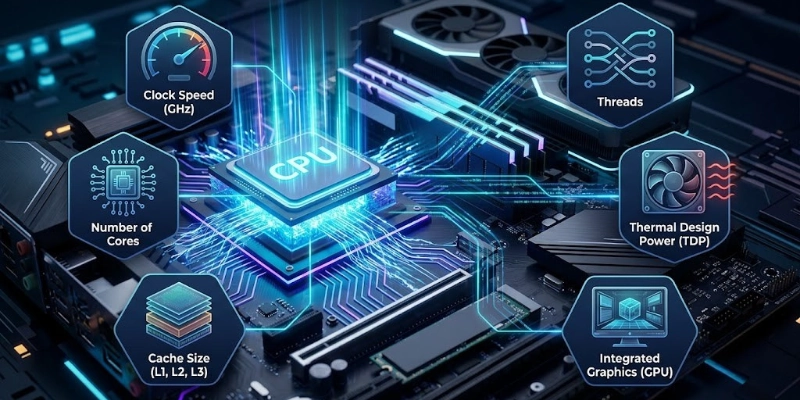
Understanding these features can help you choose the right processing unit for your needs.
Clock Speed
Clock speed shows how quickly a CPU can complete instructions. It is measured in gigahertz (GHz).
In general:
- A higher clock speed allows the CPU to complete tasks faster.
- It helps improve performance in everyday work, gaming, and many applications.
- However, clock speed is only one factor. Other features, such as cores and cache, also affect overall performance.
Number of Cores
A core is an individual processing unit inside the processor. More cores allow a processor to handle more tasks at the same time.
Common options include:
- Dual-core (2 cores): Good for basic tasks.
- Quad-core (4 cores): Great for everyday use and multitasking.
- Hexa-core (6 cores): Suitable for gaming and creative work.
- Octa-core (8 cores): Excellent for demanding applications.
- Beyond 8 cores: Best for professional workloads such as video editing, 3D design, and software development.
Threads
Threads allow a processor to work on multiple instruction streams at the same time. Some processors can run two threads on a single core, making better use of available resources.
More threads can improve:
- Multitasking
- Faster program performance
- Smoother gaming
- Better handling of heavy workloads
Cache Size
Cache is a small, high-speed memory built into the processor. It stores frequently used data so the processor can access it much faster than regular memory.
A larger cache can help:
- Reduce waiting time
- Speed up common tasks
- Improve overall system responsiveness
Thermal Design Power (TDP)
Thermal Design Power (TDP) indicates how much heat a processor can produce during normal use. It is measured in watts (W).
A higher TDP usually means:
- Better performance potential
- More heat generation
- A stronger cooling system may be required
A lower TDP helps reduce power consumption and is often preferred in laptops and compact devices.
Integrated Graphics
Some processors include integrated graphics, which means they have a built-in graphics processing unit (GPU).
Integrated graphics allow you to:
- Watch videos
- Browse the web
- Work with office applications
- Play light games
- Connect a display without needing a separate graphics card
For advanced gaming, video editing, or 3D rendering, a dedicated graphics card usually provides much better performance.
Functions of a Processor
A processor is responsible for carrying out the tasks that keep a computer running smoothly. Every time you use your device, it works behind the scenes to process information, manage resources, and help different components work together.
- Program Instructions
Every application is made up of instructions. The processor reads these instructions one by one and completes them so programs can work correctly.
- Calculations
Many tasks require mathematical and logical operations. From simple calculations to complex computing, the processor handles them quickly to deliver accurate results.
- Hardware Operations
Different hardware components need to communicate with each other. The processor coordinates these activities, ensuring that memory, storage, graphics, and other devices work together efficiently.
- Multitasking
Modern computers often run several programs at the same time. The processor switches between tasks at high speed, making it feel like everything is happening at once without slowing down the system.
- Input and Output
Whenever you type on a keyboard, click a mouse, or save a file, the processor manages the flow of data. It receives information from input devices, processes it, and sends the results to output devices such as a monitor, printer, or speakers.
Processor vs CPU
In most cases, processor and CPU (Central Processing Unit) mean the same thing. The difference mainly matters in technical discussions, where a processor may include extra built-in features beyond the CPU.
| Processor | CPU |
| Common name | Full name: Central Processing Unit |
| Everyday term | Technical term |
| Includes the main computing chip | Refers to the computing unit |
| Often used in product names | Common in technical documents |
| Used by most users | Used by IT professionals and manuals |
| In most cases, means the same thing as CPU | In most cases, means the same thing as processor |
Quick Answer: For everyday use, there is no practical difference. Whether someone says processor or CPU, they are usually talking about the same component inside a computer or smart device.
Processor vs GPU
A processor and a GPU work together, but they are designed for different jobs. The processor handles general tasks, while the GPU focuses on graphics and large numbers of similar calculations.
| Processor | GPU |
| General-purpose computing | Graphics and parallel processing |
| Handles system and software tasks | Handles images, videos, and 3D graphics |
| Best for everyday work | Best for gaming, AI, and rendering |
| Needed for every computer | Needed for graphics-intensive tasks |
| Manages overall system | Speeds up visual and AI workloads |
Which One is More Important?
Neither is more important; they have different roles.
- Choose a stronger processor for office work, programming, browsing, and multitasking.
- Choose a stronger GPU for gaming, video editing, 3D design, AI, and machine learning.
- For the best performance, a computer should have a good balance of both.
Common Uses of a Processor
A processor powers almost every task you perform on a computer or smart gadget.
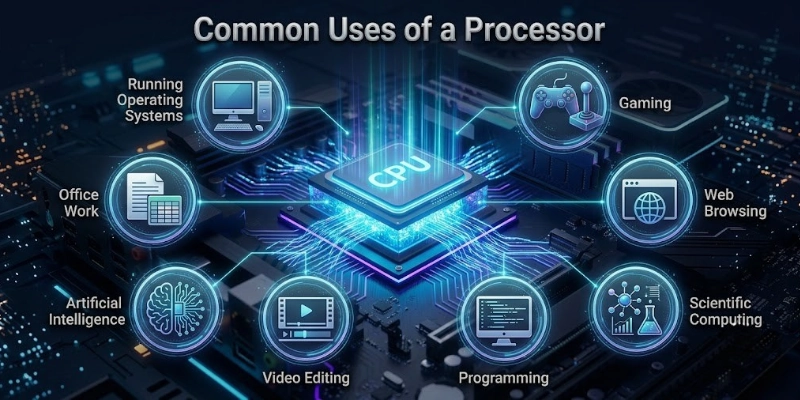
Here are some of its most common uses.
- Operating Systems: It helps operating systems like Windows, macOS, and Linux start up and manage all system activities.
- Gaming: Games rely on it to process player actions, game logic, and background tasks for smooth gameplay.
- Office Work: It supports everyday tasks such as creating documents, using spreadsheets, making presentations, and sending emails.
- Web Browsing: It loads websites, runs web apps, and helps you switch smoothly between multiple browser tabs.
- Video Editing: It processes video files, applies effects, and speeds up exporting completed projects.
- Programming: Developers use it to write, compile, test, and run software efficiently.
- Artificial Intelligence: It handles AI-related tasks such as voice recognition, smart assistants, and data processing. More demanding AI workloads often use a GPU alongside it.
- Scientific Computing: Scientists and researchers use powerful computers to perform simulations, analyze data, and solve complex calculations.
Benefits of a Powerful Processor
A faster processor can improve your overall computing experience by making everyday tasks smoother and more responsive.
- Programs open quicker, files load faster, and everyday tasks take less time to complete.
- You can run multiple apps at the same time with fewer slowdowns or interruptions.
- Games run more smoothly with better frame rates, faster loading, and improved overall responsiveness.
- Software starts faster, helping you spend less time waiting and more time working.
- Whether you’re studying, working, or creating content, tasks are completed more efficiently, helping you save time.
- Modern chips are designed to deliver strong performance while using less power, which can improve battery life in laptops and reduce energy consumption.
Limitations of Processors
Even the most advanced processors have some limitations. Understanding them can help you choose the right hardware for your needs.
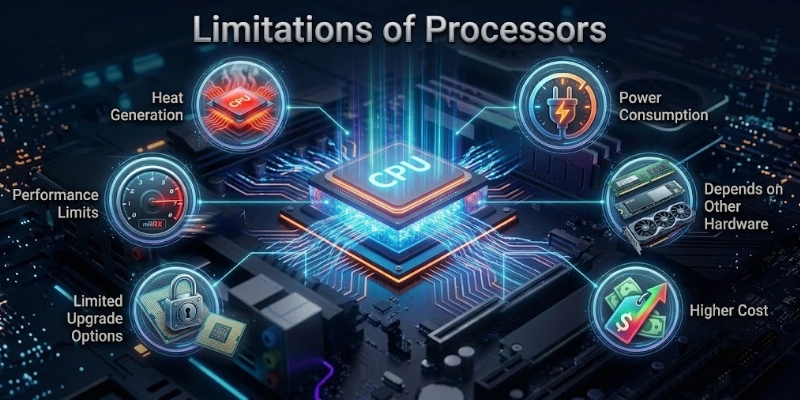
Let’s look at them.
- High workloads can produce a lot of heat, making proper cooling essential.
- Powerful models often use more electricity, especially during demanding tasks.
- Overall performance also depends on RAM, storage, and the graphics card. A fast processor alone cannot eliminate every bottleneck.
- High-end models usually cost more than entry-level or mid-range options.
- Many laptops and compact devices have processors that are built into the motherboard, making upgrades difficult or impossible.
- Very demanding tasks such as advanced 3D rendering or AI processing may still require a dedicated GPU or other specialized hardware.
How to Choose the Right Processor?
Choosing the right processor depends on how you plan to use your computer. Focus on the features that match your needs instead of buying the most expensive option.
Intended Use
Start by deciding what you’ll use your computer for.
- Everyday use: Browsing, streaming, and office work.
- Gaming: Faster speeds and more cores.
- Content creation: Video editing, graphic design, and 3D work.
- Professional tasks: Programming, AI, and heavy workloads.
Cores and Threads
More cores and threads help your computer handle multiple tasks and demanding software more efficiently.
Clock Speed
A higher clock speed can improve the performance of everyday applications and many games.
Cache Size
A larger cache allows faster access to frequently used data, helping improve overall responsiveness.
Power Efficiency
If you use a laptop, choose a model that balances performance with low power consumption to extend battery life.
Motherboard Compatibility
Make sure the processor is compatible with your motherboard’s socket and chipset before buying.
Budget
Choose the best processor within your budget. Paying more only makes sense if you need the extra performance for your work or hobbies.
Popular Processor Brands
Many companies design processors for different types of devices. Each brand focuses on specific performance, power efficiency, and user needs.
- Intel:
Intel is one of the most popular processor brands for desktop and laptop computers. It offers reliable performance for everyday use, gaming, and professional work. - AMD:
AMD is known for delivering strong performance and excellent value. Its processors are widely used for gaming, multitasking, and content creation. - Apple Silicon:
Apple Silicon powers modern Mac computers. These processors combine high performance with excellent power efficiency, helping improve battery life and overall speed. - Qualcomm:
Qualcomm designs processors mainly for smartphones, tablets, and other mobile devices. They focus on fast performance, AI features, and efficient power usage. - MediaTek:
MediaTek develops processors for smartphones, tablets, smart TVs, and other smart devices. Its chips offer a balance of performance, features, and affordability across different price ranges.
Signs You Need a Better Processor
If your computer struggles with everyday tasks, it may be time for a more powerful processor.
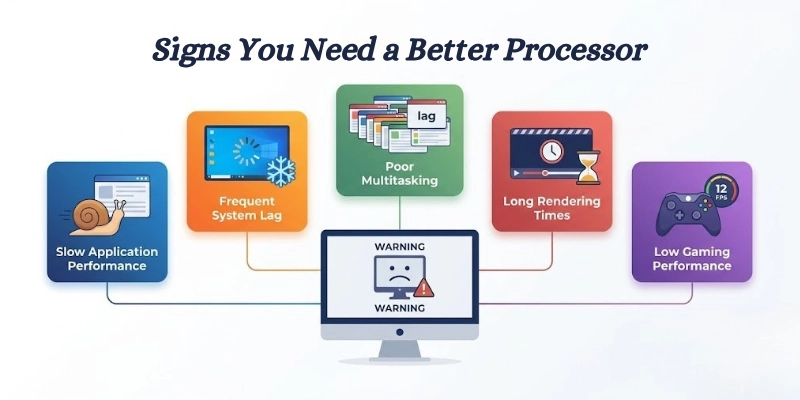
Here are some common signs to watch for.
- Applications take longer to open and respond, even when performing simple tasks.
- Your computer frequently lags, freezes, or feels slow during normal use.
- Running multiple programs at the same time causes noticeable slowdowns.
- Video rendering, file processing, or other demanding tasks take much longer to complete.
- Games suffer from low frame rates, stuttering, or slow loading times.
Tips for Maintaining Processor Performance
A few simple maintenance habits can help your computer run faster, stay cooler, and perform reliably for a longer time.
- Clean the cooling system regularly to remove dust and improve airflow.
- Apply high-quality thermal paste when needed to improve heat transfer.
- Keep your drivers and BIOS updated for better stability and performance.
- Close unnecessary background applications to free up system resources.
- Monitor CPU temperatures to prevent overheating and performance drops.
Common Processor Problems and Solutions
Even a well-maintained computer can experience processor-related issues. The good news is that many common problems have simple solutions.
| Problem | Solution |
| High CPU usage | Close unnecessary programs and scan for malware. |
| Overheating | Clean the cooling system and ensure proper airflow. |
| Slow performance | Restart your computer and upgrade RAM or storage if needed. |
| CPU throttling | Improve cooling and reduce heavy workloads until temperatures return to normal. |
| System crashes | Update drivers, install system updates, and check for hardware issues. |
| Processor compatibility issues | Verify that the processor is compatible with your motherboard and BIOS before installing it. |
Conclusion
A processor is one of the most important parts of a computer, helping your device run programs, manage tasks, and deliver smooth performance. In this guide, you learned how it works, its main features, types, uses, and how to choose the right one.
For beginners and students, a mid-range processor is ideal for everyday use. Gamers and professionals should choose a more powerful option that matches their workload and budget for the best performance.
FAQs
Before you go, read these FAQs to learn more about processors and make a more informed decision.
A processor carries out the instructions needed to run your computer or smart device. It helps open applications, process data, and manage system tasks. Without it, a device cannot perform any operations.
Yes, in most everyday situations, the terms processor and CPU mean the same thing. Both refer to the main chip that executes instructions. The small difference mainly appears in technical discussions.
It follows a simple cycle of fetching, decoding, and executing instructions. After completing a task, it sends the results back to memory. This process repeats billions of times every second.
The processor performs calculations and controls system operations. RAM temporarily stores the data and programs currently in use. Both work together to keep your computer running smoothly.
The best choice depends on your budget and the games you play. A processor with strong single-core performance and multiple cores is usually a good option. Pairing it with a capable graphics card delivers the best gaming experience.
For web browsing and office work, 4 cores are usually enough. Gamers and content creators often benefit from 6 to 8 cores or more. Choose the number of cores based on the software you use most.
Many desktop computers allow processor upgrades if the motherboard supports the new chip. Some laptops also support upgrades, but many have processors that are permanently attached. Always check compatibility before buying a replacement.
A failed processor can prevent your computer from starting. It may also cause crashes, freezing, or repeated shutdowns. In most cases, replacing the faulty hardware is the only solution.
A faster processor can improve overall system performance and reduce waiting times. However, RAM, storage, and the graphics card also affect speed. The best results come from having balanced hardware.
Yes, a processor can overheat if cooling is poor or dust blocks airflow. High temperatures may reduce performance or cause unexpected shutdowns. Cleaning the cooling system and using proper ventilation can help prevent overheating.




- Be Respectful
- Stay Relevant
- Stay Positive
- True Feedback
- Encourage Discussion
- Avoid Spamming
- No Fake News
- Don't Copy-Paste
- No Personal Attacks
- Be Respectful
- Stay Relevant
- Stay Positive
- True Feedback
- Encourage Discussion
- Avoid Spamming
- No Fake News
- Don't Copy-Paste
- No Personal Attacks
