What is a Laptop Computer? Unlock the World of Portability
Published: 3 Nov 2025
Imagine carrying your whole computer in your bag; that’s the power of a laptop! A laptop is a small, portable computer that works like a desktop but runs on a battery.
It helps in studying, working, and entertainment. Today, laptops are useful for students, businesses, and families.
In this article, you’ll learn what is laptop computer, the meaning of a laptop computer, and the main uses of a laptop in daily life.
What is a Laptop Computer?
A laptop computer is a portable computer that you can easily carry and use anywhere. It combines all the main parts of a desktop computer, such as the screen, keyboard, touchpad (which works like a mouse), speakers, and battery, into one compact device.
Unlike desktop computers that need to stay on a table and connect to many wires, a laptop works without constant power when charged.
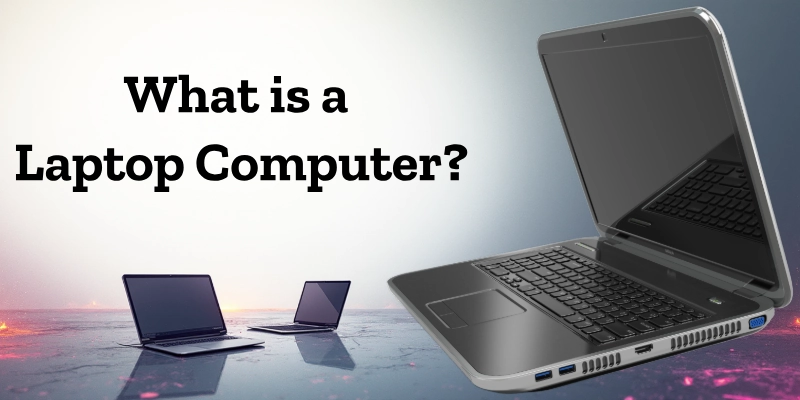
A laptop, also known as a notebook computer, is made for working on the move. It runs on a rechargeable battery and can also work with an electric charger.
You can use it on your desk, bed, or even while traveling. It helps in writing, designing, learning, watching videos, and staying connected online, all in one small, smart machine.
Example:
Imagine you need to take your computer to school or work. Instead of disconnecting wires and heavy parts, you can simply close your laptop, put it in your bag, and go.
That’s why students, teachers, and office workers all prefer laptops; they make work and study easy anywhere you go.
History of Laptop Computers
The history of laptops shows how computers became smaller, faster, and easier to carry. From heavy machines in the 1980s to thin and smart laptops today, this evolution changed the way people study, work, and connect.
Laptops are now a daily need for students, professionals, and families worldwide.
- 1981 – Osborne 1: The first portable computer, heavy but easy to move.
- 1983 – Compaq Portable: A smaller and more powerful version of the portable computer.
- 1990s – Business Laptops: Laptops became lighter and faster, widely used in offices.
- 2000s – Wi-Fi and Multimedia: Laptops started to support wireless internet, games, and videos.
- 2010s – Slim and Smart Designs: Touchscreens, SSD storage, and long battery life became common.
- Today – Modern Laptops: Thin, stylish, and energy-efficient models like Apple MacBook, Dell XPS, HP Pavilion, and Lenovo ThinkPad lead the market.
The evolution of laptops proves how far technology has come, turning bulky computers into portable powerhouses we use every day.
Parts of a Laptop Computer
A laptop computer has many hardware components and built-in devices that help it work smoothly. All these parts are packed inside a small, portable body. Each part has a special job, from showing pictures to storing data.

Let’s look at the main parts of a laptop computer and their functions.
| Part | Function |
| Screen (Display) | Shows text, images, and videos clearly. |
| Keyboard | Used for typing and giving input to the laptop. |
| Touchpad | Works like a built-in mouse for moving the pointer. |
| Battery | Power the laptop when it’s not plugged into electricity. |
| Processor (CPU) | The brain of the laptop is the part that runs all tasks and programs. |
| RAM | Temporary memory that helps the laptop run faster during use. |
| Storage (HDD/SSD) | Saves your data, files, and software. |
| Ports (USB, HDMI) | Allows you to connect external devices like flash drives or monitors. |
| Camera and Microphone | Used for video calls and recording sound. |
| Speakers | Produce sound output for music, videos, and calls. |
Each of these components of a laptop works together to make the system fast, smart, and portable. Without them, a laptop wouldn’t function properly.
How a Laptop Computer Works?
The working of a laptop computer depends on several parts working together. The processor (CPU) reads and handles all the instructions to make the laptop function. The RAM provides quick access to data, helping the laptop run fast when you open apps or files.
The battery gives power when the laptop is not plugged in, and the operating system (like Windows, macOS, or Linux) helps users interact with the system easily.
Together, these parts allow the laptop to think, store, and display information, just like the brain and body working together in a human.
Example:
When you open a program or browse the internet, your processor processes your command, the RAM helps load data quickly, and the screen shows the result. The battery and operating system keep everything running smoothly.
So, every time you type, click, or watch something, all these components work as a team to give you fast and clear results.
Features of Laptop Computers
A laptop computer is designed to make work and study easier anywhere you go. It has many smart features that make it different from a desktop.
Below are some of the main features of a laptop and what they mean.
| Feature | Description |
| Portability | A laptop is light and easy to carry, so you can work or study anywhere. |
| Battery Power | It runs on a built-in battery, so it doesn’t always need electricity. |
| Compact Design | All parts, like the screen, keyboard, and touchpad, are built into one slim device. |
| Wireless Connectivity | Supports Wi-Fi and Bluetooth for internet and device connection without wires. |
| Performance | Modern laptops come with powerful processors and RAM for smooth multitasking. |
| Built-in Devices | Has a camera, microphone, and speakers, making video calls and entertainment easy. |
These laptop specifications make it a perfect tool for students, professionals, and families who need comfort, speed, and smart performance in one device.
Types of Laptop Computers
Laptops come in many types, made for different needs and users. Some are best for work, others for study, travel, or gaming.
Let’s look at the main types of laptop computers and what makes each one special.
| Type | Description | Example |
| Traditional Laptop | A standard laptop for home, school, or office use. It balances performance and price. | Dell Inspiron, HP Pavilion |
| Ultrabook | A thin and light laptop with a long battery life, perfect for travelers and professionals. | MacBook Air |
| Gaming Laptop | Designed for gamers, with high-speed graphics cards, cooling systems, and strong processors. | ASUS ROG, Acer Predator |
| 2-in-1 Laptop | It can work as both a laptop and a tablet; touchscreen and foldable design. | Microsoft Surface Pro |
| Business Laptop | Built for office use, with better security, durability, and long performance life. | Lenovo ThinkPad |
| Student Laptop | Simple, affordable, and easy to use for learning and online classes. | Chromebook |
| Workstation Laptop | A powerful laptop for designers, engineers, and video editors who need strong performance. | Dell Precision |
Each type of laptop is designed for a different purpose, whether you need portability, speed, or power. Choosing the right one depends on your daily needs and budget.
Uses of Laptop Computers
Laptops are part of everyday life. They help people study, work, create, and connect with others.

Let’s explore the main uses of laptop computers in daily life.
- Education:
A laptop in education makes learning easier and faster. Students use laptops for online classes, doing research, writing assignments, and making presentations. Teachers also use them to share lessons and teach virtually. - Business:
A laptop for business is an essential tool for professionals. It helps in creating reports, making presentations, managing projects, and communicating with clients. Business laptops are portable, so meetings and office work can happen anywhere. - Entertainment:
Laptops are great for watching movies, listening to music, playing games, and streaming videos. With clear displays and good speakers, they provide a complete entertainment experience at home or on the go. - Communication:
Laptops make communication easy through video calls, emails, and social media. With a built-in camera and microphone, users can connect face-to-face with family, friends, and coworkers around the world. - Creativity:
Creative people use laptops for graphic design, video editing, digital art, and music production. With powerful processors and design software, laptops turn ideas into real projects quickly.
Difference Between Laptop and Desktop Computer
Laptops and desktops are both computers, but they are designed for different purposes. Laptops are portable and convenient, while desktops are larger and often more powerful.
Here’s a clear laptop vs desktop comparison:
| Feature | Laptop Computer | Desktop Computer |
| Portability | Can be carried anywhere | Fixed, stays on a desk |
| Power Source | Runs on battery | Needs to be plugged into electricity |
| Size | Compact and lightweight | Larger and heavier |
| Upgrade Options | Limited | Easy to upgrade components |
| Price | Slightly expensive | Usually cheaper |
| Performance | Moderate to high | High, especially for gaming or workstations |
In short, the difference between a laptop and a desktop is mostly about mobility, size, and convenience. Laptops are perfect for on-the-go use, while desktops are ideal for high-performance work or gaming.
Advantages and Disadvantages of a Laptop Computer
Laptops are very useful, but they also have some limitations. Let’s look at the main benefits and drawbacks of a laptop.
| Advantages | Disadvantages |
| Portability: Can be carried anywhere. | Limited Upgrade Options: Harder to add new components. |
| Battery Power: Works without electricity for hours. | Price: Usually more expensive than desktops with similar specs. |
| Compact Design: All-in-one structure saves space. | Performance: High-end tasks may be slower than on desktops. |
| Built-in Devices: Camera, mic, speakers included. | Durability: More prone to damage if dropped. |
| Wireless Connectivity: Wi-Fi and Bluetooth support. | Overheating: A small size can cause heat issues during heavy use. |
Summary: Laptops are ideal for portability, convenience, and everyday tasks. However, they can be costly, harder to upgrade, and less powerful for heavy work compared to desktops.
How to Take Care of a Laptop Computer?
Taking care of your laptop helps it last longer and work smoothly. Good laptop maintenance is easy if you follow a few simple steps:
- Keep it clean: Wipe the screen, keyboard, and body regularly to remove dust and dirt.
- Avoid food and drinks: Don’t eat or drink near your laptop to prevent spills and damage.
- Use a cooling pad: Helps prevent overheating, especially during long use or gaming.
- Update software and antivirus: Keep your operating system and antivirus up-to-date for security and performance.
- Charge properly: Avoid overcharging or letting the battery die completely; it protects battery life.
Following these laptop safety tips keeps your device healthy, fast, and safe to use for years.
Future of Laptop Computers
The future of laptops looks exciting as technology keeps improving. Laptops are becoming thinner, faster, and smarter, making them even easier to carry and use.

New developments in laptop technology include:
- AI-powered processors: Laptops will use artificial intelligence to work faster and manage tasks efficiently.
- Foldable screens: Future laptops may have flexible displays, allowing them to transform into tablets or compact devices.
- Longer-lasting batteries: Advanced battery technology will keep laptops running longer without frequent charging.
- Hybrid laptops (2-in-1): Laptops that work as both a laptop and tablet are becoming more popular and may soon be the new standard.
With these innovations, laptops will continue to be powerful, portable, and smart tools for work, study, and entertainment.
Conclusion
A laptop computer is a portable computer. It combines all desktop parts into one small device. Laptops are light, easy to carry, and battery-powered.
They have many features like a keyboard, screen, and built-in devices. Laptops are used in education, business, communication, creativity, and entertainment. They help people work faster and stay productive anywhere.
From classrooms to offices, the laptop is our smartest everyday partner.
FAQs
Confused about laptops? Our FAQs have all the solutions you need!
A laptop computer is a portable computer. It combines all parts of a desktop in one device.
There are several types of laptops. They include traditional, ultrabook, gaming, 2-in-1, business, student, and workstation laptops.
The full form of a laptop is “Lightweight Portable” computer. It is designed to be easy to carry.
A laptop has many features. Key ones include portability, battery power, compact design, wireless connectivity, performance, and built-in devices.
The father of the laptop is Adam Osborne. He created the first portable computer called the Osborne 1.
The most important feature is portability. It allows you to work or study anywhere.
The first laptop was made by Adam Osborne in 1981. It was called the Osborne 1.





- Be Respectful
- Stay Relevant
- Stay Positive
- True Feedback
- Encourage Discussion
- Avoid Spamming
- No Fake News
- Don't Copy-Paste
- No Personal Attacks
- Be Respectful
- Stay Relevant
- Stay Positive
- True Feedback
- Encourage Discussion
- Avoid Spamming
- No Fake News
- Don't Copy-Paste
- No Personal Attacks
