What is a Dash Cam – Benefits, Uses & Key Features
Published: 22 Sep 2026
A dash cam is a small camera that records what happens on the road while you drive. It is usually placed on the windshield or dashboard, with the camera facing the road ahead. Some models can also record the rear of the vehicle or the area inside the car.
People use dash cams to keep a record of their journeys and capture important moments on the road. The footage can be useful after an accident, during a traffic incident, or when something unexpected happens.
“What is a dash cam?” becomes easier to understand when you see it as a simple camera made to record your driving.
What Is a Dash Cam?
A dash cam is a compact camera designed to record the road while a vehicle is moving. The name comes from “dashboard camera,” although many models are mounted on the windshield instead of the dashboard.
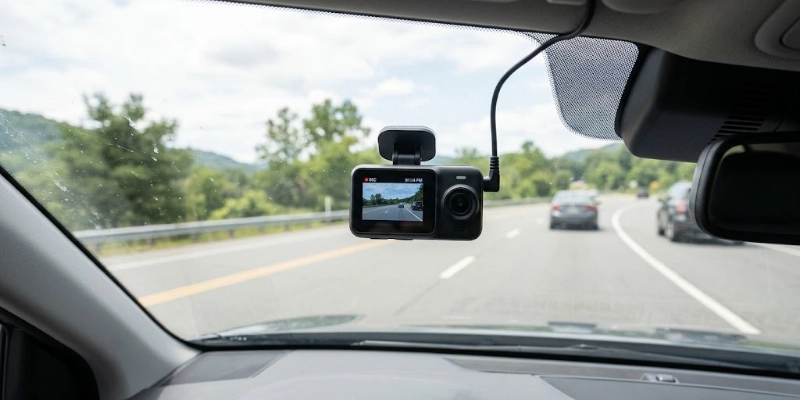
It usually records the view in front of the vehicle. Depending on the model, it may also cover the rear or the inside of the car. Most dash cams start recording automatically when the vehicle is turned on and save the footage to a memory card.
Unlike a regular camera or smartphone, a dash cam is made for continuous recording during driving. It can use features such as loop recording and a G-sensor to manage footage and protect important clips when an impact is detected. This makes it more suitable for keeping a record of events on the road.
How Does a Dash Cam Work?
A dash cam works by taking power from the vehicle and recording video while you drive. Most models handle the recording process automatically, so you do not need to start and stop it every time you get in the car.
Powering On
Most models connect to the vehicle through a 12V power outlet. When the car starts, the camera usually turns on and begins recording automatically. For a cleaner setup, some people choose a hardwired installation that connects the camera directly to the vehicle’s electrical system.
Recording Video
Once powered on, the camera records the road in front of the vehicle. Depending on the model, additional cameras can record the rear or inside of the car. Instead of saving one very long video, most models divide the recording into shorter clips, making the files easier to manage.
Loop Recording
Loop recording allows the camera to keep recording when the memory card becomes full. It does this by replacing the oldest unlocked clips with new ones. This means you do not have to manually delete old footage every time the storage fills up.
Important clips can usually be protected so they are not removed during this process. This is useful when you need to keep footage of an accident or another road event.
Impact Detection
Many models have a built-in G-sensor that detects sudden movement or a strong impact. When it detects an unusual force, it can mark the current video as an important file. Protected clips are then kept separately from normal recordings and are less likely to be overwritten.
Saving and Reviewing Footage
Video is usually saved to a microSD card inside the camera. You can remove the card and view the files on a computer, or transfer them using a supported phone app. Some models also offer Wi-Fi, which makes it easier to view or download recordings directly from a smartphone.
What Are the Main Parts of a Dash Cam?
A dash cam has several small components that work together to capture, process, and store video. Each part has a specific job, from capturing the view to saving the recorded files.
- Camera Lens: The lens captures the view outside the vehicle. Its viewing angle determines how much of the road and surrounding area can appear in the video.
- Image Sensor: The image sensor turns the light coming through the lens into digital images. A good sensor can help produce clearer footage, especially when lighting conditions change.
- Processor: The processor handles the video captured by the sensor. It helps process and save recordings while also supporting features such as video compression and image enhancement.
- G-Sensor: The G-sensor detects sudden movement, such as a strong impact or sharp change in motion. When this happens, it can help protect the related recording from being overwritten.
- GPS Module: A GPS module can record information such as the vehicle’s location and speed. Some models add this information to the recorded footage or make it available in the companion app.
- MicroSD Card: The microSD card is used to store recorded videos. Its storage capacity affects how much footage can be saved before older files are replaced.
- Power Connection: The power connection supplies electricity to the camera. It may use a vehicle’s 12V outlet or a hardwired connection, depending on the installation.
- Microphone and Speaker: The microphone can capture audio inside the vehicle when audio recording is enabled. The speaker is mainly used for alerts, voice prompts, or other sounds from the camera.
What Are the Different Types of Dash Cams?
Dash cams come in different setups based on how many cameras they have and which areas they can record. The right type depends on the level of coverage a driver needs.
- Single-Channel Dash Cams
A single-channel model uses one camera, usually placed at the front of the vehicle. It mainly records the road ahead and is a simple option for drivers who only need front coverage.
- Dual-Channel Dash Cams
A dual-channel setup uses two cameras. One records the front view, while the second is normally placed at the rear. This gives the driver footage from both directions.
- Three-Channel Dash Cams
These models use three cameras to cover the front, rear, and inside of the vehicle. They can be useful for people who want a wider view, especially when they also want to record activity inside the car.
- Interior or Cabin Dash Cams
An interior camera focuses on the area inside the vehicle. It can be useful for rideshare drivers, taxi operators, and fleet vehicles where recording the cabin is important.
- 360-Degree Dash Cams
A 360-degree setup is designed to capture a much wider area around the vehicle. Depending on the model, it may provide views from several directions instead of focusing only on the road ahead.
- Motorcycle Dash Cams
Motorcycle models are built for two-wheelers and usually have a different mounting and wiring setup. They may use separate front and rear cameras to provide coverage while riding.
What Features Do Dash Cams Have?
Dash cams come with different features depending on the model and price. Some focus on basic recording, while others add tools that make recording, viewing, and managing footage easier.
- Video Resolution: Resolution affects how clear the recorded video looks. Common options include 1080p, 2K, and 4K. Higher resolutions can show more detail but usually require more storage space.
- Night Vision: Night vision helps the camera capture clearer footage in dark or low-light conditions. This can be useful when driving at night or in poorly lit areas.
- Wide-Angle Lens: A wide-angle lens captures more of the area in front of the vehicle. It can help include multiple lanes and more of the surroundings in the frame.
- GPS Tracking: GPS can record information such as location and speed along with the video. Some models allow you to view this information when checking a recording.
- Wi-Fi and Smartphone Connectivity: Wi-Fi lets compatible cameras connect to a smartphone. You can use the related app to view, download, or manage recordings without removing the memory card.
- Parking Mode: Parking mode allows supported models to monitor the vehicle while it is parked. Depending on the camera, it may start recording when movement or an impact is detected.
- Voice Control: Some models support voice commands for basic functions. This can let you control certain features without reaching for the camera while driving.
- Motion Detection: Motion detection can trigger recording when movement is noticed. It is mainly useful for monitoring the vehicle when it is parked.
- HDR: HDR helps balance bright and dark areas in a scene. It can improve detail when there is a big difference between light and shadow.
- Cloud Storage: Some models can upload recordings to cloud storage through an internet connection. This allows supported footage to be accessed remotely instead of relying only on local storage.
- Built-In Display: A built-in screen lets you see the camera view and review recordings directly on the device. Models without a display may rely on a smartphone app or computer instead.
What Is Parking Mode on a Dash Cam?
Parking mode allows a compatible camera to monitor the vehicle even when it is parked. Instead of recording continuously, it can stay ready and start capturing footage when something happens around the car.
How Parking Mode Works
When the vehicle is turned off, the camera can switch from its normal recording mode to parking mode. Depending on the model, it may use motion detection, impact detection, or both to decide when to record.
Motion-Based Recording
With motion detection, the camera starts recording when it notices movement near the vehicle. This can help capture events such as someone walking close to the car or another vehicle moving nearby.
Impact Detection While Parked
Some models use a G-sensor to detect a sudden hit or strong movement while the vehicle is parked. If an impact is detected, the camera can save the related footage as an important file.
Why a Separate Power Solution May Be Needed
A standard power connection may stop supplying electricity when the vehicle is turned off. For parking monitoring to continue, some setups use a hardwire kit or another compatible power source. These options can help the camera operate without leaving the engine running.
Normal Recording vs. Parking Recording
Normal recording is mainly used while the vehicle is being driven and usually captures the road continuously. Parking recording is designed for a parked vehicle and may remain inactive until motion or an impact triggers it. The exact behavior depends on the model and its settings.
What Are the Benefits of Using a Dash Cam?
A dash cam can be useful for more than simply recording your daily drive. It can provide a record of events on the road and offer extra peace of mind in different situations.
- Recorded footage can show what happened during a road incident. This may be useful when the details of an event are unclear or when different accounts are given.
- A recording can capture important details before, during, and after a collision. This may help provide a clearer picture of how the incident happened.
- If another vehicle hits your car and leaves the scene, recorded footage may capture useful details such as the vehicle, location, or time of the incident.
- Models with parking mode can monitor the vehicle when it is left unattended. Depending on the settings, they may capture movement or an impact near the car.
- The camera may capture sudden or unusual events that happen during a journey. These can include traffic incidents, dangerous driving, or objects entering the road.
- Footage may provide additional information when reporting an accident or making an insurance claim. However, the recording does not automatically decide who is responsible or how a claim will be handled.
- A dash cam can also be used to save memorable parts of a journey. Long drives, scenic roads, and interesting moments can be kept as personal recordings.
How Do You Install a Dash Cam?
Installing a dash cam is usually a simple process. Most basic setups can be connected through the vehicle’s 12V power outlet, while a hardwired setup may require professional installation.
Choose the Mounting Position
Pick a spot on the windshield where the camera has a clear view of the road. It should not block your view while driving or interfere with important areas of the windshield.
Attach the Camera
Clean the mounting area and attach the camera using its included adhesive mount or suction mount. Make sure it is firmly secured before moving on to the next step.
Connect the Power Cable
Connect the power cable to the camera and plug it into the vehicle’s 12V outlet. Some drivers choose a hardwired connection for a cleaner setup or to support features such as parking mode.
Insert the microSD Card
If the camera requires a microSD card, insert a compatible card into the correct slot. It is a good idea to format the card through the camera before using it, if the manufacturer’s instructions recommend doing so.
Adjust the Camera Angle
Set the camera so the road is clearly visible, and the frame is not pointing too high or too low. Check the view on the screen or through the companion app if the model supports one.
Test the Recording
Start the vehicle and make sure the camera turns on and begins recording. Check a short clip afterward to confirm that the video, date, time, and other selected settings are working correctly.
Where Should You Mount a Dash Cam?
The best place is usually high on the windshield, near the center, so the camera can capture a clear view of the road without taking up much space.
- A position behind or near the rearview mirror is often a practical choice. It keeps the camera out of the way while giving it a wide view of the road.
- Make sure the camera and its cable do not block your view. You should be able to see the road, signs, and other vehicles without the camera becoming a distraction.
- Do not place the camera where it can interfere with sensors, stickers, or other important equipment on the windshield. Also check local rules about where cameras can be mounted.
- Adjust the lens so it captures the road ahead without pointing too much toward the sky or the vehicle’s dashboard. A level view usually gives more useful footage.
How Much Storage Does a Dash Cam Need?
The amount of storage you need depends on how often you drive, the camera settings, and how long you want to keep recordings. Most dash cams use a microSD card to store video clips, while older footage is automatically replaced when the card becomes full.
Why Dash Cams Use microSD Cards
A microSD card gives the camera a place to save recorded videos. It is small, removable, and available in different storage capacities. The right size depends on the camera’s supported card capacity and your recording needs.
How Loop Recording Affects Storage
Loop recording helps manage limited storage automatically. When the card becomes full, the camera normally removes the oldest unprotected clips and saves new recordings in their place.
This means you do not need to delete old videos manually every time the storage fills up. Important clips should be locked or saved separately so they are not replaced.
Factors That Affect Recording Time
Several things can change how much footage a memory card can hold. These include video resolution, frame rate, the number of cameras recording, and whether audio is enabled.
A camera recording only the front view will generally use less storage than a setup recording the front, rear, and inside of the vehicle at the same time.
Why High-Resolution Recording Uses More Storage
Higher-resolution video contains more image data, so it usually takes up more space. For example, 4K recordings generally require more storage than 1080p recordings.
If you choose a higher resolution, you may need a larger memory card or may have less recording time before older footage is replaced.
When You Should Back Up Important Footage
Back up important recordings as soon as possible, especially after an accident or another important road event. Copy the video to a computer, phone, or another safe storage location instead of leaving the only copy on the memory card.
This is especially important if you may need the footage later, because normal loop recording can eventually replace files that have not been protected.
Is Dash Cam Footage Useful After an Accident?
Dash cam footage can provide a visual record of what happened before, during, and after an accident. It may help show details that are difficult to remember or explain later.
How Footage Can Document What Happened
A recording can show the road conditions, traffic movement, vehicle positions, and actions that took place around the time of the accident. This can provide additional context when reviewing the incident.
Saving the Original File
Save the original recording as soon as possible after an accident. Copy it to a computer, phone, or another secure location so you have a backup.
If the camera uses loop recording, protecting or copying the clip quickly can also reduce the chance of it being overwritten by newer recordings.
Keeping Timestamp and Location Information When Available
Some cameras add information such as the date, time, speed, or GPS location to recordings. If this information is available, keep the original file with these details intact.
These details can provide useful context about when and where the recording was made.
Sharing Footage With an Insurer or Relevant Authority When Appropriate
Depending on the situation, you may choose to provide the footage to your insurance company, police, or another relevant authority. Follow their instructions about how and in what format the recording should be submitted.
Why You Should Avoid Editing the Original Evidence File
Avoid trimming, adding text, changing the audio, or making other edits to the original recording. Keep an untouched copy as your original file.
If you need to create a shorter clip for easier sharing, make a separate copy and leave the original unchanged. This helps preserve the recording in its original form.
Are Dash Cams Legal?
Dash cams are allowed in many places, but the rules can vary by country, state, province, or region. Restrictions may apply to where the camera is mounted, what it records, and how recordings are used.
Laws Vary by Country, State, or Region
There is no single rule that applies everywhere. Some locations may allow dash cams with certain conditions, while others may have specific restrictions on recording or mounting them inside a vehicle.
Always check the rules that apply where you drive rather than relying on general information from another country or region.
Windshield-Mounting Restrictions
Some areas have rules about placing objects on a vehicle’s windshield. Even where dash cams are permitted, the mounting position may need to leave the driver’s view clear.
Before installing the camera, check whether your local rules place limits on windshield-mounted devices.
Privacy and Audio-Recording Rules
Video and audio can be treated differently under local privacy laws. A camera may legally record the road in one location while audio recording may have additional requirements.
Check the rules that apply to recording conversations and other sounds inside or around your vehicle.
Rules About Recording Other People
A dash cam can capture other drivers, passengers, pedestrians, and license plates as part of normal road recording. Privacy rules may affect how this footage can be used, shared, or published.
If you plan to share a recording publicly, check the applicable privacy requirements first.
Check Local Laws Before Installation
Before installing a dash cam, check official government or transportation sources for your area. Pay particular attention to windshield placement, privacy, and audio-recording rules.
Local laws can change, so current information for your specific location is more useful than a general rule that may apply somewhere else.
Dash Cam vs. Smartphone Camera
A smartphone camera can record video, but it is not designed specifically for continuous use inside a vehicle. A dash cam is built around driving-related recording, which gives it several practical advantages for this purpose.
| Feature | Dash Cam | Smartphone |
| Automatic recording | Usually | Usually requires setup |
| Loop recording | Yes | Not normally |
| Parking monitoring | Some models | Limited |
| Continuous vehicle recording | Designed for it | Not its main purpose |
| Vehicle mounting | Designed for it | Requires a separate mount |
| Storage management | Built for frequent video recording | Shares storage with other phone data |
| Power while driving | Designed for vehicle power | Requires a suitable charging setup |
| Driving-focused features | Common | Limited without additional apps |
Which One Is More Suitable?
A smartphone can work for occasional recording, especially if you already have one available. However, a dash cam is designed to remain in the vehicle and handle regular recording with features made for driving.
For everyday road recording, the dedicated design of a dash cam makes it more practical than using a smartphone as a permanent camera.
Common Dash Cam Terms Explained
Dash cam specifications can include several terms that may be unfamiliar to beginners. Understanding these common terms makes it easier to compare different models and understand their features.
- Loop Recording: A recording system that automatically replaces older, unprotected video clips when the memory card runs out of space.
- G-Sensor: A sensor that detects sudden movement or impact. It can trigger the camera to protect a recording from being overwritten.
- Parking Mode: A feature that allows compatible cameras to monitor a parked vehicle. Depending on the model, recording may start after motion or an impact is detected.
- Dual-Channel: A setup that uses two cameras, usually one facing the road ahead and another covering the rear or inside of the vehicle.
- GPS Logging: A feature that records location and, on supported models, speed information along with the video.
- HDR: High Dynamic Range helps balance very bright and dark areas in the same scene, which can improve visible details in challenging lighting.
- WDR: Wide Dynamic Range is an image-processing feature designed to handle large differences between bright and dark areas, such as when driving between sunlight and shade.
- Hardwiring: Connecting the camera directly to the vehicle’s electrical system instead of using the standard 12V outlet. This can provide a cleaner installation and may support features such as parking mode.
- Event Recording: A recording saved or protected because the camera detects an important event, such as a sudden impact. These clips are normally kept separate from regular recordings.
- microSD Storage: A small removable memory card used to store recorded video. Different cameras support different card capacities, so check the manufacturer’s specifications before buying one.
Conclusion
A Dash Cam is a small vehicle camera designed to automatically record what happens on the road. Depending on the model, it can also cover the rear, cabin, or other areas around the vehicle.
Features, recording quality, storage options, and coverage can vary between models, so beginners should focus on the features that match their actual driving needs.
The simple takeaway is this: choose a reliable camera with the coverage, video quality, and recording features you need, then install and use it according to local rules and the manufacturer’s instructions.
FAQs
Still have questions? Check out the FAQs below to find quick and simple answers.
It is mainly used to keep a video record of what happens while driving. The footage can also help document unexpected road situations or memorable journeys.
It receives power from the vehicle and records video to a memory card. Depending on the model, recording can start automatically when the vehicle is turned on.
Some models can continue monitoring a parked vehicle through a parking mode feature. This usually requires a suitable power connection because a standard outlet may stop providing power when the vehicle is turned off.
There is no fixed time because it depends on the card’s capacity, recording quality, and how many cameras are active. With loop recording, older unprotected clips are normally replaced when storage becomes full.
Many models have a built-in microphone that can record sound inside the vehicle. Audio recording can usually be turned off, but local rules may apply to recording conversations.
Yes, some models support a separate rear camera. This setup can record the area behind the vehicle in addition to the front view.
No, Wi-Fi is not normally required for basic recording. Models with Wi-Fi use it mainly for features such as viewing or transferring recordings through a smartphone.
Most models need some form of storage to save recordings, and many use a microSD card. However, storage methods can vary between models, so check the manufacturer’s requirements.
Yes, many models can record in low-light conditions. Video quality at night depends on factors such as the image sensor, lens, lighting, and available night-recording features.
It can be useful for drivers who want a convenient record of their journeys and road events. Whether it suits you depends on your driving habits, desired coverage, and the features you need.






- Be Respectful
- Stay Relevant
- Stay Positive
- True Feedback
- Encourage Discussion
- Avoid Spamming
- No Fake News
- Don't Copy-Paste
- No Personal Attacks
- Be Respectful
- Stay Relevant
- Stay Positive
- True Feedback
- Encourage Discussion
- Avoid Spamming
- No Fake News
- Don't Copy-Paste
- No Personal Attacks
