Compact Keyboard Explained – Sizes, Uses & Benefits
Published: 4 Jun 2026
Have you ever wondered why so many people are switching to smaller keyboards? A compact keyboard is designed to save desk space while still providing a comfortable typing experience. Its simple design makes it a popular choice for gamers, office workers, students, and remote professionals.
As workspaces become more flexible and portable, many users are looking for gadgets that are easy to carry and fit neatly on a desk. Smaller keyboards can help create a cleaner setup and may improve comfort by keeping everything within easy reach.
In this guide, you will learn what a compact keyboard is, how it works, its different types, key benefits, possible drawbacks, and tips for choosing the right one for your needs.
What is a Compact Keyboard?
A compact keyboard is a smaller version of a standard keyboard. It is designed to take up less space on a desk while still allowing users to type, work, and play games comfortably. Most models keep the essential keys and remove or combine the less frequently used ones.
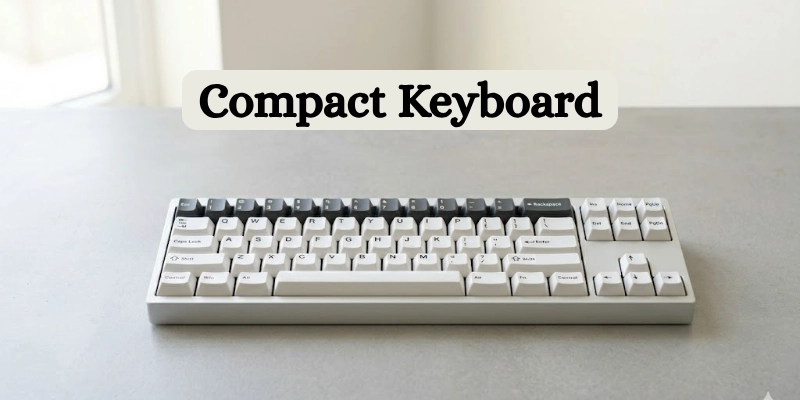
The main difference between this type of keyboard and a full-size keyboard is the number of keys. A full-size layout usually includes a number pad, function keys, navigation keys, and other extra buttons. Smaller layouts often remove some of these sections to create a more space-saving design.
The purpose of reducing the size is to make the keyboard easier to carry and fit into different workspaces. It also helps create a cleaner desk setup while maintaining the core functions that most users need every day.
How Does a Compact Keyboard Work?
A compact keyboard works by arranging essential keys in a smaller layout while keeping everyday functions easily accessible. It saves space by removing certain keys and uses smart shortcuts to provide the same core features found on larger keyboards.
Reduced Key Layout
A smaller keyboard works by using fewer keys than a full-size model. It removes less-used sections, such as the number pad or some navigation keys, to save space. This design keeps the most important keys while making the keyboard more compact and portable.
Function Layer Keys
Even though some keys are removed, users can still access many functions through key combinations. By pressing a special Function (Fn) key along with another key, they can control volume, adjust brightness, use media controls, or perform other tasks.
Efficient Desk Utilization
A smaller layout creates more room on a desk. Users have extra space for a mouse, documents, or other accessories. This can help keep the workspace organized and comfortable without reducing productivity.
Wired and Wireless Connectivity
Many keyboards connect through a USB cable for a stable and reliable connection. Others use Bluetooth or 2.4GHz wireless technology, allowing users to connect without cables. These wireless options offer greater flexibility and help keep desks free from clutter.
Types of Compact Keyboards
Compact keyboards come in different sizes and layouts. Each type is designed to balance space savings and functionality in a different way. Some focus on portability, while others keep more keys for convenience and productivity.
- 75% Keyboards
A 75% keyboard keeps most of the keys found on a standard keyboard but places them closer together. It includes dedicated arrow keys and many navigation keys, making it a good choice for both work and everyday use.
- 65% Keyboards
A 65% keyboard is smaller than a 75% layout but still includes arrow keys and a few navigation keys. It offers a balance between a compact design and practical functionality.
- 60% Keyboards
A 60% keyboard removes the function row, navigation cluster, and number pad. It relies on key combinations for extra commands. Its minimalist design makes it especially popular among gamers and users with limited desk space.
- TKL (Tenkeyless) Keyboards
A Tenkeyless (TKL) keyboard removes only the numeric keypad while keeping most other keys. It provides a familiar typing experience and full functionality for users who do not regularly use a number pad.
- 40% Keyboards
A 40% keyboard is one of the smallest layouts available. It removes many keys and depends heavily on function layers and shortcuts. This layout is mainly used by keyboard enthusiasts who prefer maximum portability and customization.
- Mini Wireless Keyboards
Mini wireless keyboards are designed for portability and convenience. They connect through Bluetooth or wireless receivers and work well with laptops, tablets, smart TVs, and mobile devices. Their lightweight design makes them easy to carry while traveling.
Key Features of Compact Keyboards
These keyboards offer several features that make them popular among gamers, professionals, students, and remote workers. Their design focuses on convenience, flexibility, and efficient use of space.
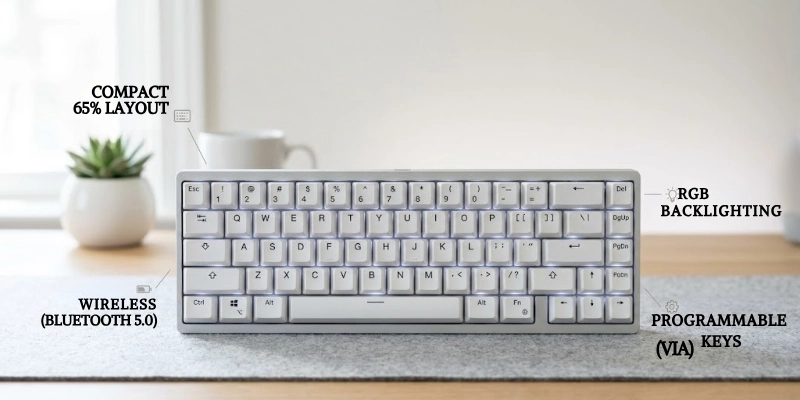
Here are some features given below.
Space-Saving Design
One of the biggest advantages is the smaller footprint. The reduced size takes up less desk space and creates a cleaner, more organized workspace. It also leaves more room for a mouse and other accessories.
Portability
The lightweight and smaller design makes these keyboards easy to carry. Users can move them between home, office, and travel locations without much effort.
Mechanical or Membrane Switches
Many models are available with either mechanical or membrane switches. Mechanical switches provide tactile feedback and durability, while membrane switches are often quieter and more affordable. This allows users to choose a typing experience that matches their preferences.
RGB Backlighting
Some keyboards include RGB backlighting with customizable lighting effects. Users can select different colors, patterns, and brightness levels to match their setup or improve visibility in low-light environments.
Wireless Connectivity
Wireless models connect through Bluetooth or a 2.4GHz wireless receiver. Many also support multiple devices, making it easy to switch between a computer, tablet, or smartphone.
Programmable Keys
Programmable keys allow users to create custom shortcuts and macros. This feature can save time by automating repetitive tasks and providing quick access to frequently used commands.
Benefits and Limitations
Before choosing a smaller keyboard, it is helpful to understand both its advantages and drawbacks. The table below provides a quick comparison.
| Benefits | Limitations |
| More desk space | Takes time to get used to |
| Better hand and arm position | No dedicated number pad on many models |
| More room for mouse movement | Some functions need key combinations |
| Easy to carry and travel with | May not suit all professional tasks |
| Cleaner desk setup | Fewer dedicated keys |
| Lightweight design | Extra shortcuts can be harder to remember |
| Great for small workspaces | Not ideal for heavy data entry |
| Reduces desk clutter | Some users prefer larger layouts |
Overall, these keyboards are a great choice for users who value portability, desk space, and a clean setup. However, the smaller layout may require some adjustment, especially for users who rely on dedicated keys.
Who Should Use a Compact Keyboard?
A compact keyboard can be a good choice for many types of users. Its smaller size makes it useful for both work and everyday tasks.
- Gamers:
Gamers often prefer smaller layouts because they provide more space for mouse movement. This can be helpful during fast-paced games and competitive play. - Programmers and Developers:
Programmers and developers can benefit from a cleaner desk setup and easier hand movement. Many also like the ability to customize shortcuts and key functions. - Writers and Content Creators:
Writers and content creators often appreciate the comfortable typing experience and organized workspace. The smaller design can help keep the focus on daily tasks. - Students:
Students can easily carry a keyboard between classes, libraries, and study areas. Its portable design works well in small workspaces and dorm rooms. - Remote Workers and Travelers:
Remote workers and frequent travelers often need devices that are easy to move from one location to another. A lightweight keyboard fits easily into a bag and helps create a productive workspace almost anywhere.
How to Choose the Best Compact Keyboard?
Choosing the right keyboard depends on your needs, preferences, and budget. Consider the following factors before making a decision.
- Keyboard Size:
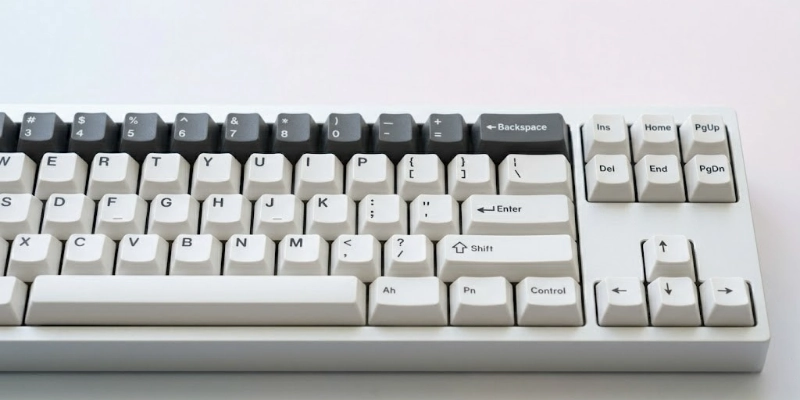
Different layouts offer different levels of functionality. A 60% layout provides maximum space savings, while 65% and 75% layouts keep additional keys. TKL models offer a more traditional experience without the number pad. - Switch Type:
Switches affect how a keyboard feels and sounds. Mechanical switches provide better feedback and durability, while membrane switches are usually quieter and more affordable. - Connectivity:
Decide whether you prefer a wired or wireless connection. Wired models offer a stable connection, while wireless options provide greater flexibility and a cleaner setup. - Build Quality:
Build quality plays an important role in durability. Plastic models are lightweight and budget-friendly, while aluminum models often feel stronger and more premium. - Battery Life:
For wireless keyboards, battery life is an important factor. Longer battery life means less frequent charging and more convenient daily use. - Customization Options:
Some models include RGB lighting, programmable keys, and software customization. These features allow users to personalize their experience and create useful shortcuts. - Budget Considerations:
Prices can vary significantly between models. Entry-level options provide basic features at a lower cost, while premium keyboards often include better materials, advanced features, and greater customization.
Popular Compact Keyboard Brands
Many well-known brands offer high-quality compact keyboards for different needs and budgets. Some focus on gaming, while others are designed for productivity, portability, or customization.
- Keychron
Keychron is popular for its versatile keyboards that support both wired and wireless connections. Its products are widely used by professionals, programmers, and everyday users.
- Logitech
Logitech offers reliable keyboards with strong build quality and long battery life. The brand provides options for office work, home use, and travel.
- Corsair
Corsair is known for gaming-focused keyboards with mechanical switches, RGB lighting, and advanced customization features.
- Razer
Razer produces keyboards designed primarily for gamers. Many models include fast switches, customizable lighting, and gaming-focused software.
- Royal Kludge (RK)
Royal Kludge, often called RK, offers affordable keyboards with useful features such as wireless connectivity, hot-swappable switches, and compact layouts.
- Anne Pro
Anne Pro is a popular choice among users who prefer smaller layouts. Its keyboards are known for portability, wireless support, and customization options.
- Ducky
Ducky is well known for its excellent build quality and comfortable typing experience. Many enthusiasts choose this brand for its reliable performance and durable designs.
Tips for Maintaining a Compact Keyboard
Proper care can help your keyboard last longer and continue working smoothly. A few simple habits can keep it clean and in good condition.
- Cleaning:
Dust, dirt, and fingerprints can build up over time. Wipe the keys regularly with a soft cloth to keep the surface clean. - Protection:
Keep food and drinks away from your workspace whenever possible. Using a keyboard cover can also help reduce dust buildup. - Updation:
Some keyboards receive firmware updates from the manufacturer. Installing these updates can improve performance, fix issues, and add new features. - Travel Storage:
When carrying your keyboard, place it in a protective case or padded bag. This helps prevent scratches and damage during transport. - Keycap Pullers:
For a more thorough cleaning, remove the keycaps with a keycap puller. This makes it easier to clean dust and debris from hard-to-reach areas.
Common Mistakes to Avoid When Buying
Choosing the right keyboard can be easier when you know what mistakes to avoid. Paying attention to the following factors can help you make a better purchase.
- Layout Choice:
Different layouts offer different key arrangements. Always choose a size that matches your typing habits and daily tasks. - Switch Type:
Switches affect comfort, sound, and typing feel. Test different options if possible before making a decision. - Connectivity:
Some users prefer a wired connection, while others need wireless flexibility. Pick the option that best fits your setup. - Compatibility:
Before buying, make sure the keyboard works with your operating system and devices. This can help prevent connection and software issues. - Appearance:
A keyboard may look attractive, but performance and comfort are more important. Consider features, build quality, and usability before making a purchase.
Conclusion
Compact keyboards offer a great balance of functionality, portability, and desk space savings. Their smaller design makes them a popular choice for gaming, work, study, and travel.
As more people look for efficient and organized workspaces, these keyboards continue to grow in popularity. With different sizes and features available, there is an option for almost every user.
Choose a model based on your layout preference, connectivity needs, and budget to find the best fit for your daily tasks.
FAQ
Still have questions? Explore more guides to find the right keyboard for your needs.
It is used for typing, gaming, studying, and office work. Its smaller size helps save desk space and improve portability. Many people choose it for cleaner and more organized setups.
Yes, many gamers prefer smaller layouts. They provide more room for mouse movement during gameplay. They can also make gaming setups look cleaner.
A 60% layout removes arrow keys and several navigation keys. A 65% layout keeps dedicated arrow keys and a few extra controls. This makes it more convenient for everyday use.
Yes, many users find them comfortable for daily typing. Their smaller size can reduce hand movement across the desk. Comfort also depends on the switch type and layout.
Some layouts include dedicated function keys, while others do not. Smaller models often use key combinations to access these functions. This helps keep the design compact.
It depends on your needs and preferences. Smaller layouts save space and are easier to carry. Full-size models may be better for users who frequently use a number pad.
Yes, they work well for most office tasks. They help create a tidy workspace and leave more room on the desk. Many professionals use them for daily work.
Yes, most models work with laptops. They can connect through USB, Bluetooth, or a wireless receiver. This makes them useful for both home and travel setups.
A well-made keyboard can last for many years. Regular cleaning and proper care can help extend its lifespan. Build quality also plays an important role in durability.
Yes, modern wireless models offer stable and responsive connections. Many support Bluetooth or 2.4GHz wireless technology. They are suitable for work, study, and everyday use.






- Be Respectful
- Stay Relevant
- Stay Positive
- True Feedback
- Encourage Discussion
- Avoid Spamming
- No Fake News
- Don't Copy-Paste
- No Personal Attacks
- Be Respectful
- Stay Relevant
- Stay Positive
- True Feedback
- Encourage Discussion
- Avoid Spamming
- No Fake News
- Don't Copy-Paste
- No Personal Attacks
