What is a Tripod | Types, Uses & its Work
Published: 29 Dec 2025
Have you ever seen a camera standing on three thin legs and wondered why it does not fall? Why do photographers trust it more than their own hands? And how does such a simple thing help take clear photos and videos?
At first glance, it looks small and boring, but it plays a very important role in photography and video making. Let us understand what a tripod is and why people use it so often.
What is a Tripod?
It is a simple stand with three legs. People use it to support a camera, mobile phone, or other gadgets. It helps keep the device steady, so photos and videos do not look shaky.
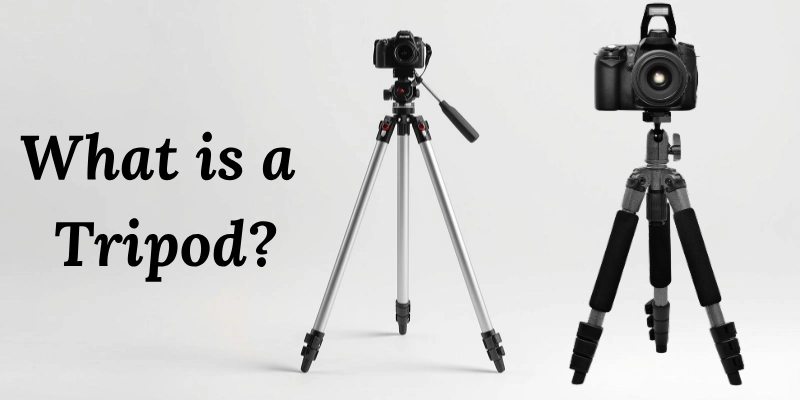
This tool is very helpful for clear photos and smooth videos.
- It keeps the camera still.
- It helps avoid blurry photos.
- It supports phones and small cameras.
- It is easy to carry and use.
- It is useful for photos and videos.
Example:
Imagine you want to take a family photo at night. Your hands may shake a little, and the picture can look unclear. When you place the camera on it, it stays still, and the photo looks sharp and clear.
What Devices Use a Tripod?
It is not only for cameras. Many devices can be used with it to stay steady and work better. It makes capturing videos or photos much easier. Even small devices like smartphones can benefit from its stability.
- Cameras: Help take clear photos without shaking.
- Smartphones: Useful for videos, selfies, or group photos.
- Video cameras: Keep videos smooth and stable.
- Lights and microphones: Supports them during recordings or shoots.
Example:
If you want to take a clear photo at night, holding the camera by hand may make it shaky. By placing it on a tripod, the camera stays still, and the photo comes out sharp and clear.
How a Tripod Works?
It is a tool that helps keep cameras and devices steady. It makes photos and videos clear and easy to take.
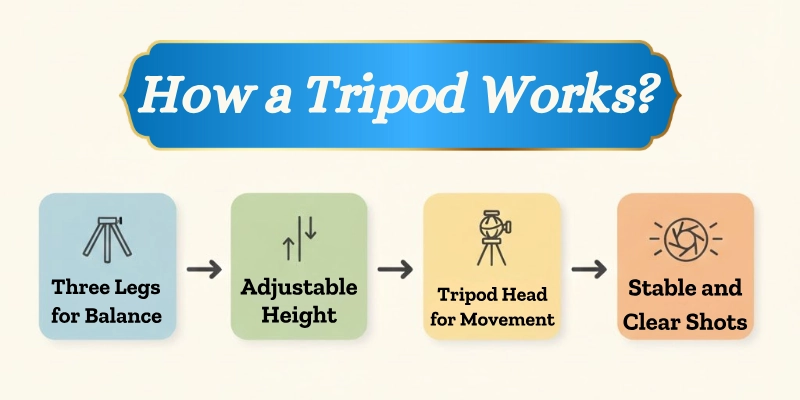
Its design and parts work together to give balance and flexibility.
- The three legs provide strong balance on any surface.
- The height can be adjusted by lengthening or shortening the legs for high or low shots.
- The head allows the camera to move up, down, and sideways smoothly.
- It gives stable support even on uneven ground.
- It helps capture different angles without holding the camera by hand.
Types of Tripods
There are different types of stands with three legs, and each is made for a specific use. Choosing the right one depends on what device you have and where you want to use it.
| Type | Best For | Special Feature |
| Camera Tripods | Photography & videos | Strong and tall |
| Mobile Tripods | Smartphones | Small and lightweight |
| Tabletop Tripods | Desk or table shots | Compact and portable |
| Flexible Tripods | Outdoor or uneven surfaces | Bendable legs |
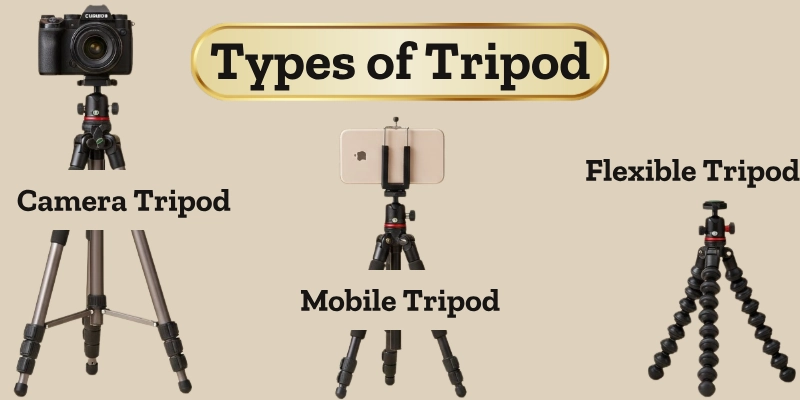
Example:
If you want to take a video on a tree branch, a flexible tripod can bend its legs around the branch and keep your phone stable.
Parts of a Tripod
It has several important parts that work together to keep cameras and devices steady. Each part has a special role in making photography and video easier.
- Legs:
The legs support the stand and can be adjusted in length. They give stability on flat or uneven surfaces. - Center Column:
This is the middle rod that can be raised or lowered to change the height quickly. It helps get better angles for shots. - Head:
The head holds the camera or device and allows it to move up, down, and sideways smoothly. - Mounting Plate:
This is the part where the camera or device is attached. It keeps the device secure and prevents it from falling. - Feet or Rubber Grips:
The feet at the bottom keep the stand from slipping. Rubber grips add extra stability on slippery surfaces.
Uses of a Tripod
A tripod is very helpful in many situations. It keeps cameras and devices steady, making photos and videos better.
- Photography: It helps take clear photos and long-exposure shots without blur.
- Videography: It keeps video recordings smooth and stable, even when filming for a long time.
- Live Streaming: It is useful for online classes, YouTube videos, or video calls, keeping the camera in place.
- Travel and Vlogging: Lightweight and portable stands make it easy to record videos while traveling or vlogging.
Example:
A mobile stand can hold your phone while making short videos, keeping the video steady and clear.
Advantages and Disadvantages of a Tripod
A tripod makes photography and video recording easier by keeping devices steady. However, it also has some limitations depending on the situation.
| Advantages | Disadvantages |
| Keeps the camera or device steady | It can be heavy to carry |
| Helps take clear and sharp photos | Takes time to set up |
| Useful for long exposure shots | Not ideal for moving shots |
| Allows better framing and angles | Can be expensive for high-quality ones |
| Supports phones, cameras, and lights | Needs space to use properly |
Tips for Beginners
Using a tripod properly can make your photos and videos much better. Here are some simple tips for beginners:
- Pick a stand that can hold your camera, phone, or other device safely.
- Make sure the legs are fully locked so the device stays steady and does not fall.
- Place the stand on even ground whenever possible for extra stability.
- Do not put a device heavier than the stand can hold, or it may tip over.
- Wipe the legs and head after use, especially if used outdoors, to keep it working well for a long time.
Tripod vs Handheld Shooting
Choosing between a tripod and shooting by hand depends on the situation. A stand keeps your device steady, while handheld shooting can be faster and more flexible.
| Tripod | Handheld Shooting |
| Keeps the device steady and stable | Allows quick movement and flexibility |
| Best for long exposure or videos | Good for action or fast shots |
| Helps capture clear and sharp images | Can be used anywhere easily |
| Useful for live streaming | No setup time required |
Conclusion
A stand with three legs is a very useful tool for photography, videos, and online work. It keeps cameras and devices steady, helps take clear photos, and allows smooth recordings. By understanding its parts, types, and proper use, beginners can improve their shots and make their work easier and more professional.
FAQs
Find quick answers to all your tripod questions!
It is used to keep cameras and devices steady. It helps take clear photos and smooth videos. It is also useful for online classes or live streaming.
A tripod can also mean a stand with three legs used for cooking or holding objects. In history, it was used to support pots over a fire. The word can describe anything with three supporting legs.
People use it to avoid blurry photos or shaky videos. It makes recording and photography easier. It also allows hands-free use for long sessions.
You can use stacks of books, jars, or even small stools. These can help hold a camera or phone steady. They work as a temporary solution when a stand is not available.
Some people call it a “three-leg stand” in casual talk. In video or photography groups, it may just be called a “stand.” It is a simple way to refer to the same tool.
Three legs provide strong balance on uneven surfaces. It is the easiest way to keep the device steady. More or fewer legs would make it less stable.
Yes, small stands are made specifically for smartphones. They help take steady photos and record videos easily. Some even have adjustable mounts for different phone sizes.
Its main function is to hold devices steady. This helps avoid blurry photos or shaky videos. It also allows better control over angles and framing.
Photographers, videographers, vloggers, and online teachers need it. Beginners also find it helpful for clear shots. Anyone recording or taking long-exposure photos can use it.
You can use books, shelves, or stable tables. Even jars or small stools can hold a device temporarily. These options work when a proper stand is not available.


- Be Respectful
- Stay Relevant
- Stay Positive
- True Feedback
- Encourage Discussion
- Avoid Spamming
- No Fake News
- Don't Copy-Paste
- No Personal Attacks
- Be Respectful
- Stay Relevant
- Stay Positive
- True Feedback
- Encourage Discussion
- Avoid Spamming
- No Fake News
- Don't Copy-Paste
- No Personal Attacks
