What is a Projector: Uses, Types & Working Explained
Published: 11 Nov 2025
Have you ever watched a movie on a big screen at home or in school? That’s the magic of a projector! A projector is a device that shows images or videos on a big screen or wall. In simple words, it makes small pictures look large and clear.
That’s the basic projector meaning and projector definition. People use projectors in schools, offices, and homes for lessons, meetings, or fun movie nights. A projector is an output device.
In this article, you’ll learn about projector uses, how projectors work, types, and tips to choose the right one.
What is a Projector?
A projector is a device that takes pictures or videos from another device, like a computer, laptop, or phone, and shows them on a big wall or screen. It uses light to display the image so everyone in the room can see it easily. In simple words, a projector device makes small pictures look large and bright.

Compared to a TV, a projector can show much bigger images, which is why people often use it in classrooms, offices, and homes. For example, teachers use a projector for beginners to explain lessons to students. In offices, people use it to show slides during meetings. At home, it can turn a plain wall into a movie screen for family fun.
So, you can think of a projector as a helpful tool that makes learning, working, and entertainment more enjoyable for everyone.
History of Projectors
Projectors have come a long way over time. In the past, people used old projectors that worked with film reels or slides. Teachers in schools often used overhead projectors to show notes on transparent sheets.
As technology improved, these old machines turned into modern digital projectors. Today’s projectors are smaller, clearer, and easier to use. They can connect to computers, phones, and even Wi-Fi.
This projector evolution shows how we moved from simple film projectors to smart digital ones that bring learning and entertainment to life.
How Does a Projector Work?
The projector’s working principle is easy to understand. It changes small pictures or videos into big ones using light and a lens.
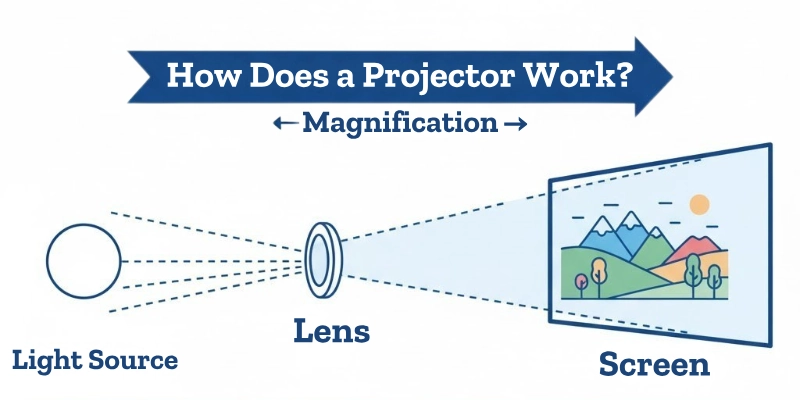
Here’s how a projector works step by step:
- The projector takes image or video data from a computer, phone, or USB drive.
- A bright light source inside the projector shines on small panels or mirrors.
- The panels create the colors and shapes of the picture.
- The lens focuses the light and sends the enlarged image forward.
- The image appears clearly on a wall or screen for everyone to see.
So, the projector uses light and lenses to make small pictures look big and bright; that’s the simple projector working principle.
Main Parts of a Projector
A projector is made of many small parts that work together to show clear and bright images. Let’s learn the main projector parts’ name and their simple functions.
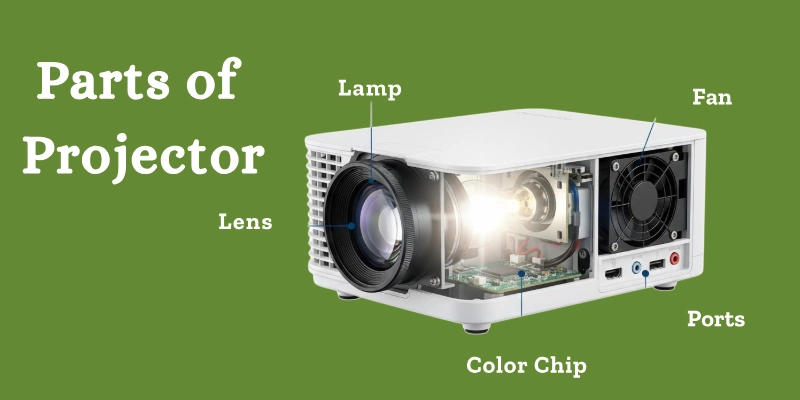
- Lens: Helps focus and project the image on the screen.
- Lamp (Light Source): Creates the brightness needed to see the picture.
- Color Wheel / LCD / DLP Chip: Makes the colors and shapes of the image.
- Fan: Keeps the projector cool while it’s running.
- Ports: Used to connect other devices like computers, phones, or USB drives.
These components of the projector help it work smoothly and display pictures clearly.
Types of Projectors
Projectors come in different types. Each works in a slightly different way and is used for different purposes.
Here are the main types of projectors:
| Type | Working Method | Example Use |
| LCD | Uses light panels | Schools |
| DLP | Uses tiny mirrors | Home theater |
| LED | Uses an LED lamp | Small rooms |
| Laser | Uses laser light | Office or cinema |
| Overhead | Uses transparent sheets | Old classrooms |
Tip: Choosing between an LCD vs DLP projector depends on whether you want brighter colors (LCD) or sharper images (DLP).
Uses of Projectors in Daily Life
Projectors are useful in many areas of our daily lives. Here are the main uses of a projector:
- Education: Teachers use projectors to show videos, slides, and lessons in class. This is called a projector in education.
- Business: Companies use projectors for meetings, presentations, and charts. This is a projector in business.
- Home Entertainment: Families use projectors to watch movies, play games, or enjoy sports on a big screen.
- Events: Projectors are used at weddings, concerts, and gatherings for big displays.
- Advertising: Outdoor screens use projectors to show ads and promotions.
Example: “Teachers use projectors to show videos and diagrams in class, making learning easier and fun.”
These projector applications make work, learning, and entertainment easier and more enjoyable.
Difference Between a Projector and a Television
A projector can show very large images on a wall or screen, making it great for movies or classrooms. A TV has a fixed size but always gives a clear image without needing extra setup.
So, choosing depends on whether you want big-screen flexibility or ready-to-watch clarity. Here’s a quick projector vs TV comparison to understand the difference between a projector and a television:
| Feature | Projector | Television |
| Screen Size | Adjustable and big | Fixed size |
| Portability | Easy to move | Not portable |
| Image Quality | Depends on light | Always clear |
| Setup | Needs a wall or a screen | Ready to use |
This simple projector comparison helps beginners see why projectors and TVs serve different purposes.
How to Choose the Right Projector?
Choosing the right projector is easy if you know what to look for. Here are some practical tips:
- Brightness: Higher lumens give a clearer picture, even in bright rooms.
- Resolution: Go for HD or Full HD for better image quality.
- Portability: Small and light projectors are easy to carry for travel or events.
- Connectivity: Check for HDMI, USB, or wireless options to connect devices easily.
- Price: Pick a projector that fits your budget and purpose, for school, home, or office.
Following this simple projector buying guide helps you choose the best projector for home or work without confusion.
| Tip |
|---|
|
For small rooms, LED projectors are best because they are bright, compact, and energy-saving. |
How to Take Care of Your Projector?
Taking care of your projector keeps it working longer and shows clear images. These projector care tips are simple but very effective. Learning how to clean the projector lens properly helps maintain bright and sharp images.
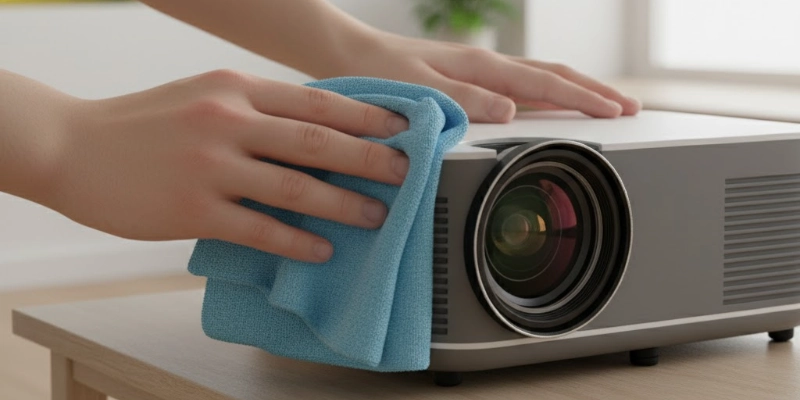
Here are some easy projector maintenance tips:
- Keep the lens clean: Use a soft cloth to remove dust.
- Avoid overheating: Use the projector in a cool, ventilated place.
- Don’t block the fan vent: Make sure air can flow freely.
- Turn off properly: Always switch off using the power button, not unplugging directly.
- Cover it when not in use: Protects from dust and damage.
| Tip |
|---|
|
Clean dust regularly to keep picture quality clear. |
Common Problems and Easy Fixes
Even the best projectors can have small issues. Here’s a simple projector troubleshooting guide for beginners:
- No Display: Check all cables and make sure the projector is powered on.
- Blurry Picture: Adjust the focus ring or move the projector closer/farther from the screen.
- Overheating: Clean the air filter and make sure the fan vents are not blocked.
- No Sound: Check audio connections and settings on both the projector and your device.
This guide helps fix common issues when your projector is not working, without needing a technician.
| Tip |
|---|
|
Regular maintenance can prevent most projector problems and keep it running smoothly. |
Conclusion
A projector is a device that takes small images or videos from a computer, phone, or other device and shows them on a big screen or wall. It makes learning, work, and entertainment easier and more fun. This is the basic projector summary in simple words.
Projectors are very important in our daily lives. They are used in schools for teaching, in offices for presentations, and at home for movies and games. Understanding the projector importance helps us see why it is such a useful device.
Now you know what a projector is and how this simple device can turn small screens into big experiences!
FAQs
Have questions about projectors? Find answers here!
A projector has a lens, a light source, and color panels. It also has a fan to stay cool. Ports connect it to devices like computers or phones.
Yes, a projector can show big images like a TV. But it needs a wall or screen to work. TVs are easier to use and always bright.
TVs give clear images anytime and are easy to set up. Projectors can make very big pictures. It depends on your needs and room size.
It depends on the model. Small projectors are cheaper than big TVs. High-end projectors can be more expensive than TVs.
No, most projectors use less power than TVs. LED projectors save more energy. Bright projectors may use more electricity.
Projectors are used in schools, offices, and homes. They show movies, games, or presentations. They are also used for events and advertising.
Yes, you can connect a TV box or antenna to a projector. The projector will show TV channels on a big screen. You can watch movies or shows easily.


- Be Respectful
- Stay Relevant
- Stay Positive
- True Feedback
- Encourage Discussion
- Avoid Spamming
- No Fake News
- Don't Copy-Paste
- No Personal Attacks
- Be Respectful
- Stay Relevant
- Stay Positive
- True Feedback
- Encourage Discussion
- Avoid Spamming
- No Fake News
- Don't Copy-Paste
- No Personal Attacks
