Discover the Power of a Multimedia Keyboard Today
Published: 8 Nov 2025
Have you ever seen extra buttons on your keyboard for sound or music? That is a multimedia keyboard. A multimedia keyboard is a special input device. It helps you control music, videos, and the internet easily.
You can change volume, play songs, or open apps with one press. People use it in offices, homes, schools, and gaming setups. It saves time and makes work simple.
In this article, you will learn what a multimedia keyboard is, its functions, features, types, and advantages.
What is a Multimedia Keyboard?
A multimedia keyboard is a special type of computer keyboard. It has extra keys or buttons made for media control. These keys let you play, pause, stop, or change the volume without touching your mouse.
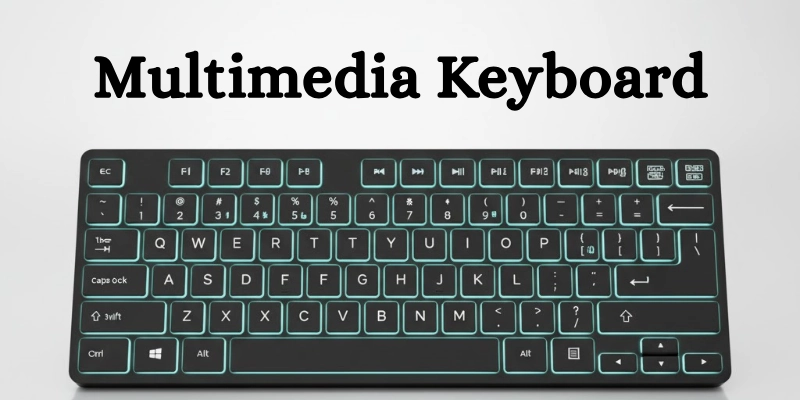
Some keys also help you open email, internet browsers, or media players quickly. It works like a normal keyboard but gives you more control.
Here’s how it helps:
- You can play or stop music and videos with one key.
- You can increase or decrease volume quickly.
- You can open your browser or email with one button.
- You can skip songs or mute the sound without using the mouse.
- You can save time by doing quick actions from the keyboard itself.
It makes using the computer fast, easy, and comfortable, especially for people who watch videos, listen to songs, or work online.
Example
For example, when you are watching a movie, you can press the volume down key to lower the sound instantly. Or you can press the browser key to open the internet without using the mouse.
History and Development of Multimedia Keyboards
The history of multimedia keyboards started with basic keyboards that had only letters, numbers, and function keys. Over time, they evolved to include media buttons, internet shortcuts, and advanced controls for modern computer use.
Early Keyboards:
Older keyboards were very basic.
- They only had letters, numbers, and function keys.
- There were no media keys or shortcut buttons.
- Users had to control music, videos, or the internet manually using software.
The Rise of Multimedia Use:
In the late 1990s and early 2000s, computers started playing music, videos, and games.
- People needed faster ways to control the media.
- Manufacturers began adding media control keys to keyboards.
- These keyboards made tasks like play, pause, and volume control easier.
Modern Multimedia Keyboards:
Today’s keyboards are advanced and user-friendly.
- They include volume knobs and media buttons.
- Some have internet launch keys and programmable shortcut buttons.
- High-end keyboards even have touch controls and customizable lighting.
- These features make computers faster and more enjoyable to use.
Multimedia keyboards have come a long way. From basic typing tools, they are now smart devices for work, gaming, and entertainment.
Working of a Multimedia Keyboard
A multimedia keyboard works by sending signals from special keys to the computer. The computer’s software then performs the command instantly, like playing music, muting sound, or opening apps.

The working of a multimedia keyboard is very simple:
- You press a multimedia key like “Play,” “Pause,” or “Mute.”
- The keyboard sends a signal through a USB or wireless connection.
- The computer’s software recognizes the command.
- The function is performed instantly, like muting sound or opening an email.
Hardware and Software Role:
Both hardware and software work together for multimedia keys:
- Physical keys you press.
- Circuits inside the keyboard that send signals to the computer.
Software / Driver:
- Tells the computer what each key does.
- Ensures the multimedia key works correctly with your programs.
This is how a multimedia keyboard works to make media control fast and easy.
Parts of a Multimedia Keyboard
A multimedia keyboard has many parts that make it useful for typing and controlling media. Each part has a special function. Here is a simple overview of the main components of a keyboard:
| Part Name | Function |
| Alphabet Keys | For typing letters |
| Numeric Keys | For typing numbers |
| Function Keys (F1–F12) | For shortcuts and commands |
| Multimedia Keys | For controlling music, videos, and volume |
| Internet Keys | For quick web access, like a browser and email |
| Power Keys | Sleep, shut down, or restart the computer |
| Indicator Lights (LEDs) | Show Caps Lock, Num Lock, and media status |
| Connector / Receiver | Connects to the CPU (wired or wireless) |
Each part works together to make your keyboard more than just a typing device. Multimedia keys and Internet keys make it faster and easier to control your computer.
Common Multimedia Keys and Their Functions
A multimedia keyboard has special keys to make media and computer tasks faster. Here are some common multimedia keyboard keys and what they do:
| Key Name | Function |
| Play / Pause | Starts or stops music or video |
| Stop | Stops the current audio or video |
| Next / Previous Track | Moves to the next or previous media file |
| Volume Up / Down / Mute | Controls the speaker sound or mutes it |
| Internet / Browser | Opens your web browser quickly |
| Launches your email application | |
| Calculator | Opens the calculator app |
| Sleep / Power | Puts the computer to sleep or shuts it down |
These keys make it easy to control media, apps, and system functions without using the mouse.
Types of Multimedia Keyboards
Multimedia keyboards come in different types to meet various needs. Each type has its own features and benefits for users.
Wired Multimedia Keyboard
A wired keyboard is connected directly to the computer for stable performance.
- Connected using a USB or PS/2 cable.
- Provides a stable and reliable connection.
- Good for offices and home computers where mobility is not needed.
Wireless Multimedia Keyboard
A wireless keyboard connects without cables and offers flexibility.
- Works with Bluetooth or a USB receiver.
- Allows free movement and fewer cables.
- Ideal for living rooms, presentations, or flexible setups.
Gaming Multimedia Keyboard
A gaming keyboard is designed for gamers with extra features.
- Made for gamers with extra macro keys and special lighting.
- Provides faster response for games.
- Supports advanced gaming features and customization.
Foldable or Compact Multimedia Keyboard
A foldable or compact keyboard is portable and space-saving.
- Small and portable, easy to carry.
- Perfect for travel or limited desk space.
- Still includes essential multimedia keys for convenience.
These types make it easy to choose a keyboard that fits your work, gaming, or travel needs.
Multimedia Keyboard vs Standard Keyboard
A multimedia keyboard is different from a standard keyboard. It has extra keys for media and internet control, making work faster and easier.
| Feature | Standard Keyboard | Multimedia Keyboard |
| Keys | Basic letters, numbers, and function keys | Extra multimedia and shortcut keys |
| Usage | Typing and general work | Typing + media and internet control |
| Speed | Slower for multitasking | Faster access to tools |
| Price | Cheaper | Slightly more expensive |
| Connectivity | Mostly wired | Wired and wireless options |
A standard keyboard is good for typing and basic tasks. A multimedia keyboard is better if you want quick control over music, videos, and online tools.
Features of a Multimedia Keyboard
A multimedia keyboard has many features that make it more useful than a standard keyboard. These features improve speed, comfort, and convenience for users.
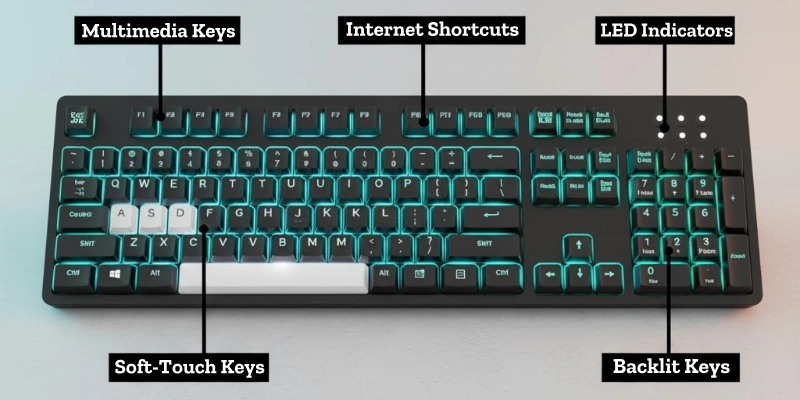
These features make a multimedia keyboard faster, smarter, and easier to use compared to a normal keyboard.
- Extra multimedia keys for fast control of music, videos, and internet tools.
- Wireless or USB connectivity for easy connection to the computer.
- Soft-touch keys make typing comfortable for long periods.
- LED indicators to show Caps Lock, Num Lock, and media status.
- Ergonomic design for easy and comfortable typing.
- Backlight or programmable keys on some models for better visibility and customization.
Uses of a Multimedia Keyboard
A multimedia keyboard is not just for typing. It helps users control media, work faster, and enjoy a better computer experience.
- Listening to music or watching movies: Control play, pause, skip, and volume easily.
- Quick access to browsers, email, and system tools: Open apps with one press.
- Gaming: Use special media and macro keys for faster responses.
- Online meetings: Mute/unmute and adjust volume instantly.
- Office work: Multitask faster with media and shortcut keys.
- Education and online learning: Quickly access learning tools, videos, and online resources.
These uses make a multimedia keyboard very helpful for work, study, entertainment, and gaming.
Advantages and Disadvantages of a Multimedia Keyboard
A multimedia keyboard has many benefits, but it also has a few drawbacks. Here is a simple comparison:
| Advantages | Disadvantages |
| Play, pause, skip, or mute easily | Slightly expensive compared to standard keyboards |
| Open apps and shortcuts quickly | Extra keys may confuse beginners |
| Soft-touch keys reduce strain | Takes more desk space than a basic keyboard |
| Freedom of movement | Battery required for wireless models |
| Special keys for faster response | Complex for simple tasks if not needed |
| Easy to see Caps Lock, Num Lock, and media status | Some models need software installation |
A multimedia keyboard is fast, convenient, and user-friendly for music, videos, gaming, and office work. But it can be more expensive and slightly complicated for beginners.
Maintenance Tips for Multimedia Keyboard
A multimedia keyboard works best when it is clean and well-maintained. Follow these simple tips to keep it in good condition:
- Clean keys regularly using a soft cloth to remove dust and dirt.
- Avoid eating or drinking near the keyboard to prevent spills.
- Keep away from dust and moisture to avoid damage to circuits.
- Replace batteries on time for wireless keyboards to maintain performance.
- Use key covers for long-term protection and easy cleaning
Proper maintenance helps your multimedia keyboard last longer and work smoothly.
Future of Multimedia Keyboards
The future of multimedia keyboards looks very exciting. New technology is making keyboards smarter, faster, and more user-friendly.

These innovations will make multimedia keyboards more advanced, convenient, and interactive for work, gaming, and entertainment.
- Touch-sensitive keys may replace physical buttons for smoother control.
- Voice-controlled keyboards will let you operate computers with simple commands.
- Customizable layouts and LED lighting will make keyboards more personal and visually appealing.
- Integration with AI and gesture controls could allow hands-free operation and smarter shortcuts.
Conclusion
Let’s wrap up this article about the multimedia keyboard. It is very useful for listening to music, watching videos, gaming, office work, and online learning.
These keyboards make media control faster and easier. You can play, pause, skip songs, adjust volume, or open apps with just one press.
In short, the multimedia keyboard is more than a typing tool; it’s your shortcut to a faster and more enjoyable computer experience.
FAQs
Still curious? Check out these common questions to learn even more about multimedia keyboards!
A multimedia keyboard is a special keyboard with extra keys for media and internet control. It helps you play music, adjust volume, and open apps quickly.
Multimedia keys are extra buttons on the keyboard for music, videos, and shortcuts. They let you play, pause, skip, mute, or open apps easily.
Common features include extra media keys, LED indicators, soft-touch keys, and wireless or USB connectivity. Some also have backlight or programmable keys.
A multimedia keyboard has all standard keys plus extra multimedia and shortcut keys. The total number of keys can vary depending on the model.
Press the multimedia key you want, like Play or Mute. The computer will perform the function instantly.
The number of multimedia keys varies by keyboard. Most keyboards have 5 to 15 extra keys for media and shortcuts.
You can change multimedia keys using the keyboard’s software or driver. Some keyboards allow you to reassign keys or create custom shortcuts.




- Be Respectful
- Stay Relevant
- Stay Positive
- True Feedback
- Encourage Discussion
- Avoid Spamming
- No Fake News
- Don't Copy-Paste
- No Personal Attacks
- Be Respectful
- Stay Relevant
- Stay Positive
- True Feedback
- Encourage Discussion
- Avoid Spamming
- No Fake News
- Don't Copy-Paste
- No Personal Attacks
