What is a WiFi router? Definition, Types & Uses
Published: 16 Jan 2026
Have you ever wondered how the internet moves through the air in your home? You cannot see it or touch it, but it is there, letting you play games and watch videos. It all comes from a small box with blinking lights in your room, and many people ask, “What is a wifi router?”
Is this box a secret helper, a traffic cop for the internet, or a tiny radio station? It feels like magic, but there is a simple reason why we need it. Let’s look at how this little box works and why it is so important for our phones and computers.
What is a WiFi Router?
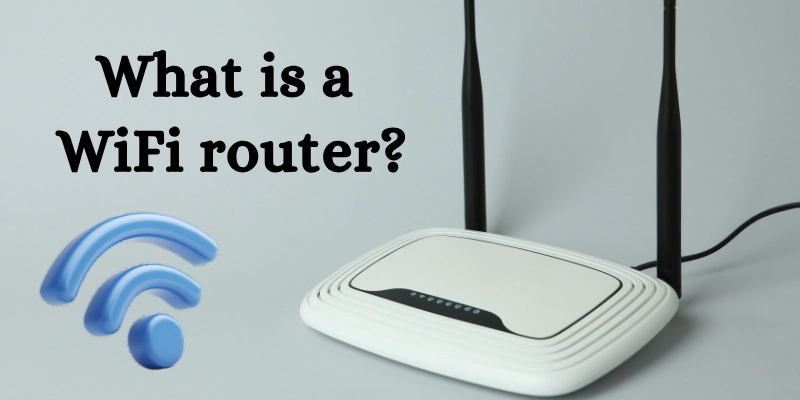
A WiFi router is a small box that helps you use the internet without cables. It shares the internet with many devices in one place.
What Does it Do?
This device takes the internet from a cable or a modem. Then it sends the internet to smartphones, laptops, tablets, and smart TVs. It also helps devices send information back to the internet.
You can move around your home and still stay online. Many people can use the internet at the same time.
Example
In a home, one device helps everyone use the internet. Parents use laptops, children use phones, and the TV plays online videos.
How a WiFi Router Works?
This topic explains how the internet reaches your devices at home. It shows how one device helps many people use the internet easily.
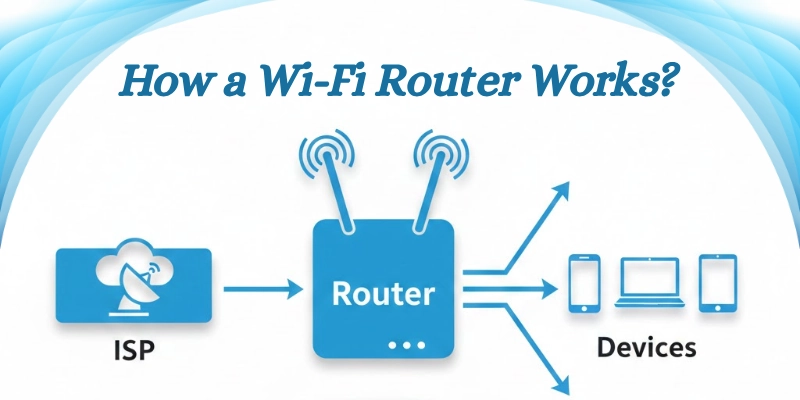
Let’s look at the working process step by step below.
- Internet Connection Source:
The internet comes from a service company called an ISP. It enters your home through a cable or a modem and becomes ready to share. - Data Sharing:
The device takes the internet and gives it to many devices at the same time. Phones, laptops, tablets, and smart TVs can all stay online together. - Wireless Signals:
It sends the internet through the air using radio waves. This allows devices to connect without wires and move freely.
Types of WiFi Routers
Different types are available for different needs. Some are good for basic use, while others work better for many devices and large homes.
Let’s look at them.
- Single-Band Router:
This type is good for simple internet use. It works well for browsing, emails, and light online work. It is best for small homes with few gadgets. - Dual-Band Router:
This type offers better speed and a stronger connection. It can handle more devices at the same time. It is good for watching videos and online classes. - Tri-Band Router:
This type is made for many connected devices. It helps reduce slow speeds when many people use the internet together. It is great for large families. - Mesh Wi-Fi Systems:
This system uses more than one unit to spread the internet. It covers large homes and removes weak signal areas. It keeps the connection strong in every room.
Parts of a WiFi Router
This device has different parts that help it work smoothly. Each part has its own job to keep the internet running well.
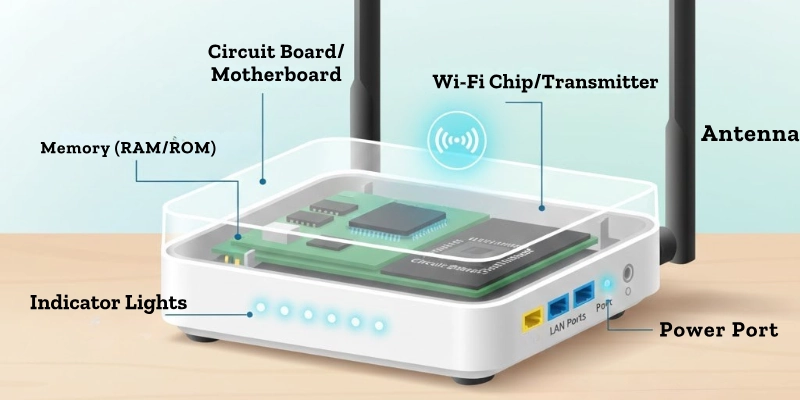
Here are some parts given below.
- Antennas:
Antennas help send the internet signal through the air. They make the signal stronger and help it reach more rooms in a home or office. - Ports:
Ports are small openings where cables are connected. These cables bring internet from the modem and also connect computers or other devices directly. - Processor and Memory:
The processor acts like a brain and controls all the work. The memory helps store information for a short time so data can move faster between devices. - Indicator Lights:
Small lights show what is happening. They tell you if the internet is working, if devices are connected, or if there is a problem.
Uses of a WiFi Router
This device is useful in many places. It helps people connect to the internet easily and share it with multiple devices.
Some of the uses are given below.
- It lets family members use phones, laptops, and TVs online at the same time.
- It connects office computers and printers for easy file sharing.
- Students can attend online classes and access lessons without interruptions.
- It controls smart lights, cameras, and speakers through phones or tablets.
- It allows smooth online gaming and video streaming for multiple devices.
Advantages and Disadvantages
A Wi-Fi router helps people share the internet with many devices at home or in the office. It has some benefits but also a few limits to keep in mind.
| Benefits | Drawbacks |
| Let’s connect many devices. | The signal may be weak in large homes. |
| Works without wires. | Can be affected by walls or distance. |
| Easy to set up. | Needs electricity to work. |
| Supports online gaming & streaming. | It can be expensive for high speed. |
| Controls smart home devices. | It can have security risks if not protected. |
Tips for Beginners Using a Wi-Fi Router
Using this device is easy if you follow a few simple steps. These tips help keep your internet fast and safe. They also make sure all your devices stay connected without problems.
- Keep the device in the middle of your home. This helps the signal reach all rooms evenly.
- Change the default password right away. It keeps your network safe from strangers.
- Check for updates regularly. Updates fix problems and make the device work better.
- Do not connect too many devices at once. Too many devices can slow down the internet.
- Create a strong password with letters, numbers, and symbols. It makes your network more secure.
Conclusion
A Wi-Fi router is your key to easy and fast internet at home or the office. By using it wisely and following a few simple tips, you can enjoy smooth browsing, streaming, and online fun without any interruptions.
Try these tips with your wifi router and share your thoughts in the comments below!
FAQs
Still curious? Explore these tips and learn more to get the best from your wifi router!
A router shares the internet with multiple devices at the same time. It sends and receives data from the internet. It also allows devices to connect without using wires.
Most routers do not need a SIM card. They get internet from a cable or a modem. Some portable routers use SIM cards for mobile data.
Yes, a router is needed to create a WiFi network. WiFi alone cannot reach devices without a router. It is the router that sends internet signals to your devices.
It is not easy to connect without a router. Some devices can share mobile data directly. But a router gives a stronger and more stable internet for many devices.
You pay the internet provider, not the router itself. Some routers are rented from the provider. If you buy your own, there is no extra monthly cost.
Yes, you can connect a phone using a cable if the router has a port. But most people use WiFi to connect without wires. Using WiFi is easier and more flexible.
A router is usually a small box with antennas or lights. It has ports at the back for cables. Some routers are flat, while others stand upright.
You need a router and an internet connection from a provider. You may also need a modem if it is separate. Devices like phones, laptops, or tablets use the WiFi from the router.
Not always. Some internet types, like fiber or mobile broadband, do not need a landline. But DSL internet usually requires a landline to work.
You can use a mobile hotspot or a portable router with a SIM card. Some providers offer wireless internet plans. This gives WiFi without using a cable connection.






- Be Respectful
- Stay Relevant
- Stay Positive
- True Feedback
- Encourage Discussion
- Avoid Spamming
- No Fake News
- Don't Copy-Paste
- No Personal Attacks
- Be Respectful
- Stay Relevant
- Stay Positive
- True Feedback
- Encourage Discussion
- Avoid Spamming
- No Fake News
- Don't Copy-Paste
- No Personal Attacks
