What are VR Headsets? Types, Uses & Features
Published: 20 Dec 2025
Have you ever wanted to step inside a game or feel like you are visiting another world without leaving your room? Have you wondered why people wear a special device on their eyes and say everything looks real? Why are kids using it for games, students using it for learning, and adults using it for fun and virtual trips?
How can one device make you feel like you are somewhere else? These questions are the reason why VR headsets are getting so much attention today, and in this article, you will discover what makes them so interesting and useful.
What are VR Headsets?
VR headsets are special devices that you wear on your head. They show 3D pictures and play sound so you feel like you are inside a virtual world.

When you move your head, the view also moves, which makes the experience feel real and exciting.
- They cover your eyes and block the outside world.
- They make videos and games feel more real.
- They react when you turn or move your head.
- They are used with phones, computers, or consoles.
- They help users feel like they are inside another place.
Example:
Wearing a headset makes you feel like you are inside a game or walking in a virtual world instead of just watching it on a screen.
How VR Headsets Work?
This section explains how this technology creates a feeling of a virtual world. You will learn how images, movement, sound, and controls work together.
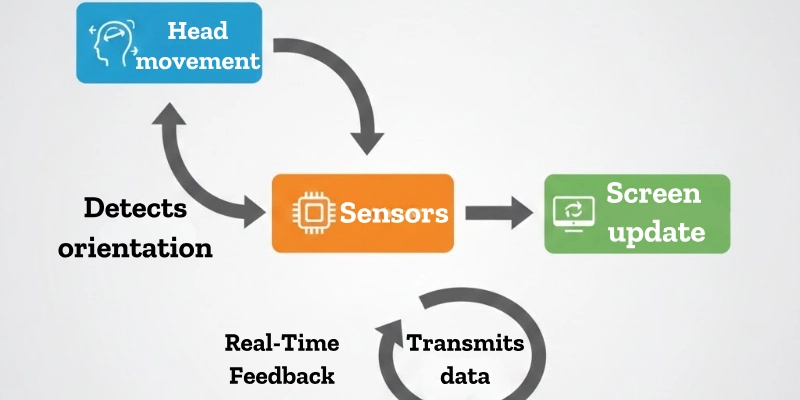
- Display and Lenses
Small screens sit very close to your eyes. Special lenses bend the images and turn them into a 3D view. This makes everything look deep and real, not flat like a normal screen. - Motion Tracking
Tiny sensors inside the device watch how your head moves. When you look left, right, up, or down, the view changes the same way. This helps your brain feel like you are really there. - Audio Experience
Built-in speakers or connected headphones play sound around you. You can hear noises from different directions, which makes the experience more real and exciting. - Controllers
Hand controllers act like your hands in the virtual space. You can grab things, press buttons, or move objects, just like you would in real life.
Types of VR Headsets
There are different kinds of devices that let you explore virtual worlds. Each type works in its own way, and you can choose one depending on your needs and budget.
| Type | Needs | How Good It Is | Example Use | Price |
|---|---|---|---|---|
| Mobile VR Headset | Phone | Simple | Easy games or videos | Low |
| Standalone VR Headset | Nothing | Medium | Casual gaming or learning | Medium |
| PC-Based VR Headset | Computer | High | Advanced games or apps | High |
Features of VR Headsets
These devices have many features that make the virtual experience fun and realistic. Knowing them helps you choose the right one for gaming, learning, or exploring.

- Good resolution and clear screens make images sharp and easy to see. Higher display quality makes the virtual world more realistic.
- This shows how wide the virtual scene looks. A bigger field of view makes you feel more “inside” the world.
- Soft padding, adjustable straps, and lightweight make it comfortable to wear for a long time.
- Sensors track your head and hand movements. Better tracking makes actions in the virtual space feel smooth and natural.
- Some devices work with phones, computers, or gaming consoles. Checking compatibility ensures you can use it with your favorite games or apps.
Uses of VR Headsets
These devices are not just for fun; they are changing the way we play, learn, and explore.
- Gaming
They make games feel real and exciting. You can move around, look in every direction, and feel like you are inside the game world.
Example: Playing a racing game as if you are actually driving a car. - Education and Training
Students and trainees can learn in a virtual classroom or practice skills safely.
Example: Students using VR to study science concepts by exploring the human body in 3D. - Healthcare
Used for therapy, pain management, or medical training. Doctors can practice surgeries in a safe virtual space.
Example: A medical student using VR to perform a virtual heart surgery before trying it on a real patient.
Virtual Tours
Travel, museums, or real estate tours can be experienced without leaving home.
Example: Walking through a famous museum virtually or exploring a new city.- Entertainment
Watching movies or concerts in VR feels like being part of the action, not just a viewer.
Example: Sitting in a virtual front-row seat at a live concert or watching a 3D movie as if you are inside the scene.
Advantages and Disadvantages of VR Headsets
These devices are exciting and useful, but like any technology, they have both good and not-so-good points. Knowing the benefits and drawbacks can help you decide if a device is right for you.
| Advantages | Disadvantages |
| Makes games and experiences feel real | Can cause motion sickness or dizziness |
| Useful for learning and training | Some devices are expensive |
| Helps explore places without traveling | Needs space to move safely |
| Can be used for therapy or medical practice | Long use may cause eye strain |
| Fun for movies, concerts, and entertainment | Some headsets are heavy or uncomfortable |
Tips for Beginners Using VR Headsets
Starting with these simple tips can make your first experience fun and safe. Following them helps you enjoy virtual worlds without discomfort or problems.
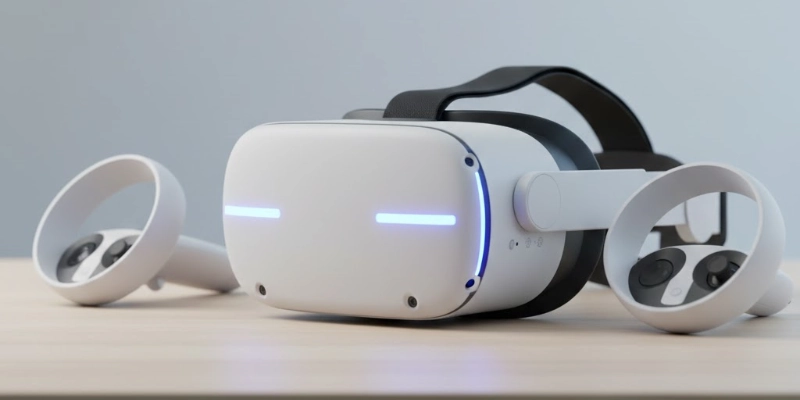
- Begin with 10–15 minutes to let your eyes and brain adjust. Gradually increase time as you get used to it.
- Pick a device with good padding and adjustable straps so it fits your head well. Comfort is important for long-term use.
- Make sure there is enough open space around you. This prevents accidents while moving or turning.
- Set the lenses for your eyes to get clear and sharp images. Proper adjustment reduces eye strain and makes the experience better.
- Pause every 20–30 minutes to rest your eyes. Looking away from the screen and blinking helps prevent discomfort.
VR Headsets vs AR Devices
Virtual and augmented reality are often talked about together, but they are different. This section explains the simple differences and helps you understand which one does what.
| Feature | VR Devices | AR Devices |
| Environment | Fully virtual world | Real world with added digital items |
| Experience | Immersive and isolated | Interactive with real surroundings |
| Equipment Needed | Headset | AR glasses or smartphone/tablet |
| Common Use | Gaming, virtual tours, training | Navigation, furniture placement, apps |
| Feeling | “Inside” a different world | Digital objects appear in real space |
Conclusion
VR devices are changing the way we play, learn, and explore new worlds. From gaming and virtual tours to education and healthcare, they make experiences feel real and exciting. By knowing how they work, their types, features, and tips for beginners, anyone can enjoy these virtual adventures safely and easily.
Jump into the virtual world and tell us your thoughts in the comments!
FAQs
Have questions? Explore our FAQs to find all the answers!
VR headsets let you see and feel like you are inside a virtual world. They show 3D images and play sound around you. You can look, move, and interact with things in that world.
It depends on the type. Some work alone, some need a phone or computer. You just need the device it is compatible with.
No, it is not only for gaming. People use it for learning, virtual tours, movies, and therapy. Gaming is just one of the uses.
Yes, you can watch Netflix or other movies. Some apps make the screen feel like a big theater. You can enjoy movies in 3D or virtual space.
The technology is growing fast. More people are using it for games, education, and work. New devices and apps keep coming every year.
Only in mobile VR headsets. You slide your phone into the device to use it. Standalone or PC devices don’t need a phone.
Yes, standalone headsets work on their own. They have built-in screens and processors. You don’t need a computer to use them.
Some headsets use Wi-Fi to download apps or stream content. Others can work offline with built-in apps. Wi-Fi is needed only for online features.
They are generally safe if used carefully. Long use may cause eye strain, dizziness, or headaches. Taking breaks and adjusting properly helps prevent problems.
Young children, people with severe motion sickness, or certain eye problems should avoid it. Pregnant women should also be cautious. Anyone feeling discomfort should stop using it.





- Be Respectful
- Stay Relevant
- Stay Positive
- True Feedback
- Encourage Discussion
- Avoid Spamming
- No Fake News
- Don't Copy-Paste
- No Personal Attacks
- Be Respectful
- Stay Relevant
- Stay Positive
- True Feedback
- Encourage Discussion
- Avoid Spamming
- No Fake News
- Don't Copy-Paste
- No Personal Attacks
