Mechanical Mouse: A Simple Guide For Beginners
Published: 6 Nov 2025
Have you ever used an old ball-type mouse and wondered how it worked before today’s modern optical mice? That’s called a mechanical mouse!
A mechanical mouse is one of the earliest computer input devices. It has a small rubber ball inside that moves when you move the mouse. The movement of the ball is turned into signals that the computer understands.
In this article, you’ll learn what is mechanical mouse, how it works, its parts, types, and advantages in a simple way.
What is a Mechanical Mouse?
A mechanical mouse is an input device that controls the pointer on a computer screen using the movement of a small rubber or metal ball underneath it. This ball helps detect direction and speed, making it an easy way to move the cursor.
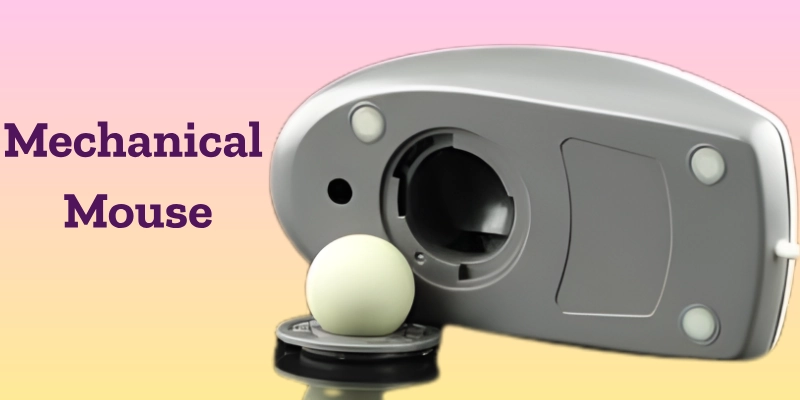
In simple words, when the ball rolls on a flat surface, sensors inside the mouse read its movement. These sensors change the movement into signals that tell the computer where to move the cursor. That’s the basic idea behind what is mechanical mouse and how it works.
Example:
Old desktop computers from the 1990s often used mechanical mice before optical and wireless models became common. These early mice were the first step toward the modern pointing devices we use today.
History of the Mechanical Mouse
The story of the mechanical mouse began in 1964 when Douglas Engelbart invented the first computer mouse. The early version was made of wood and had two small wheels to track movement. Later, this wheel-based model evolved into the ball-type design that became popular for many years.
Early Computers:
During the 1980s and 1990s, the mechanical mouse became a common part of personal computers. It helped users move the cursor smoothly and perform tasks like drawing, clicking, and selecting files. This period marked an important step in the evolution of computer mouse technology.
Replacement By Optical Mouse:
By the early 2000s, optical and laser mice started replacing mechanical ones. These newer versions were faster, more accurate, and required less cleaning and maintenance. As a result, the history of the mechanical mouse slowly came to an end, making way for modern designs.
Working of a Mechanical Mouse
The working of a mechanical mouse is based on how a small rubber ball moves and sends signals to the computer.

Here’s a simple step-by-step explanation:
- The rubber ball under the mouse touches the surface.
- When you move the mouse, the ball rolls in different directions.
- Inside the mouse, two rollers (sensors) detect how the ball moves, one for the X direction and one for the Y direction.
- These rollers are connected to small wheels with holes, and a light sensor tracks how much they rotate.
- The rotation is then converted into electronic signals, which are sent to the computer.
- The computer moves the cursor on the screen according to the movement of the ball.
In short, that’s how a mechanical mouse works, by turning physical motion into digital movement on your computer screen.
Parts of a Mechanical Mouse
The mechanical mouse is made up of several small but important parts. Each part plays a special role in helping the mouse work smoothly. Let’s look at the main parts of a mechanical mouse and their functions.
| Part Name | Function |
| Rubber Ball | Detects movement when rolled on a surface. |
| Rollers (X and Y Axis) | Measure movement in different directions. |
| Sensors (Optical Encoders) | Convert movement into signals the computer understands. |
| Buttons (Left and Right Click) | Send input commands to the computer. |
| Scroll Wheel | Used for scrolling through documents or web pages. |
| Circuit Board | Processes signals received from the sensors. |
| Cable/Connector | Connects the mouse to the CPU or USB port. |
| Outer Casing | Protects all internal components of the mouse from dust and damage. |
Each of these parts of the mechanical mouse works together to make pointer control smooth and accurate.
Types of Mechanical Mouse
There are a few types of mechanical mice based on how they track movement and what features they offer.
Let’s look at the main ones below.
- Ball-Type Mouse:
The ball mouse is the most common and traditional form of a mechanical mouse. It uses a rolling rubber ball to track motion on a flat surface. The ball’s movement is detected by sensors inside, which help move the cursor on the screen. - Wheel Mouse:
The wheel mouse is an improved version of the ball mouse. It includes a scroll wheel between the buttons, making it easier to move through long documents or web pages. This type of mechanical mouse became popular in the late 1990s. - Hybrid Mechanical Mouse:
The hybrid mechanical mouse combines both mechanical and optical technologies. It still uses a moving ball, but instead of rollers, optical sensors read the ball’s movement. This design made the mouse more accurate and easier to maintain.
Mechanical Mouse vs Optical Mouse
The comparison between a mechanical and an optical mouse shows how technology has improved over time.
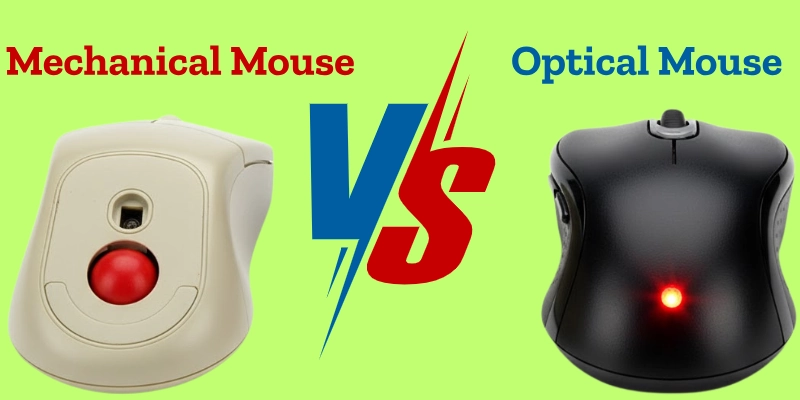
While both serve the same purpose, they work in different ways and have unique pros and cons.
| Feature | Mechanical Mouse | Optical Mouse |
| Technology | Uses a rolling ball to detect movement. | Uses a light sensor to track motion. |
| Accuracy | Moderate accuracy depending on the surface. | High accuracy on most surfaces. |
| Maintenance | Needs regular cleaning due to dust buildup. | Almost no cleaning required. |
| Durability | Average; moving parts may wear out. | High; fewer moving parts make it long-lasting. |
| Surface Use | Works best on a smooth mouse pad. | Works on many surfaces without a pad. |
| Cost | Cheaper and easier to repair. | Slightly more expensive but more reliable. |
In short, when comparing a mechanical vs an optical mouse, the optical version is faster, cleaner, and more accurate, while the mechanical one is simpler and more affordable.
Uses of a Mechanical Mouse
The mechanical mouse was an important tool in early computers. It made it easy for users to control actions on the screen. Here are the main uses of a mechanical mouse in simple words:
- It is used to control the cursor on the computer screen.
- It helps in selecting, dragging, and dropping files or folders.
- It was used in early computer gaming to control movement and aim.
- It supports graphical applications like drawing or basic design work.
- It was common in office work, data entry, and navigation tasks on older systems.
These functions of the mechanical mouse made it one of the most useful input devices before the optical mouse became popular.
Advantages and Disadvantages of a Mechanical Mouse
Like every device, the mechanical mouse has both good and bad sides. The table below shows the main advantages and disadvantages of a mechanical mouse in an easy-to-understand way.
| Feature | Advantages (Benefits) | Disadvantages (Drawbacks) |
| Design | Simple and easy to use. | It can get dirty easily due to the open ball area. |
| Cost | Cheap and affordable. | Needs regular cleaning and maintenance. |
| Durability | Works well if kept clean. | Wears out faster because of moving parts. |
| Performance | Accurate on smooth surfaces. | Doesn’t work well on rough or uneven surfaces. |
| Repair | Easy to open and fix. | Ball or rollers may stop working over time. |
In short, the benefits and drawbacks of a mechanical mouse show that while it is simple and affordable, it requires more care compared to modern optical or wireless mice.
Maintenance and Care Tips
Proper mechanical mouse care helps it work smoothly and last longer. Since it has moving parts, regular cleaning is important to keep it accurate and responsive. Here are a few easy tips:
- Clean the rubber ball regularly to remove dust and dirt.
- Use a mouse pad to ensure smooth and steady movement.
- Avoid dropping the mouse, as it can damage the ball or internal parts.
- Keep it in a dry place to prevent corrosion or moisture buildup.
- Check the rollers inside and clean them if you see dirt or dust.
If you’re wondering how to clean a mechanical mouse, simply remove the ball cover, take out the ball, and gently wipe it and the rollers with a soft cloth. This simple care routine keeps your mouse working like new.
Importance of the Mechanical Mouse
The mechanical mouse played a big role in the history of computer mouse technology. It was the first major step that made it easier for people to interact with computers.

The importance of the mechanical mouse lies in how it changed the way users controlled computers. Before it, most tasks were done using a keyboard only. The mechanical mouse helped create GUI-based systems (like early versions of Windows), where users could point, click, and drag instead of typing long commands.
This simple invention also inspired the creation of optical, laser, and wireless mice, shaping the modern computer experience we enjoy today.
Future and Modern Alternatives
Today’s world uses modern mouse technology that is faster, cleaner, and easier to maintain than the old ball-based design. The classic mechanical mouse has been replaced by several advanced options.
- Optical and Laser Mice: These use light instead of ball sensors to detect movement. They are more accurate, durable, and need almost no cleaning.
- Wireless Mouse: Works through Bluetooth or a small USB receiver, giving freedom from tangled cables.
- Touchpads and Trackballs: Found in laptops and some desktop setups, these devices offer smooth and modern replacements for traditional mice.
Now, mechanical mice are mostly used for educational or experimental purposes, helping students understand how early computer hardware worked before the rise of optical and laser mouse alternatives.
Conclusion
In this what is mechanical mouse summary, we learned that a mechanical mouse is one of the earliest computer input devices. It works with a small rubber ball that moves on a surface, helping the cursor move on the screen.
The mechanical mouse holds great historical value because it introduced the idea of smooth, point-and-click control, leading to the development of modern computer mouse types like optical, laser, and wireless mice.
The mechanical mouse may seem old, but it played a big role in shaping how we use computers today.
FAQs
Check out these simple FAQs to clear your doubts and learn more!
A mechanical mouse is an early type of computer input device. It uses a small rubber ball to detect movement on a surface. The ball’s motion controls the cursor on the screen.
When you move the mouse, the rubber ball rolls underneath. Sensors inside detect the movement in different directions. The computer then moves the cursor based on those signals.
It has several parts like a rubber ball, rollers, sensors, buttons, and a scroll wheel. The circuit board processes signals from the sensors. The outer casing protects all the parts inside.
The main function is to move the cursor on the computer screen. It helps in clicking, dragging, and selecting items easily. It acts as a bridge between the user and the computer.
A mechanical mouse is also called a ball mouse. It gets this name because of the rubber ball used for movement detection. The ball mouse was popular before optical mice became common.
Most mechanical mice have two buttons, left and right. Some also include a scroll wheel for easier navigation. These buttons send commands to the computer when clicked.
The full form of MOUSE is “Manually Operated User Selection Equipment.” It helps users give commands and control computer actions. This device makes computing faster and easier.





- Be Respectful
- Stay Relevant
- Stay Positive
- True Feedback
- Encourage Discussion
- Avoid Spamming
- No Fake News
- Don't Copy-Paste
- No Personal Attacks
- Be Respectful
- Stay Relevant
- Stay Positive
- True Feedback
- Encourage Discussion
- Avoid Spamming
- No Fake News
- Don't Copy-Paste
- No Personal Attacks
