Learn What is a Gamepad and its Role in Modern Gaming
Published: 9 Nov 2025
If you love playing video games, you’ve probably used a small handheld device with buttons and joysticks, which is called a gamepad!
A gamepad is a handheld input device used to control characters and actions in video games. It’s commonly used with gaming consoles, computers, and mobile devices to make gaming easier and more fun.
In this article, we’ll learn what is a gamepad?, how it works, its parts, types, and more.
What is a Gamepad?
A gamepad is a type of input device used to control video games. It usually has buttons, triggers, and joysticks that send signals to the computer or console when pressed or moved. These signals tell the game what action the player wants to perform, like jumping, shooting, running, or driving.
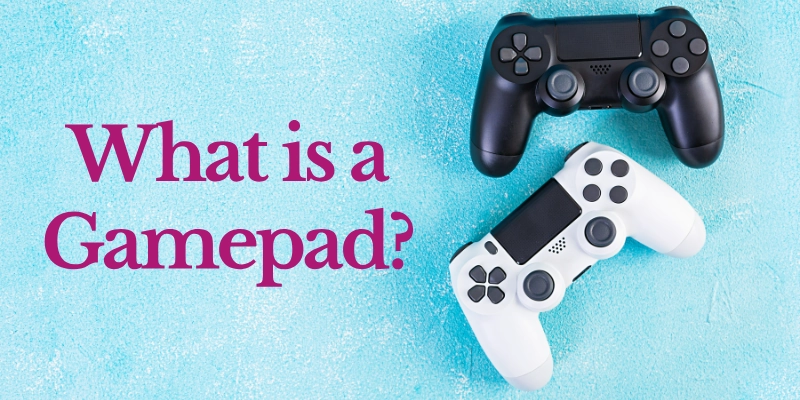
In simple terms, a gamepad acts as a bridge between the player and the game, helping to turn hand movements into game actions quickly and smoothly.
Simple Explanation
A gamepad is a handheld controller that players use with both hands. It’s designed for comfort, allowing gamers to play for long hours without getting tired. The left joystick usually controls the direction of movement, while the right joystick is often used to look around or aim. The buttons are used for actions like jumping, punching, or selecting options in a game.
Gamepads are used with computers, gaming consoles like PlayStation and Xbox, and even mobile devices through Bluetooth or USB connections. They make playing games more fun and natural because you can control the game just by moving your fingers and thumbs.
Example:
Some popular examples of gamepads are:
- Sony PlayStation Controller: Known for its comfortable design and responsive buttons.
- Xbox Controller: Offers a great grip and is used by both PC and console gamers.
- Nintendo Switch Pro Controller: A wireless controller with motion sensors for advanced gameplay.
Each of these gamepads has a unique design, but they all serve the same purpose: to give players full control over their gaming experience.
History and Evolution of Gamepads
The history of the gamepad shows how simple joysticks evolved into advanced controllers with buttons, motion sensors, and wireless features. Understanding the evolution of game controllers helps us see how gaming became more interactive and fun.
Timeline of Gamepad History:
- 1970s – Early Days: First game controllers appeared with Atari consoles; very simple, with a joystick and one button.
- 1980s – Basic Improvements: Introduction of more buttons and early D-pads for better directional control.
- 1990s – Growth Era:
- The D-pad became standard.
- Multiple buttons allowed more game actions.
- Vibration feedback added realism.
- Controllers became ergonomic for comfort.
- The D-pad became standard.
- 2000s – Modern Features:
- Analog sticks for precise movement.
- Wireless connectivity for freedom of movement.
- Motion sensors were introduced in consoles like the Wii.
- Analog sticks for precise movement.
- Today – Advanced Gamepads:
- Include touchpads and programmable buttons.
- Compatible with PCs, consoles, and mobile devices.
- Provide immersive and responsive gaming experiences.
- Include touchpads and programmable buttons.
Working of a Gamepad
A gamepad works by sending signals to the computer, console, or mobile device when a player presses a button or moves a joystick. The game’s software then interprets these signals as commands, like jump, shoot, or move left.
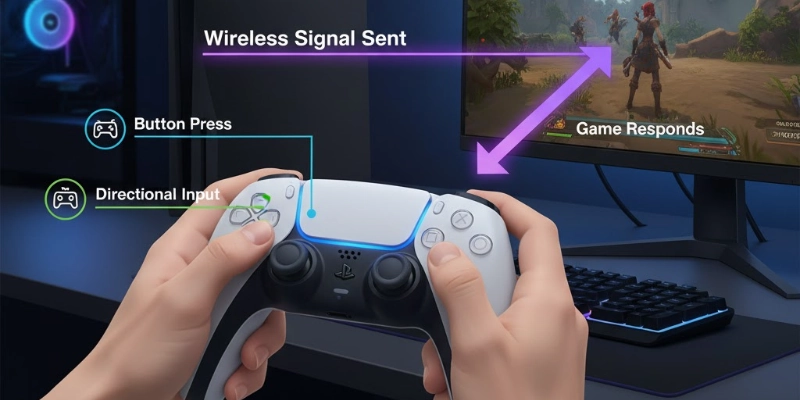
The game reacts instantly to the player’s input, giving a smooth gaming experience.
Wired vs Wireless Working
Here is a working method of wired and wireless gamepads.
- Wired Gamepad: Connected with a USB cable, it sends signals directly to the console or PC.
- Wireless Gamepad: Uses Bluetooth or Wi-Fi to send signals without any cables, offering more freedom of movement.
Internal Components:
A gamepad has several key components:
- Buttons and Triggers: For actions and commands.
- Joysticks: For movement and aiming.
- Circuit Board: Connects all parts and sends signals.
- Battery: Powers wireless gamepads.
- Receiver or USB Port: Transfers signals to the device.
Parts of a Gamepad
A gamepad has several important parts, each designed to help players control games easily. Here are the main parts of a gamepad and their functions:
| Part | Function |
| D-pad (Directional pad) | Controls character direction (up, down, left, right) |
| Analog sticks | Used for movement and camera control |
| Action buttons (A, B, X, Y) | Perform main game actions like jump, shoot, or attack |
| Triggers (L1, L2, R1, R2) | Control acceleration, braking, or aiming |
| Start/Select/Menu buttons | Pause the game or access options |
| Vibration motors | Give feedback during gameplay |
| LED/Power light | Shows device connection or battery status |
| Battery compartment / USB port | Provides power to the gamepad |
These gamepad components work together to give players full control and an immersive gaming experience.
Types of Gamepads
Gamepads come in different types to suit various gaming needs. Each type offers unique control methods and features for better gameplay. Over time, gamepads have evolved to include motion sensors, touchpads, and wireless connectivity, making gaming more immersive.
Choosing the right type can improve comfort, precision, and overall gaming experience.
- Wired Gamepad: Connected via USB; offers stable signals without batteries, commonly used in PC gaming.
- Wireless Gamepad: Connects via Bluetooth or USB receiver; allows freedom of movement and less cable clutter.
- Analog Gamepad: Has analog sticks for smooth motion control; perfect for racing, adventure, and shooting games.
- Digital Gamepad: Uses simple on/off button signals; mostly found in older consoles.
- Motion-Sensing Gamepad: Detects hand or body movements with sensors; example: Nintendo Wii Remote.
- Touchpad Gamepad: Includes a touch-sensitive area for swipes and gestures; used in PS4 and PS5 controllers.
Gamepad vs Joystick
A gamepad is compact and perfect for fast-paced games, while a joystick offers precise control for simulators. Understanding joystick vs gamepad helps choose the right controller for your gaming style.
Here’s a simple comparison between a gamepad and a joystick to understand their differences:
| Feature | Gamepad | Joystick |
| Shape | Handheld with buttons | Stick-based controller |
| Movement | Controlled by thumb and fingers | Controlled by full hand movement |
| Precision | Better for quick actions | Better for flight simulators |
| Games | Sports, racing, adventure | Flight or simulator games |
| Comfort | Easier for long gameplay | Harder to use for long hours |
Functions of a Gamepad
A gamepad is not just a controller; it serves many important purposes in gaming. Here are the main functions of a gamepad:
- Control characters and vehicles: Move your game characters or vehicles easily in any direction.
- Perform actions: Jump, shoot, attack, or interact with objects in the game.
- Navigate menus and settings: Access game options, pause, or select items quickly.
- Provide vibration feedback: Feel the action with vibrations for a more realistic gaming experience.
- Enable multiplayer gameplay: Connect multiple controllers for playing with friends or family.
Uses of Gamepad
A gamepad is a versatile device used in many gaming and interactive applications. A gamepad is used in many places.
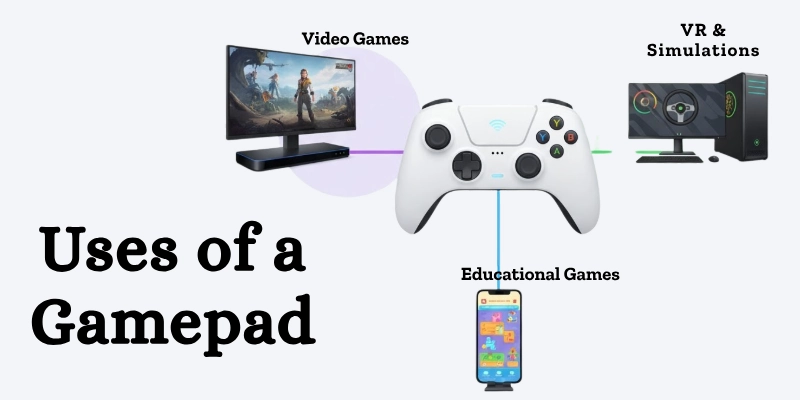
Here are the main uses of a gamepad:
- Playing video games: Used on consoles and PCs for all kinds of games.
- Mobile gaming: Connects via Bluetooth for gaming on smartphones and tablets.
- Virtual reality (VR) control: Helps navigate and interact in VR environments.
- Simulations and training programs: Used in flight, driving, or military simulators.
- Educational games: Make learning fun for kids through interactive games.
Advantages and Disadvantages of Gamepads
A gamepad makes gaming easier, fun, and immersive, but it may have some limitations depending on the game type or model.
Here’s a simple comparison table showing the advantages and disadvantages of a gamepad:
| Benefits | Drawbacks |
| Easy and comfortable to hold for long gaming sessions. | It can be expensive for high-end models. |
| Provides precise control with buttons and joysticks. | Wired gamepads limit movement. |
| Supports multiple games and genres. | Some games work better with a keyboard/mouse. |
| Offers vibration feedback for immersive gameplay. | Wireless models need batteries or charging. |
| Enables multiplayer gaming with multiple controllers. | Learning curve for beginners with many buttons. |
Maintenance Tips for Gamepads
To keep your gamepad working smoothly and last longer, follow these simple gamepad care tips:
- Keep it clean and dust-free: Wipe the surface regularly and avoid dirt in buttons or joysticks.
- Don’t press buttons too hard: Gentle presses prevent wear and damage.
- Avoid dropping it: Handle carefully to protect internal components.
- Charge regularly (for wireless): Keep the battery healthy by charging on time.
- Update drivers or firmware: Ensure compatibility and fix bugs for smooth performance.
Future of Gamepads
The future of gamepad technology is exciting, with new features making gaming more immersive and interactive.
Modern controllers are evolving to include:
- Voice-controlled and gesture-based gamepads: Players can control games using voice commands or hand gestures.
- Haptic feedback: Advanced vibrations simulate realistic touch and in-game sensations.
- Rechargeable batteries with longer life: Wireless controllers will last longer and charge faster.
- AI-integrated smart controllers: Smart controllers can adapt to player style and provide enhanced gameplay.
Conclusion
In this article, we’ve learned what is a gamepad? A gamepad is a handheld device that lets players control games easily and enjoyably.
From simple joysticks to advanced controllers with motion sensors, touchpads, and wireless features, gamepads have evolved to enhance the gaming experience for everyone.
Whether wired or wireless, the gamepad gives you the power to play your way!
FAQs
Learn all about gamepads in our quick FAQ guide!
A gamepad is used to control characters and actions in video games. It makes gaming easier and more fun.
Examples include the Sony PlayStation Controller and Xbox Controller. These are popular for consoles and PC gaming.
Yes, some apps let your mobile phone act as a gamepad. It connects via Bluetooth or Wi-Fi.
A gamepad is also called a controller. It’s a handheld input device for gaming.
Gamepad support means a game or app can work with a gamepad. It allows players to use controllers instead of a keyboard or touch.
The Xbox Controller or PlayStation DualShock is good for beginners. They are comfortable and easy to use.
Future controllers will have motion sensors, AI features, and haptic feedback. They will make gaming more immersive and interactive.
A gamepad is an input device. It sends signals to the game or computer.
When you press buttons or move sticks, the gamepad sends signals to the device. The game interprets these signals as commands and responds instantly.



- Be Respectful
- Stay Relevant
- Stay Positive
- True Feedback
- Encourage Discussion
- Avoid Spamming
- No Fake News
- Don't Copy-Paste
- No Personal Attacks
- Be Respectful
- Stay Relevant
- Stay Positive
- True Feedback
- Encourage Discussion
- Avoid Spamming
- No Fake News
- Don't Copy-Paste
- No Personal Attacks
