What is an E-Reader – Best Guide for Beginners and Readers
Published: 7 Apr 2026
In today’s world, reading has gone digital, and e‑readers have become an essential tool for book lovers. But what is an e-reader? An e-reader is a portable gadget designed specifically for reading digital books, magazines, and documents.
E-readers make it easy to carry hundreds of books in one device, adjust font sizes, and read comfortably anywhere. Here, we will explore what an e-reader is, how it works, its benefits, and tips to choose the best one for your reading needs.
What Does “E‑Reader” Mean?
The term “e‑reader” stands for electronic reader or e-book reader. It is a device designed primarily for reading digital books and documents, offering a screen and interface optimized for long reading sessions.
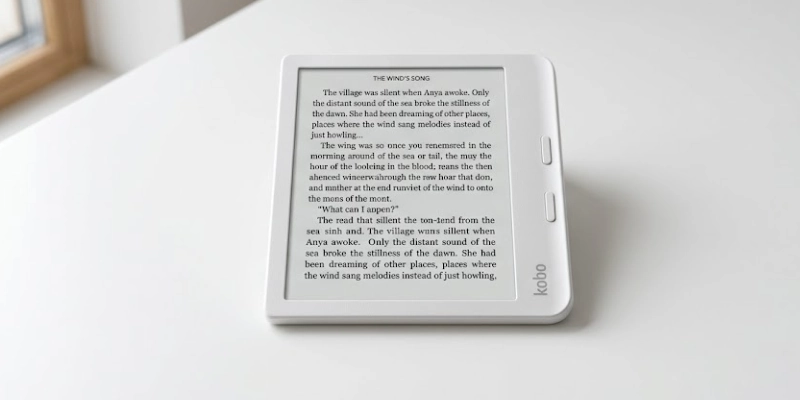
Unlike tablets or smartphones, e-readers focus on reading rather than running multiple apps, which helps reduce distractions and improve battery life. While tablets and smartphones can display e-books, they often have glare, a heavier weight, and shorter battery life.
E-readers, on the other hand, use special screens that are gentle on the eyes and can store hundreds of books in a lightweight device. This makes them ideal for readers who prefer a device dedicated solely to reading.
Brief History of E‑Readers
The journey of digital reading began in the early 1990s with the first electronic book devices. These early gadgets were simple and expensive, storing only a few books at a time. Over the years, technology has improved, and new mohttps://nowtechguide.com/gadget/dels have made reading more accessible.
Key milestones in the history of digital reading include:
- 1990s: The first electronic book devices were introduced.
- Early 2000s: Improved screens and storage allowed more books on one device.
- Mid-2000s: Popular devices brought digital reading to a wider audience.
- Today: Lightweight and affordable devices let users carry hundreds of books in one device.
This evolution shows how digital reading has become mainstream, making it easier than ever for people to enjoy books anywhere.
How E‑Readers Work?
Digital reading devices may look simple, but they rely on several key components to deliver a smooth reading experience.
Core hardware components:
- Screen: The main part you read on. Most devices use special screens designed to be easy on the eyes.
- Processor: Handles tasks like turning pages, opening books, and running apps.
- Storage: Saves all your digital books, documents, and notes.
- Battery: Long-lasting to allow days or weeks of reading without charging.
Display technology:
- E‑Ink screens: Mimic paper, reduce eye strain, and work well in sunlight.
- LCD screens: Brighter and full-color, but they can cause eye fatigue during long reading sessions.
Processing and storage basics:
- Devices use lightweight processors because reading doesn’t need high power.
- Storage varies from a few gigabytes to hundreds, enough to hold hundreds of books.
These components work together to give a comfortable, portable reading experience, making digital books as easy to enjoy as printed ones.
Key Features & Benefits
Digital reading devices make reading easier and more enjoyable. They let you carry hundreds of books in one lightweight device and adjust text and brightness for a comfortable experience.
Display Technology
The screen is the most important part of a reading device, affecting comfort and visibility.
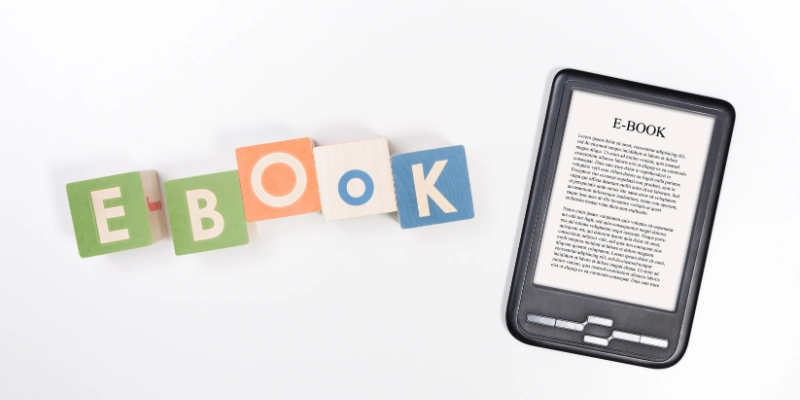
- E‑Ink vs LCD: E‑Ink screens look like real paper and are gentle on the eyes, while LCD screens are brighter and can show colors.
- Readability in sunlight: E‑Ink screens remain clear even in bright sunlight, unlike standard LCD screens that can be hard to see outdoors.
Portability & Battery Life
A good device should be easy to carry and last long without frequent charging.
- Lightweight design: Easy to carry anywhere, perfect for travel or daily commuting.
- Long battery life: Many devices can last for weeks on a single charge, unlike tablets or smartphones.
Storage Capacity
Having enough space means you can carry many books without worrying about limits.
- It can store thousands of books in one small device, letting you carry an entire library in your bag or pocket.
Reading Experience Enhancements
Extra features make reading more comfortable and interactive.
- Adjustable font size: Customize text size for comfortable reading.
- Built-in lighting: Read easily in dark or low-light environments.
- Annotation tools & dictionary lookup: Highlight text, take notes, and quickly check word meanings while reading.
E‑Readers vs. Tablets & Smartphones
Choosing the right device for reading depends on your needs. While tablets and smartphones can display books, digital reading devices are made specifically for comfortable, focused reading. The table below highlights the main differences:
| E‑Reader | Tablet / Smartphone |
| Gentle on eyes, e‑Ink, reduces strain | Bright, full-color images can cause eye fatigue |
| Lightweight, easy to hold for hours | Heavier, less comfortable for long reading |
| Weeks on a single charge | Hours, needs frequent charging |
| Hundreds to thousands of books | Can store books, but also apps & media |
| Mainly for reading | Multi-purpose: apps, internet, videos |
| Minimal, focused on reading | High, notifications & apps can interrupt |
| Best for text-based books | Great for interactive or colorful content |
Popular E‑Reader Brands & Models
Several companies produce digital reading devices, each with unique features and designs to suit different types of readers.
Amazon Kindle lineup
The Kindle series is one of the most popular options for casual and avid readers alike.
- Includes devices like Kindle, Kindle Paperwhite, and Kindle Oasis.
- Known for a large e-book store, long battery life, and a user-friendly interface.
Kobo devices
Kobo devices are designed for flexible reading with multiple file formats.
- Offers models like the Kobo Clara HD and the Kobo Libra.
- Supports multiple file formats and has customizable reading options.
Barnes & Noble Nook
Nook devices focus on comfort and accessibility for book lovers.
- Includes Nook GlowLight models.
- Features built-in lighting and access to the Nook bookstore.
Other brands/features
Several other brands provide advanced features for serious readers.
- PocketBook, Onyx Boox, and Boyue offer devices with advanced features like larger screens, note-taking, and stylus support.
- Many devices focus on lightweight design, storage capacity, and enhanced reading experience.
Supported e‑Book Formats
Digital reading devices support different file formats, and knowing which formats are compatible helps you choose the right device for your library.
- EPUB: Widely supported across most devices except Kindle. Flexible and reflowable text.
- PDF: Common for documents and textbooks. Preserves formatting but may be hard to read on small screens.
- MOBI: Used primarily by older Kindle devices.
- AZW / AZW3: Amazon’s proprietary formats for Kindle devices.
- Other formats: Some devices support TXT, HTML, RTF, and CBZ/CBR for comics.
Format compatibility across brands:
- Kindle: Mainly AZW, MOBI, and PDF.
- Kobo & Nook: EPUB, PDF, and some TXT/HTML files.
- Other brands (PocketBook, Onyx Boox): Often support a wide range, including EPUB, PDF, MOBI, and comic formats.
Choosing a device that supports the formats you use ensures a smooth reading experience without the need for constant file conversion.
How to Choose the Right E‑Reader?
Picking the right digital reading device depends on your reading habits and needs. Here are the main factors to consider:
Screen type
The type of screen affects reading comfort and suitability for different content.
- E‑Ink screens are easier on the eyes for long reading sessions.
- LCD or color screens are better for magazines, comics, or multimedia content.
Storage & battery life
Storage and battery determine how many books you can carry and how long you can read without charging.
- Choose a device with enough storage to hold your library.
- Longer battery life ensures uninterrupted reading without frequent charging.
Lighting & connectivity
Built-in lighting and connectivity options improve usability in different environments.
- Built-in lighting allows reading in the dark.
- Wi-Fi or cellular options help download books on the go.
Ecosystem & bookstore support
A device’s ecosystem affects the range of books and services available.
- Check which e-book stores the device supports.
- Kindle, Kobo, and Nook each have their own digital libraries and subscription options.
Price vs features
Consider your budget and the features you really need.
- Entry-level models are lightweight and affordable, with basic reading features.
- Premium devices offer waterproofing, larger screens, adjustable lighting, and extra storage.
By considering these points, you can select a device that fits your reading style and budget while giving the best experience.
Advantages of E‑Readers
E‑readers have transformed the way people enjoy books. They make reading more comfortable, convenient, and accessible for everyone. With a lightweight design and long battery life, they are ideal for travel, study, or casual reading at home.
- Eye Comfort:
E‑Ink screens mimic real paper, reducing eye strain compared to tablets or smartphones with bright backlit screens. - Focus:
Most devices are focused solely on reading, so you won’t get interrupted by notifications or apps. - Portability:
Lightweight and compact, e-readers let you carry hundreds of books anywhere without the bulk of physical copies. - Customization:
Adjustable font sizes, styles, and margins let you personalize your reading for comfort and ease. - Tools:
Quickly look up words, highlight text, and take notes with built-in dictionary and annotation features.
Limitations and Challenges
While e-readers are great for reading, they also have some drawbacks that users should consider. Understanding these limitations can help you choose the right device for your needs.
- Apps:
Most devices support only reading, so you can’t use many apps like on tablets or smartphones. - Color:
Screens are usually black-and-white, making graphic-heavy content like comics or magazines less vibrant. - Formats:
Some devices have restrictions or DRM protection, which can limit the types of books you can read. - Multimedia:
Limited support for audio, video, or interactive content compared to tablets or smartphones. - Price for premium models:
Advanced devices with extra features can be expensive compared to basic models or tablets.
Using E‑Readers: Practical Tips
Using a digital reading device is simple, but a few practical tips can help you get the best reading experience. With the right habits, you can enjoy your books longer and make your device last.
- Getting Books:
You can buy or download books from online stores, borrow from libraries, or use subscription services for unlimited reading. - Battery Care:
Charge your device fully, avoid overcharging, and use power-saving modes to extend battery life. - Reading Tips:
Adjust font size, brightness, and margins for comfort, and take breaks to reduce eye strain during long reading sessions. - Organization:
Use folders, collections, or tags to keep your library organized and easy to navigate. - Updates:
Keep your device software updated to access new features, improve performance, and maintain security.
Conclusion
E-readers make reading convenient, comfortable, and distraction-free. With long battery life, eye-friendly screens, and the ability to carry hundreds of books, they offer a reading experience that tablets and smartphones often can’t.
Even today, e-readers remain relevant for anyone who loves books, making it easy to read anywhere and enjoy your favorite stories without strain.
FAQs
Still have questions? Check out our FAQs to get all the answers you need about e-readers!
Some devices support audiobooks, allowing you to listen instead of reading. You can use built-in speakers or headphones to enjoy your favorite titles. Not all models have this feature, so check before buying.
Yes, most devices can open PDF files. Large documents may require zooming or adjusting the view. This makes it easy to read textbooks, reports, or scanned documents.
No, you don’t need internet access to read books you’ve already downloaded. You only need a connection to download new titles or updates. Once stored, books can be read anywhere.
Kindle is a brand of digital reading device, while e-readers include all brands. Kindles are designed mainly for reading and working with Amazon’s bookstore. Other devices, like Kobo or Nook, offer similar features with different stores.
Many devices, such as Kobo, Nook, and some Kindle models, support OverDrive. This lets you borrow library books digitally. You can download them directly to your device with a library card.
Yes, devices with E-Ink screens reduce eye strain compared to tablets or phones. They mimic paper and reflect light naturally. Adjustable fonts and brightness also make reading comfortable.
Yes, most e-readers allow library book downloads through apps or OverDrive. You can borrow and return books digitally. This makes it easy to read library titles without visiting in person.



- Be Respectful
- Stay Relevant
- Stay Positive
- True Feedback
- Encourage Discussion
- Avoid Spamming
- No Fake News
- Don't Copy-Paste
- No Personal Attacks
- Be Respectful
- Stay Relevant
- Stay Positive
- True Feedback
- Encourage Discussion
- Avoid Spamming
- No Fake News
- Don't Copy-Paste
- No Personal Attacks
