What is a WiFi Extender? Types, Setup & Benefits
Published: 25 Sep 2026
A weak Wi-Fi signal can make everyday tasks frustrating, especially when some rooms have little or no connection. Thick walls, long distances, and other obstacles can create dead zones where the internet becomes slow or stops working properly.
A Wi-Fi extender can help by picking up the existing signal from your router and sending it farther into areas with weak coverage. What is a wifi extender and how does it work?
This guide explains how these devices work, where to place one, their benefits and limitations, and how they compare with other Wi-Fi solutions.
What Is a WiFi Extender?
A Wi-Fi extender is a device that helps improve wireless coverage in areas where your router’s signal is weak. It connects to your existing network and sends the signal farther, helping devices in rooms that are harder for the router to reach.
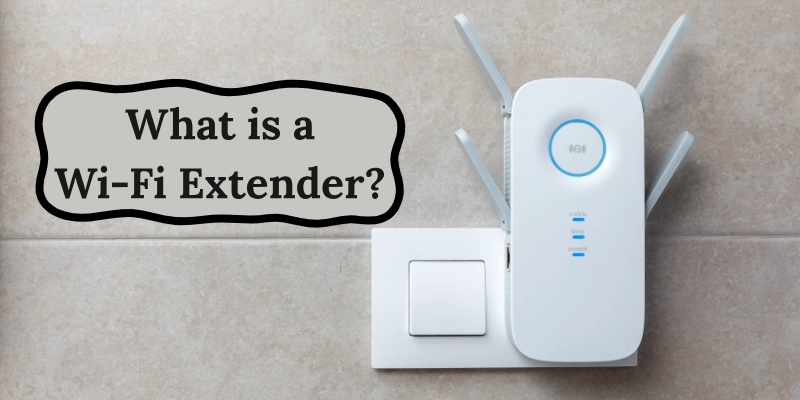
These devices are also called Wi-Fi range extenders, repeaters, or Wi-Fi boosters. While the names can vary, their main purpose is to expand the reach of an existing wireless network.
A Wi-Fi extender does not create a new internet connection. Instead, it uses the connection from your router to provide better coverage in areas with weak or no signal.
How Does a WiFi Extender Work?
A Wi-Fi extender works by receiving the wireless signal from your router and sending it farther into your home. It acts as a link between the router and areas where the connection is weak.
The Extender Receives the Router’s Signal
First, the device connects to your router’s wireless network. It needs to be placed where the router still has a strong and stable signal. If it is too far away, it may not receive enough signal to work properly.
It Rebroadcasts the Signal
After receiving the signal, the extender sends it into nearby areas. This helps improve coverage in rooms that are outside the router’s normal range.
Your Devices Connect Through the Extender
Your phone, laptop, smart TV, or other devices can then connect through the extended network. For example:
Router → Wi-Fi Extender → Phone/Laptop
The extender can only pass along the connection it receives. That is why placing it in the right location is important. It should be close enough to the router to get a usable signal while also being near the area where you need better coverage.
Where Can You Use a WiFi Extender?
A Wi-Fi extender can be useful when some parts of a home or office have a weak connection. It is especially helpful in spaces that are far from the main router or separated by walls and floors.
- Large Homes: In a large house, the router may not cover every room equally. An extender can help bring the connection to areas that are outside its normal range.
- Upstairs or Downstairs Rooms: Floors can make it harder for a wireless signal to travel. Placing an extender in a suitable location can help improve coverage on another floor.
- Bedrooms and Far Rooms:
A bedroom at the other end of the house may receive a weak signal. An extender can help provide a more stable connection for smartphones, laptops, and other devices. - Garages and Outdoor Areas:
If the signal reaches your garage, patio, or another outdoor space but becomes weak there, an extender may help improve coverage. The device should still be placed where it can receive a reliable signal from the router. - Small Offices:
In a small office, an extender can help cover rooms or work areas that are farther from the main network equipment. This can make it easier for computers and other devices to stay connected.
Types of WiFi Extenders
These devices come in different forms, mainly based on how they connect to the router and how many wireless bands they support.
- Single-Band WiFi Extenders
A single-band model uses one frequency band, usually 2.4 GHz. It can provide good range but may offer lower speeds than newer multi-band options.
- Dual-Band WiFi Extenders
Dual-band models use both 2.4 GHz and 5 GHz frequencies. This gives them more flexibility and can provide a better balance between range and speed.
- Tri-Band WiFi Extenders
Tri-band models have three wireless bands. They can handle more network traffic and may be useful when several devices need a stable connection at the same time.
- Wired or Ethernet-Based Extenders
These devices use an Ethernet cable to connect to the router instead of relying only on a wireless link. This can provide a more stable connection between the network and the extended area.
- Powerline WiFi Extenders
Powerline models use your home’s electrical wiring to carry network data from one location to another. A Wi-Fi unit at the other end then provides wireless coverage in that area.
How to Set Up a WiFi Extender
Setting up one is usually simple. Most models can be configured with a WPS button, mobile app, or web browser. The exact steps may vary by brand, but the basic process is similar.
Step 1: Place the Extender Near Your Router
Start by plugging the device into an outlet close to your router. This makes the initial connection easier and helps it receive a strong signal during setup.
Step 2: Connect It to Your WiFi Network
Follow the instructions provided with your device. You may use WPS, a mobile app, or a web browser to connect it to your home network. Enter your Wi-Fi details when required.
Step 3: Move It to the Right Location
Once the setup is complete, unplug it and move it closer to the area with weak coverage. Choose a spot where it can still receive a reliable signal from the router.
Step 4: Connect Your Devices
Connect your phone, laptop, TV, or other gadgets to the extended network. Some models use the same network name as your router, while others create a separate one.
Step 5: Test the Extended Connection
Walk around the area where the signal was weak and check the connection. If it is still unreliable, try moving the device to a different location.
Where Should You Place a WiFi Extender?
The location of an extender can affect how well it works. A good spot should be close enough to the router to receive a reliable connection while still being near the area that needs better coverage.
Place It Between the Router and Dead Zone
Put the device somewhere between your router and the room with poor coverage. Avoid placing it directly inside the dead zone, because it may not receive a strong enough signal.
Avoid Thick Walls and Large Obstacles
Concrete walls, metal objects, furniture, and other large obstacles can weaken wireless signals. Try to choose an open location with fewer barriers between the router and the device.
Keep It Away From Electronic Interference
Some electronics can interfere with wireless signals. Keep the extender away from devices such as microwaves, cordless phones, and other equipment that may cause interference.
Check the Signal Before Choosing the Final Location
After moving the device, check the signal strength and connection in the area you want to cover. If the connection is still weak, try another nearby position until you find a more suitable spot.
Benefits of Using a WiFi Extender
A Wi-Fi extender can be useful when your router does not provide reliable coverage throughout your home or office. Here are some of its main benefits.
- Better coverage: It can bring a wireless connection to areas that are outside the router’s normal range.
- Fewer dead zones: Rooms with weak or no signal may get a more usable connection.
- Reach distant rooms: It can help connect spaces that are far from the main router.
- Simple setup: Many models can be configured with WPS, a mobile app, or a web browser.
- Works with an existing router: You usually do not need to replace your current router to use one.
- Affordable option: For a small coverage problem, adding one device may cost less than replacing the whole network setup.
Limitations of a WiFi Extender
While an extender can help with coverage, it is not the right solution for every network problem. A few limitations are worth knowing before using one.
- Lower speeds: The connection may be slower than a device connected directly to the router, especially with some wireless setups.
- Placement matters: A poor location can make it difficult for the device to receive and pass along a strong connection.
- Does not increase your internet plan speed: It cannot give you more speed than the connection provided by your internet service.
- Interference can affect performance: Walls, other wireless networks, and certain electronic devices may reduce connection quality.
- May use a different network name: Some models create a separate network, so you may need to switch networks when moving around.
- Not ideal for every large home: If coverage problems exist throughout a large house, a mesh system may be more suitable than relying on a single extender.
WiFi Extender vs WiFi Booster vs WiFi Repeater
The terms extender, repeater, and booster can be confusing because they are often used to describe similar devices. However, the exact meaning can vary between brands and products.
| Device/Term | Main Purpose |
| WiFi Extender | Expands the coverage of an existing wireless network |
| WiFi Repeater | Receives a wireless signal and rebroadcasts it |
| WiFi Booster | A general term for a device designed to improve Wi-Fi coverage |
In everyday use, Wi-Fi booster and Wi-Fi repeater are often used interchangeably with Wi-Fi extender. The difference is not always clear because manufacturers may use these names differently for their products.
The important thing is to check how a specific device connects to your router and how it extends coverage, rather than relying only on the name.
What to Consider Before Buying a WiFi Extender
Different models offer different features, so it helps to check a few basic details before choosing one. Focus on what matches your home network and the area you want to cover.
- WiFi Standard:
Check the wireless standard supported by the device, such as Wi-Fi 5, Wi-Fi 6, or Wi-Fi 6E. A newer standard can offer better performance when your router and devices support it. - Frequency Bands:
Look at whether the model supports 2.4 GHz, 5 GHz, or multiple bands. The 2.4 GHz band generally offers better range, while 5 GHz can provide higher speeds over shorter distances. - Coverage Area:
Check the manufacturer’s stated coverage to see whether it is suitable for the space you want to reach. Actual results can vary because walls, floors, and other obstacles affect the signal. - Maximum Speed:
The advertised speed shows the maximum theoretical performance under certain conditions. Your actual speed may be lower depending on your router, devices, distance, and network traffic. - Router Compatibility:
Make sure the device works with your existing router and its wireless standard. Some features may also require compatible equipment from the same brand. - Ethernet Port:
An Ethernet port can be useful if you want to connect a computer, TV, or other wired device. It can also provide a wired connection between network equipment on supported models. - Security Features:
Check for modern Wi-Fi security options and regular firmware updates. Good security helps protect your network and connected devices from common threats.
Common WiFi Extender Problems and Solutions
Even after a successful setup, you may sometimes face connection problems. Most common issues can be fixed with a few simple checks.
- Extender Has a Weak Signal
If the extender itself shows a weak connection, move it closer to the router. Also, check for thick walls or large objects that may block the signal.
- WiFi Speed Is Still Slow
Slow performance can happen when the connection between the router and extender is weak, or the network is busy. Try moving the device to a better position and check whether other devices are using a lot of bandwidth.
- Devices Keep Disconnecting
Frequent disconnections may be caused by interference, outdated firmware, or an unstable connection. Restart the extender and router, then check for available firmware updates.
- Extender Cannot Connect to Router
Make sure you are entering the correct Wi-Fi password and that the router is working normally. Restart both devices and try the setup process again if the problem continues.
- Extended Network Has No Internet
If your device connects to the extended network but cannot access the internet, first check whether the main router has an active connection. If the router works normally, restart the extender and reconnect it to the network.
Does a WiFi Extender Increase Internet Speed?
No, a Wi-Fi extender does not increase the speed provided by your internet service. Its main job is to improve coverage, not create a faster internet connection.
For example, if your router provides a good connection in the living room but the signal is weak in a bedroom, an extender can help make the connection more usable there. However, it cannot turn a slow internet plan into a faster one.
The device’s location also matters. If it receives a weak signal from the router, the connection in the extended area may still be slow. For better results, place it where it can receive a reliable connection while remaining close enough to the area that needs coverage.
Conclusion
A WiFi Extender can be a practical choice when certain rooms have a weak connection, but your main router works well elsewhere. It helps expand coverage without requiring a new internet connection.
For the best results, placement matters. If the device receives a reliable signal and is positioned near the area that needs better coverage, it can make everyday browsing, streaming, and other online tasks more convenient.
FAQs
Have more questions about Wi-Fi extenders? Check the FAQs below.
It is mainly used to improve wireless coverage in parts of a home or office where the main router has difficulty reaching. This can help devices stay connected in those areas.
Not necessarily. It can improve the connection in a weak-signal area, but it does not increase the speed provided by your internet service.
There is no single range that applies to every model. The coverage depends on the device, router, building layout, walls, and other sources of interference.
Many models work with routers from different brands, but compatibility can vary. Check the manufacturer’s specifications before setting one up.
They are often used to describe similar devices. However, manufacturers may use these terms differently, so the actual features matter more than the name.
A suitable location is usually between the router and the area with poor coverage. It should still receive a reliable connection from the router rather than being placed deep inside the weak-signal area.
Yes, but walls can weaken the wireless signal. Thick concrete, metal, and multiple walls can have a greater effect, so the layout of your home can change the results.
It depends on the size and layout of your space. An extender can be useful for a specific weak area, while mesh WiFi is designed to provide broader coverage across multiple areas.





- Be Respectful
- Stay Relevant
- Stay Positive
- True Feedback
- Encourage Discussion
- Avoid Spamming
- No Fake News
- Don't Copy-Paste
- No Personal Attacks
- Be Respectful
- Stay Relevant
- Stay Positive
- True Feedback
- Encourage Discussion
- Avoid Spamming
- No Fake News
- Don't Copy-Paste
- No Personal Attacks
